

MCP core concepts
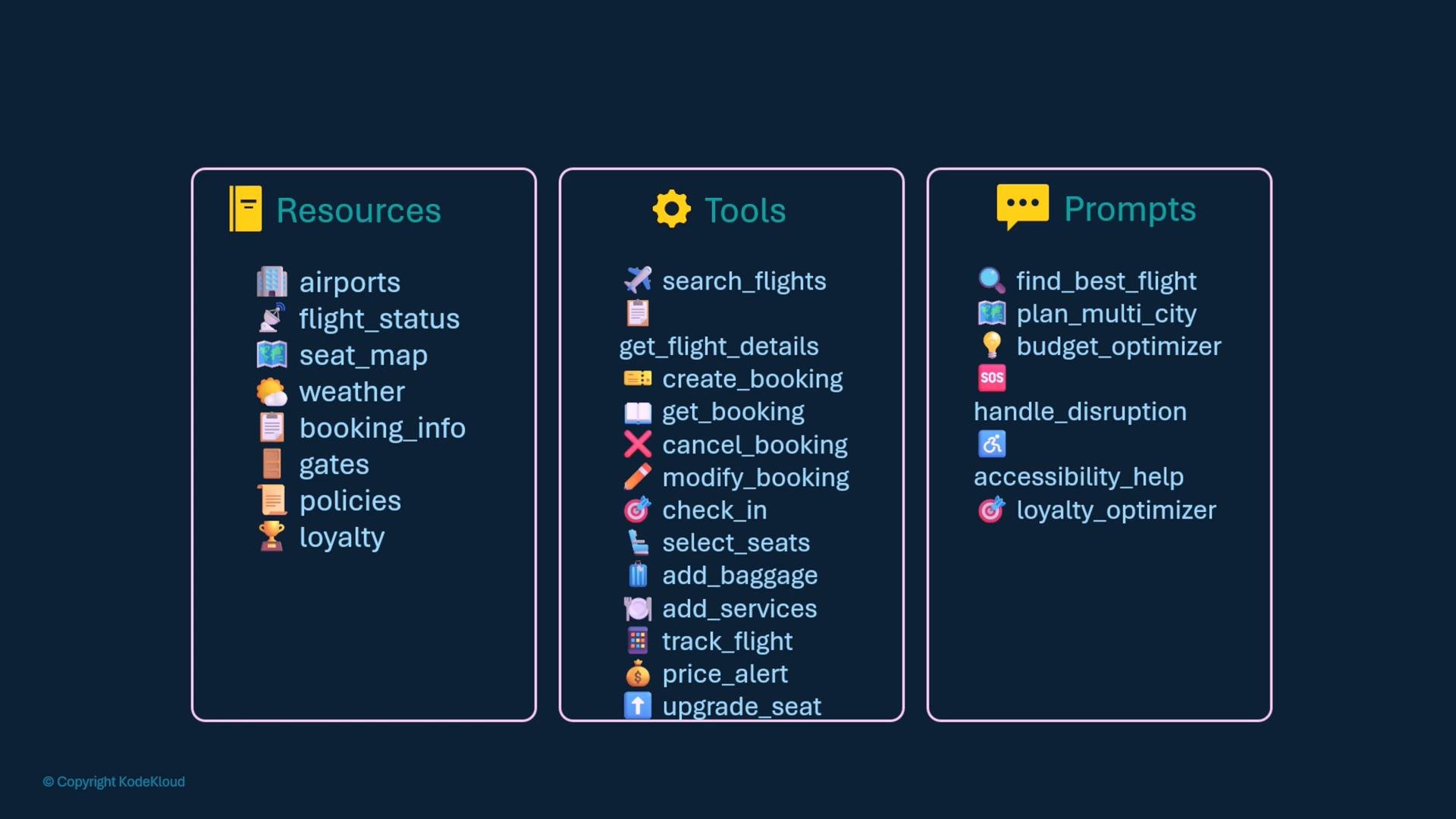
MCP servers expose three coordinated layers:- Resources: read-oriented data endpoints or accessors (e.g., airports, flight statuses, seat maps, weather, bookings, gate info, policies, loyalty programs).
- Tools: actionable functions that modify or query systems (e.g., search_flights, get_flight_details, create_booking, check_in, select_seat, add_baggage).
- Prompts: developer-authored templates that guide model behavior for tasks like finding a best flight, optimizing for budget, or handling disruptions.
For SDK reference and implementation details, see the FastMCP docs:
/docs/mcp/fastmcp (or your project’s documentation location).
Implementation approach (high level)
- Import the FastMCP library and create an MCP server instance.
- Define resources with
@mcp.resource(...)(async functions that return typed data). - Define tools with
@mcp.tool()(async functions performing actions). - Define prompts with
@mcp.prompt("name")(string- or template-returning async functions). - Run the server with your chosen transport:
stdio,http, orstreamable-http. Choosestateless_http=Truefor stateless HTTP mode.
- Resources and tools are standard async functions decorated with
@mcp.resource(...)and@mcp.tool()respectively. - Prompts are defined by developers and decorated with
@mcp.prompt(name)so the AI assistant has reliable templates to call.
Choose resource and tool interfaces that match your backend systems (databases, caches, third-party APIs). Keep resource responses stable and typed so callers can rely on consistent schemas.
Server modes: stateful vs stateless
- Stateful server (default): session state is maintained across requests and model conversations.
- Stateless server: no session persistence. Use for simple HTTP request/response patterns or horizontally scalable APIs. Create with
stateless_http=True.
Run-time transport options
Choose the transport that fits your deployment and client integration needs:
Run examples:
Best practices and next steps
- Design resource schemas and tool interfaces to be stable and typed — this reduces runtime errors and simplifies client integrations.
- Keep prompts concise but structured, making it easier for models to follow multi-step instructions.
- For production, add monitoring, metrics, and authentication on HTTP transports.
- Prototype locally with
stdiofor quick iteration, then deploy with an HTTP transport and stateless mode if you require horizontal scaling.
- FastMCP SDK docs:
/docs/mcp/fastmcp - Model Context Protocol specification: refer to your organization’s MCP spec documentation
- Python async programming: https://docs.python.org/3/library/asyncio.html