This guide explains how to create a reusable Terraform module for deploying a payroll application across multiple AWS regions.
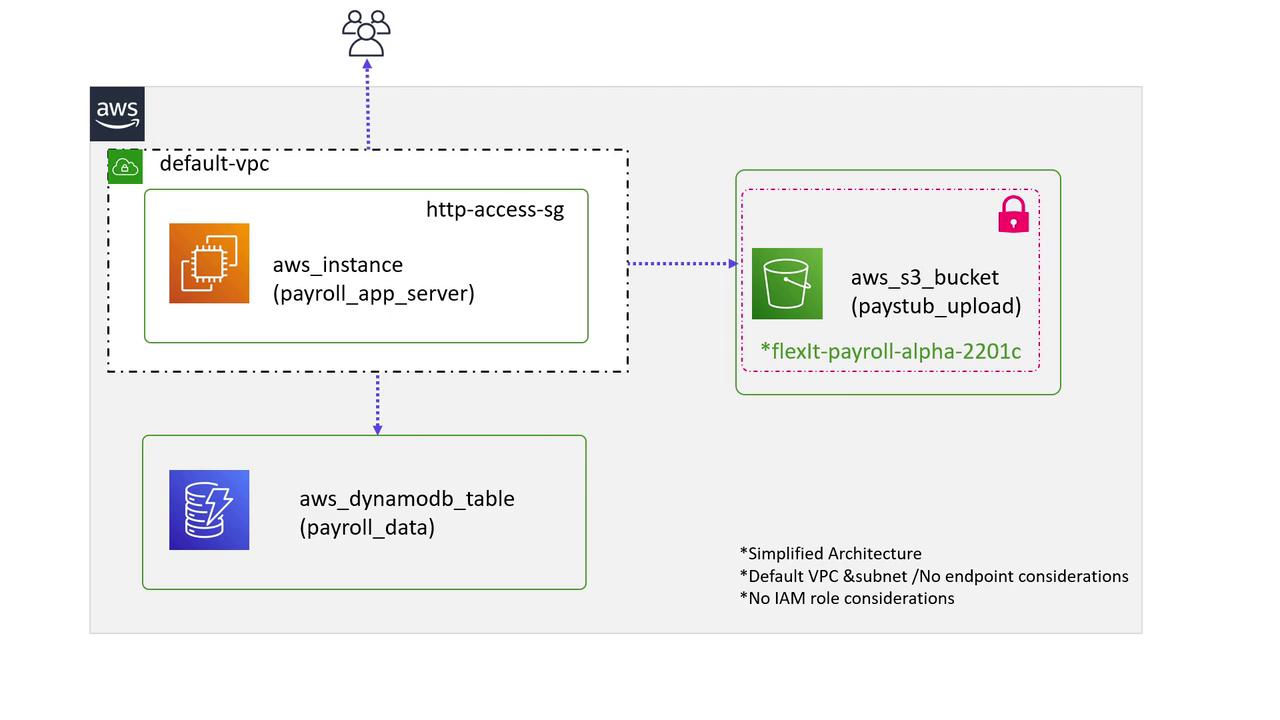
In this guide, we will create a reusable Terraform module to deploy multiple environments for the same infrastructure. Imagine an organization called FlexIT Consulting that has developed a prototype payroll software. This software needs to be deployed in several countries on AWS Cloud using the same core architecture.The simplified architecture leverages the default VPC and incorporates the following components:
An EC2 instance (using a custom AMI) that hosts the application server.
A DynamoDB NoSQL database to store employee and payroll data.
An S3 bucket to store documents such as pay stubs and tax forms.
Users accessing the application on the EC2 instance.
These components integrate to form a basic deployment model for the payroll application.
The goal is to encapsulate this setup into a Terraform module so that the same stack can be deployed across different regions. Based on the high-level design outlined above, let’s create the corresponding Terraform configuration.
Some values, such as the instance type, are hard-coded for consistency, while others — like the AMI and region-specific naming — are configurable via variables.
We will create a module under a directory named modules. For instance, you might place the module in the following path:
/root/terraform-projects/modules/payroll-app
Within this directory, you will create configuration files for the necessary AWS resources: an EC2 instance, an S3 bucket, and a DynamoDB table. Execute these commands to set up the module directory and create the required files:
$ mkdir -p /root/terraform-projects/modules/payroll-app# Create the following files inside the payroll-app directory:# app_server.tf, dynamodb_table.tf, s3_bucket.tf, variables.tf
To deploy the stack in the US East 1 region, create a new directory (for example, /root/terraform-projects/us-payroll-app) to serve as the root module. Inside this directory, add the following main.tf file:
This configuration specifies that the AWS provider should operate in the US East 1 region using the provided custom AMI. While the module hardcodes values such as the instance type and DynamoDB table parameters for consistency, it still enables regional customizations for the bucket name and AMI.Initialize, plan, and apply the configuration with the following commands:
$ terraform init$ terraform plan$ terraform apply
A sample output from terraform apply might look like:
Terraform will perform the following actions:# module.us_payroll.aws_dynamodb_table.payroll_db will be created+ resource "aws_dynamodb_table" "payroll_db" { arn = (known after apply) billing_mode = "PAY_PER_REQUEST" hash_key = "EmployeeID" name = "user_data" }# module.us_payroll.aws_instance.app_server will be created+ resource "aws_instance" "app_server" { ami = "ami-24e140119877avm" instance_type = "t2.medium" }# module.us_payroll.aws_s3_bucket.payroll_data will be created+ resource "aws_s3_bucket" "payroll_data" { bucket = "us-east-1-flexit-payroll-alpha-22001c" }Enter a value: yesmodule.us_payroll.aws_dynamodb_table.payroll_db: Creating...
To deploy the same stack in the UK region, create another directory (for example, /root/terraform-projects/uk-payroll-app) for the root module. Since both the app_region and the AMI vary by region, your main.tf should include the following configuration:
module "uk_payroll" { source = "../modules/payroll-app" app_region = "eu-west-2" ami = "ami-35e140119877avm"}provider "aws" { region = "eu-west-2"}
When you run terraform apply in this directory, Terraform will deploy the identical stack in the London region. Note that the S3 bucket name is automatically prefixed with the region code:
Terraform will perform the following actions:# module.uk_payroll.aws_dynamodb_table.payroll_db will be created+ resource "aws_dynamodb_table" "payroll_db" { arn = (known after apply) billing_mode = "PAY_PER_REQUEST" hash_key = "EmployeeID" name = "user_data" }# module.uk_payroll.aws_instance.app_server will be created+ resource "aws_instance" "app_server" { ami = "ami-35e140119877avm" instance_type = "t2.medium" }# module.uk_payroll.aws_s3_bucket.payroll_data will be created+ resource "aws_s3_bucket" "payroll_data" { bucket = "eu-west-2-flexit-payroll-alpha-22001c" }Enter a value: yesmodule.uk_payroll.aws_dynamodb_table.payroll_db: Creating...module.uk_payroll.aws_s3_bucket.payroll_data: Creating...module.uk_payroll.aws_dynamodb_table.payroll_db: Creation complete after 1s [id=user_data]
Ensure you have the appropriate AWS credentials configured for each target region before running Terraform commands.
When using modules, each resource is addressed with the syntax that concatenates the module name, the resource type, and the resource name. For example, the DynamoDB table in the us_payroll module is referenced as:
module.us_payroll.aws_dynamodb_table.payroll_db
This addressing convention keeps module resources organized and makes it easier to manage configurations when deploying identical stacks in multiple regions.
In this tutorial, we have built a Terraform module to deploy a payroll application across multiple AWS regions. By encapsulating resource definitions into a reusable module, you ensure consistency in critical parameters such as the instance type, DynamoDB table name, and primary key while allowing flexibility in regional configurations like the AMI and S3 bucket naming.Leveraging modules in Terraform simplifies infrastructure management, minimizes configuration redundancy, and reduces the risk of misconfigured resources. In our next guide, we will explore how to utilize modules available in the Public Terraform Registry.For further reading and additional resources, consider checking out: