Key Components
Establishing a Connection
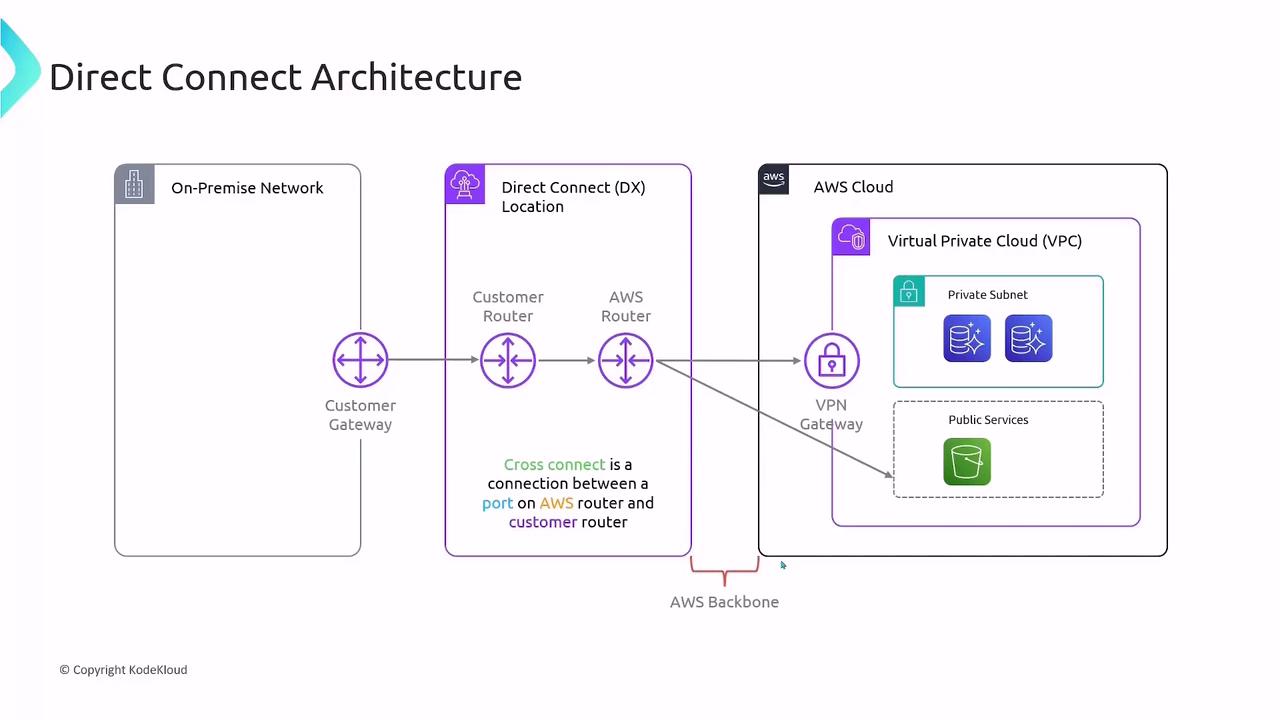
- Order a Port
Request a 1 Gbps, 10 Gbps, or 100 Gbps port in your chosen Direct Connect location. - Cross-Connect Provisioning
Work with the facility operator to install a cross-connect cable between your customer router and the AWS Direct Connect router. - BGP Session Setup
Configure Border Gateway Protocol (BGP) peering on both ends to exchange routes dynamically over the AWS global network.
Ensure your on-premises edge device supports the desired port speed and BGP configuration.
Virtual Interfaces (VIFs)
After your physical link is active, segment traffic by creating virtual interfaces:
Each VIF leverages BGP to advertise and learn routes, ensuring efficient traffic flow.
Pricing Overview
With AWS Direct Connect, you incur two main charges:Data transfer rates vary by AWS Region. Always review the AWS Direct Connect pricing page for the latest details.