

Minimal example agent
Below is a minimal Python agent used for the demo. It exposes two simple tool functions:get_current_time and get_current_weather. In production you would replace these stubs with real API calls; here they return deterministic, hard-coded values so UI behavior and traces are predictable.
Start the ADK web server locally
Run the ADK web UI locally with the CLI:Web UI: main controls and indicators
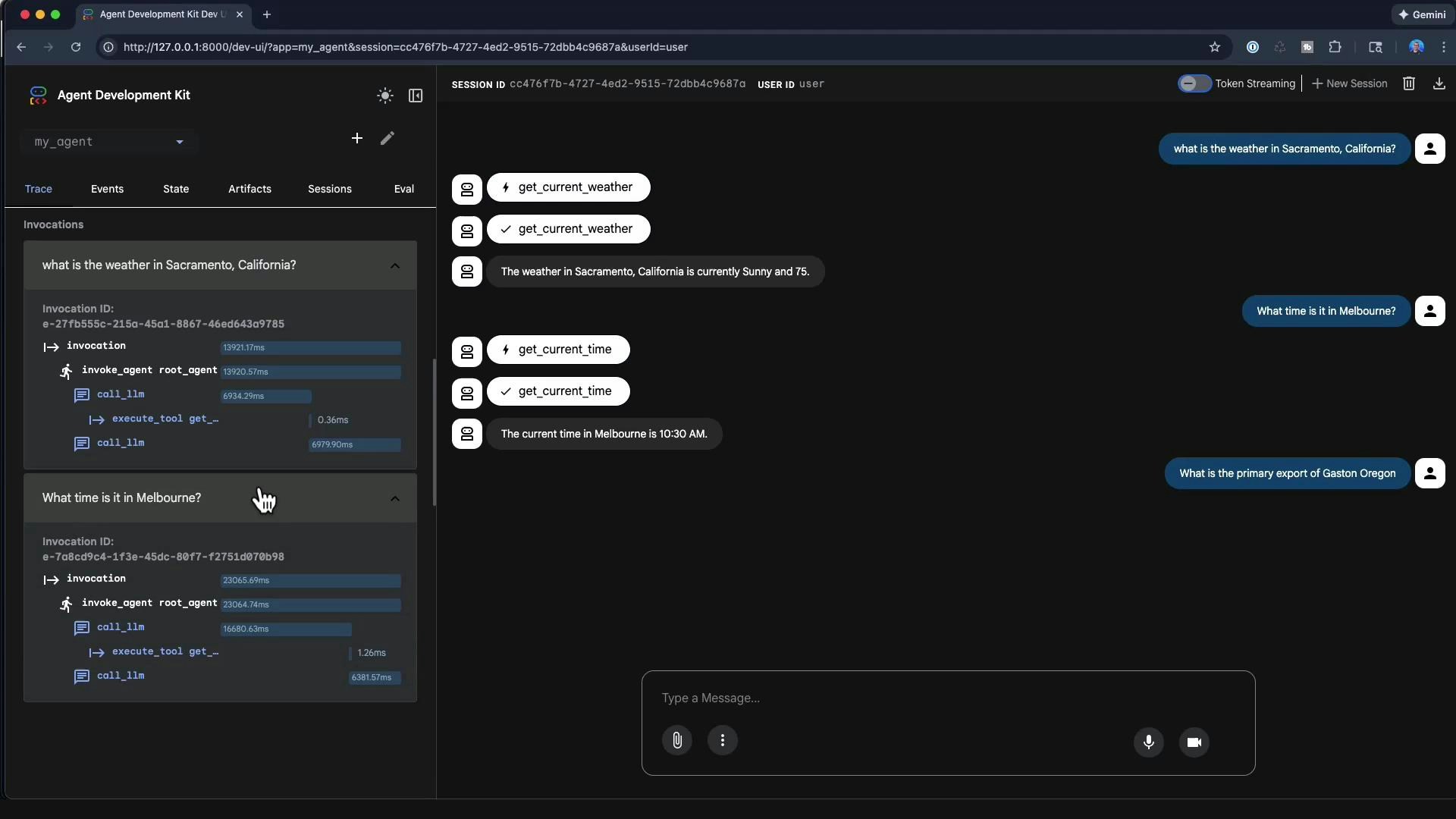
The ADK web interface provides a developer-focused environment for testing agents. Typical controls and indicators include:
These controls help you observe model routing, tool selection, and response composition in real time.
Example interactions and how tools are selected
Using the minimal agent above:-
If you ask: “What is the weather in Sacramento, California?”
- The LLM routing step selects
get_current_weather. - The tool is invoked with
city="Sacramento, California". - The tool returns:
- The chat UI displays: “The weather in Sacramento, California is currently sunny and 75.”
- The LLM routing step selects
-
If you ask: “What time is it in Melbourne?”
- The LLM selects
get_current_timeand the tool returns"10:30 AM"for the provided city.
- The LLM selects
This demo uses hard-coded tool results. In production, ensure your tools call reliable APIs and implement input disambiguation, timeouts, and retry policies to avoid incorrect or stale outputs.
Handling queries with no matching tool
If the agent receives a query for which no tool exists (for example, “What is the primary export of Gaston, Oregon?”), the model may try to respond without a tool and appear to hang while generating. To avoid this:- Implement an explicit fallback path (e.g., respond “I don’t have a tool for that, would you like me to search the web?”).
- Add a “web lookup” or generic search tool as a fallback.
- Set model/tool timeouts and meaningful error responses.
Traces, logs, and performance analysis
The web UI exposes detailed invocation traces and timing bars that let you inspect where time is being spent (LLM routing vs. tool execution). Each user interaction can show:- Function-call events and tool executions
- The sequence of LLM calls (routing -> tool -> final response)
- Millisecond-level timing for each phase
get_current_weather:
- Compare LLM call durations to tool execution times to determine where latency is occurring.
- Long LLM routing steps may indicate overly large contexts, complex prompt engineering, or model latency.
- Small tool execution times suggest the tool is fast; if user-perceived latency is high, focus on model and network timeouts.
Other useful UI features during development
- Upload local files to include them in the agent’s session state or to use as evaluation inputs.
- Edit and persist session state to reproduce scenarios and debug complex flows.
- Use microphone or camera inputs if your agent supports multimodal features.
- Create evaluation sets: curated input/output cases to score and regression-test agent behavior over time.
Best practices
- Use the ADK web interface as a development and debugging tool — iterate on model prompts, tool definitions, and routing policies here.
- Add robust error handling and explicit “no tool found” responses to avoid apparent hangs.
- Collect evaluation sets and trace logs to measure regressions and improvements after changes.
The ADK web interface is primarily a developer tool for debugging, tracing, and iterating on agents. It is not intended to be the final production UI for an agent; use it to tune tools, traces, and fallbacks before deploying.
References and further reading
- Agent Development Kit (ADK) — use the ADK web UI to inspect routing, tools, and traces before production.
- Consider adding monitoring, timeouts, and fallbacks to production agents to ensure reliability and responsiveness.