This article explores the inverted index in Elasticsearch, detailing its function in full-text search technology and how it enhances search operations.
Welcome back! In this article, we explore how the inverted index functions within Elasticsearch, a core component of full-text search technology across various platforms.Imagine a traditional book index that lists key terms along with the page numbers where they appear. Elasticsearch adopts a similar approach. When you add a document to Elasticsearch, the platform builds an inverted index that maps each term to the documents containing it. This powerful mechanism allows for fast and efficient search operations.
Document 1: “the quick brown fox jumps over the lazy dog”
Document 2: “the dog chased the cat”
Document 3: “the fox is cunning”
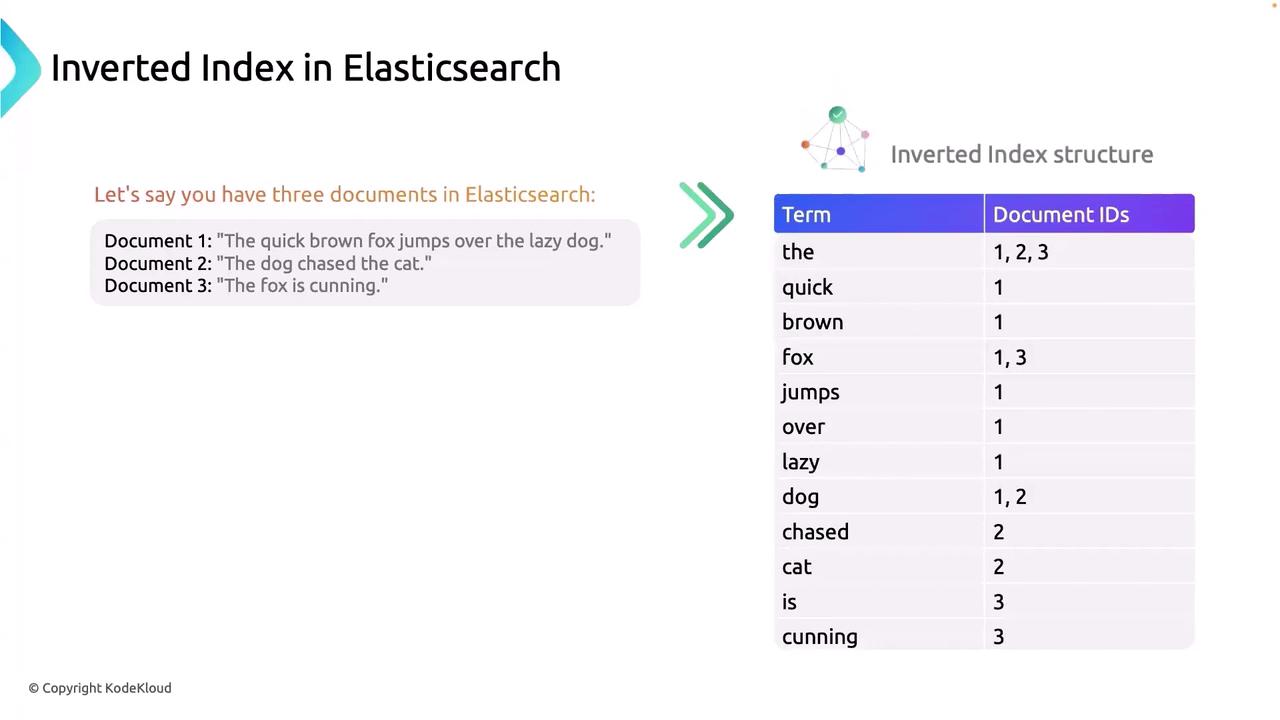
When these documents are indexed in Elasticsearch, an inverted index is created to map individual terms to their respective document IDs. The diagram below illustrates this mapping:
The diagram also highlights that the index contains not only a list of terms but also the specific positions within each document where those terms appear. For instance, the term “fox” is found in both Document 1 and Document 3. This detailed mapping is essential for achieving rapid search responses in Elasticsearch.
Elasticsearch creates the inverted index through several key steps:
Elasticsearch starts by breaking down each document into individual tokens
Elasticsearch starts by breaking down each document into individual tokens. For example, the sentence “the quick brown fox jumps over the lazy dog” is split into separate words. This process is vital for efficiently managing large volumes of text.
During normalization, all tokens are converted to lowercase and processed for…
During normalization, all tokens are converted to lowercase and processed for consistency. This ensures that searches are case-insensitive and all terms are stored in a uniform format.
Common words such as “the,” “is,” and “at” are eliminated because they offer …
Common words such as “the,” “is,” and “at” are eliminated because they offer little value in distinguishing the document content. Removing these stop words reduces noise and enhances the relevance of search results.
Index Creation
Finally, Elasticsearch builds the inverted index—a structure that maps each term to the specific documents where it is found. This is comparable to a book’s index, enabling Elasticsearch to quickly retrieve documents that match search queries.
To understand how the inverted index enhances search queries, consider a search for the words “fox” and “dog.” Based on our earlier example:
“fox” appears in Documents 1 and 3.
“dog” appears in Documents 1 and 2.
Since Document 1 is the only document containing both terms, Elasticsearch returns Document 1 as the search result. The following diagram illustrates this query process:
Understanding how the inverted index operates is crucial for grasping advanced topics such as namespaces, shards, and replicas in Elasticsearch. Mastering this concept can significantly improve your approach to optimizing search queries and managing data effectively.Thank you for reading this detailed exploration of the inverted index in Elasticsearch. We hope this guide helps you harness the power of Elasticsearch search capabilities more effectively.For further insights into Elasticsearch and related technologies, check out: