Welcome to this guide on resolving common image pull errors in Kubernetes. In this article, we will explore issues that can occur during image pulls, including typos in image names, missing credentials, incorrect tags, and DNS resolution errors. Whether you’re new to Kubernetes or an experienced user, this step-by-step guide will help you diagnose and fix these problems.

Overview

When a pod is stuck in an image pull error state, it means that Kubernetes tried to fetch the container image, encountered an error, and then applied an exponential backoff before retrying. This mechanism helps prevent network congestion and registry overload.

Pod Status Example

Below is an example of a pod status showing the error:
Each retry increases the delay before the next attempt.

1. Investigating a Pod with an Image Pull Error

Let’s start by inspecting one of the pods that is not starting correctly. In this section, we describe the API pod to look at the events, which illustrate that the image pull error is due to an unresolved image reference.
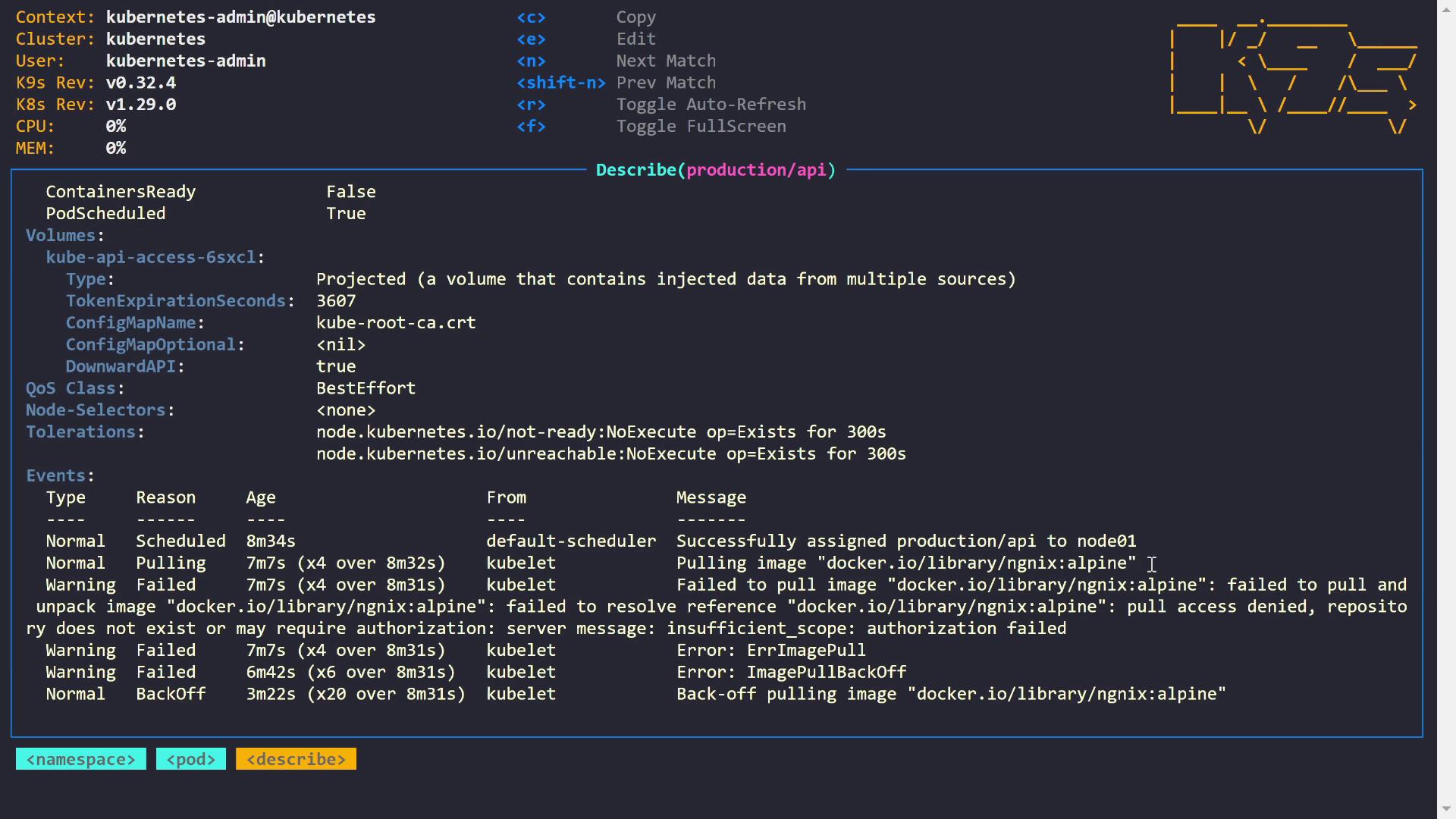
The image shows a terminal interface displaying Kubernetes pod details, including container readiness, pod scheduling, volume information, and event logs related to image pulling errors.
The events reveal that the cluster scheduled the pod correctly but failed to pull the image because the reference could not be resolved. Common error messages include “pull access denied,” “repository does not exist,” or messages indicating the need for authorization.

Example: Fixing a Typo in the Image URL

In this example, the pod uses an image sourced from Docker Hub. Upon checking, a typo was discovered in the image name (“NGINX”). Correcting the typo will resolve the issue. Below is the updated pod definition:
After saving this configuration, the pod status updates to:

2. Resolving Credential Issues for Private Registries

The next issue involves the notifications pod, which faces a 401 Unauthorized error while pulling an image from the GitHub Container Registry (ghcr.io). A 401 error generally indicates missing or invalid credentials.

Check the Image Pull Secrets

Inspect the pod’s events:
A quick check confirms that the required secret for ghcr.io (named “ghcr-secret”) does exist:
Since you’re editing a pod directly (instead of a Deployment), some fields cannot be updated on a running pod. You must delete the pod and reapply the updated configuration.

Updated Notifications Pod Definition

Below is the updated configuration with the image pull secret added:

Steps to Apply the Change

  1. Export the current pod configuration:
  2. Delete the existing pod:
  3. Apply the updated configuration:
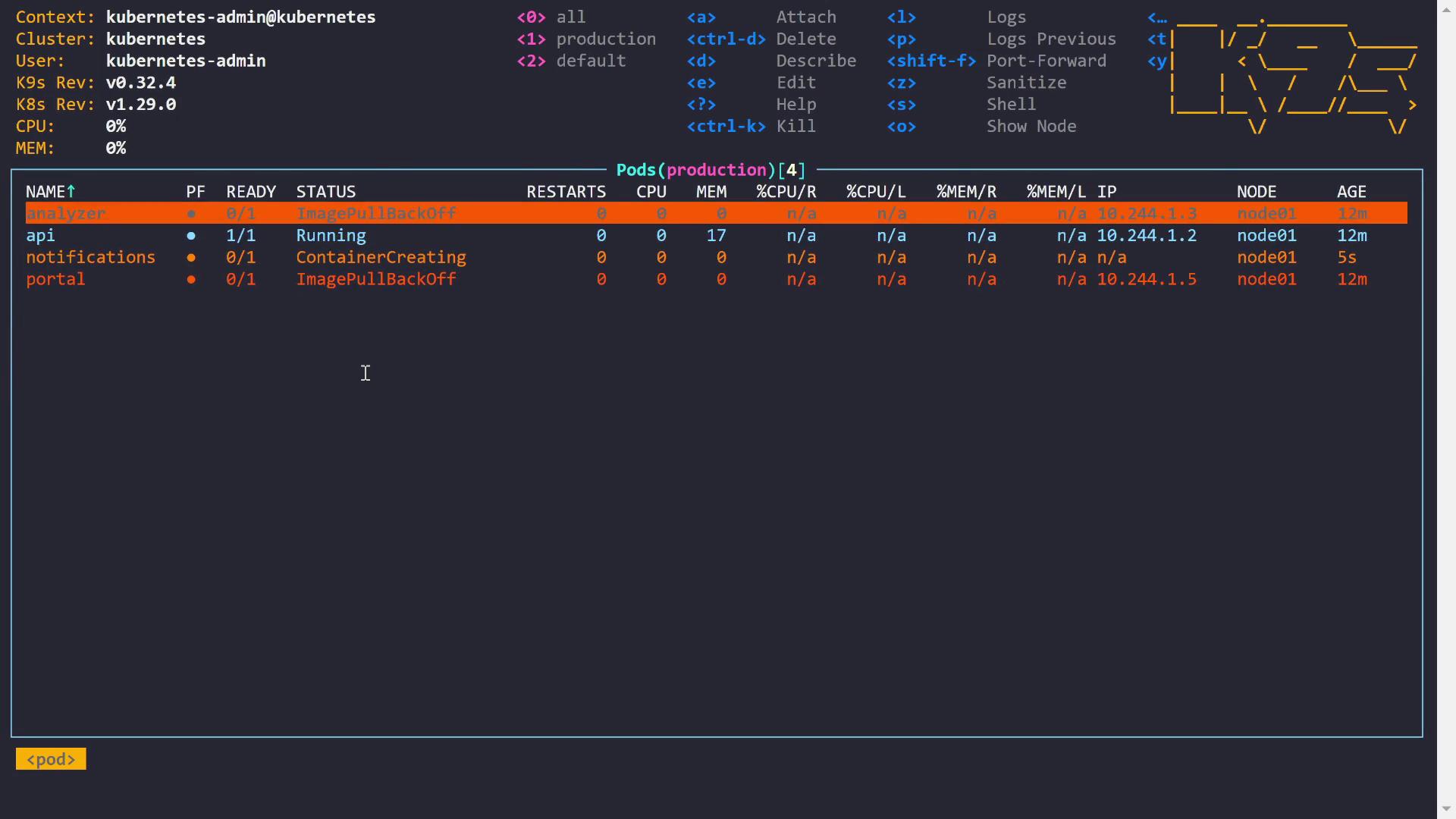
After applying the changes, verify the pod status using a CLI tool like K9s.
The image shows a terminal interface of K9s, a Kubernetes CLI tool, displaying the status of pods in a cluster. It lists four pods with their readiness, status, restarts, CPU, memory usage, IP, node, and age, highlighting issues like "ImagePullBackOff" and "ContainerCreating."
The notifications pod should now be in a Running state.

3. Correcting Image Tags and Resolving DNS Issues

The portal pod experienced image pull errors due to an incorrect image tag. In the pod description, the following error was observed:
Although the repository is correct (“docker.io/library/httpd”), the tag “bookstore” does not exist. A quick check on Docker Hub confirms the correct tag should be “bookworm” (or another valid tag). After correcting the tag in the pod definition, the portal pod successfully starts. Additionally, another pod faced DNS resolution issues with a long image reference from “gitlab.kodekloud.com”. The error message showed:
Running a local nslookup confirms that the hostname cannot be resolved:
Since the cluster cannot resolve the hostname, you will need to coordinate with your networking team or cluster administrators to fix the DNS issue.

Summary of Common Image Pull Error Scenarios


Conclusion

In this guide, we walked through several common issues that lead to image pull errors in Kubernetes, including:
  1. Typos in the image URL.
  2. Missing or misconfigured image pull secrets for private registries.
  3. Incorrect image tags.
  4. DNS resolution errors.
It is essential to verify application details, ensure image URL correctness, and configure proper credentials before troubleshooting such issues. Happy troubleshooting! For more Kubernetes resources, check out the Kubernetes Documentation and Docker Hub.

Watch Video

Practice Lab