Observing the Problem
When inspecting the cluster, both the blue and green deployments are running as expected. The following command output confirms this:Investigating Service Definitions
To diagnose the issue, let’s review the service definitions.Current Cluster State
The initial output of our cluster services is as follows:Listing Service Definition Files
The two service configuration files in the directory are:blue-svc.yaml
green-svc.yaml
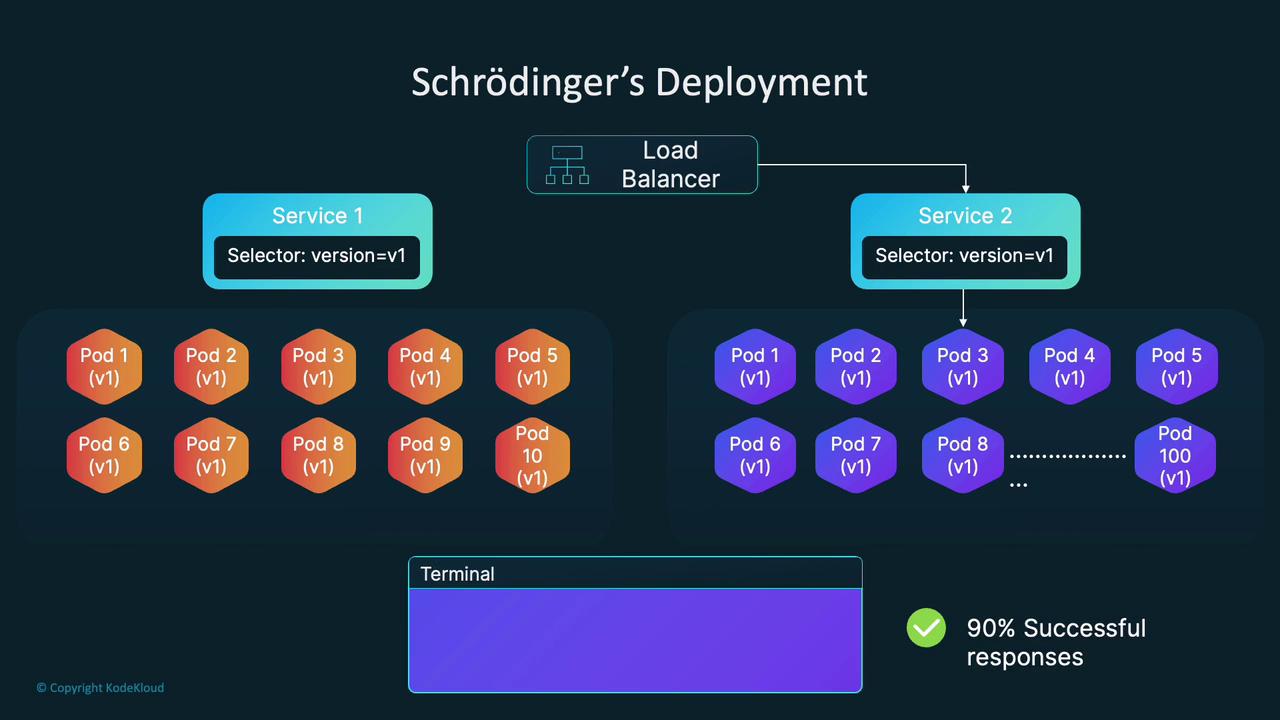
version: v1 and app: green, isolating the green pods properly. The blue service, however, only uses version: v1 as its selector. Since both blue and green pods share the version: v1 label, the blue service unintentionally selects green pods too, leading to mixed responses.
Understanding Label Selectors and Endpoints
Kubernetes services route traffic to all pods matching their label selectors. To verify the selected pods for labelversion=v1, run:
Use the command “k edit svc blue-service” to inspect and modify the blue service configuration in real time.
Fixing the Issue
To ensure that the blue service routes traffic only to blue pods, update the blue service selector by adding a unique label. Modify the selector to include bothversion: v1 and app: blue. After making this change, the blue service will exclusively target blue pods.
Once updated, verify the endpoints again:
Final Thoughts
This troubleshooting exercise highlights the critical importance of using unique labels in Kubernetes deployments. Overlapping selectors can cause unexpected behavior and intermittent failures that are challenging to diagnose in large-scale environments. Understanding how label selectors, service endpoints, and load balancing interact is vital for maintaining reliable application deployments in Kubernetes.