This guide explains how to create a reusable Terraform module for deploying multi-environment infrastructure on AWS.
In this guide, we will walk you through creating a new Terraform module that deploys multiple environments of an infrastructure template. FlexIT Consulting’s blueprint for a prototype payroll software is used as an example. This payroll software will be deployed in several countries on the AWS Cloud using an identical architecture for each deployment. The architecture comprises the following components:
A single EC2 instance, using a custom AMI, that hosts the application server.
A DynamoDB NoSQL database to store employee and payroll data.
An S3 bucket to store documents such as pay stubs and tax forms.
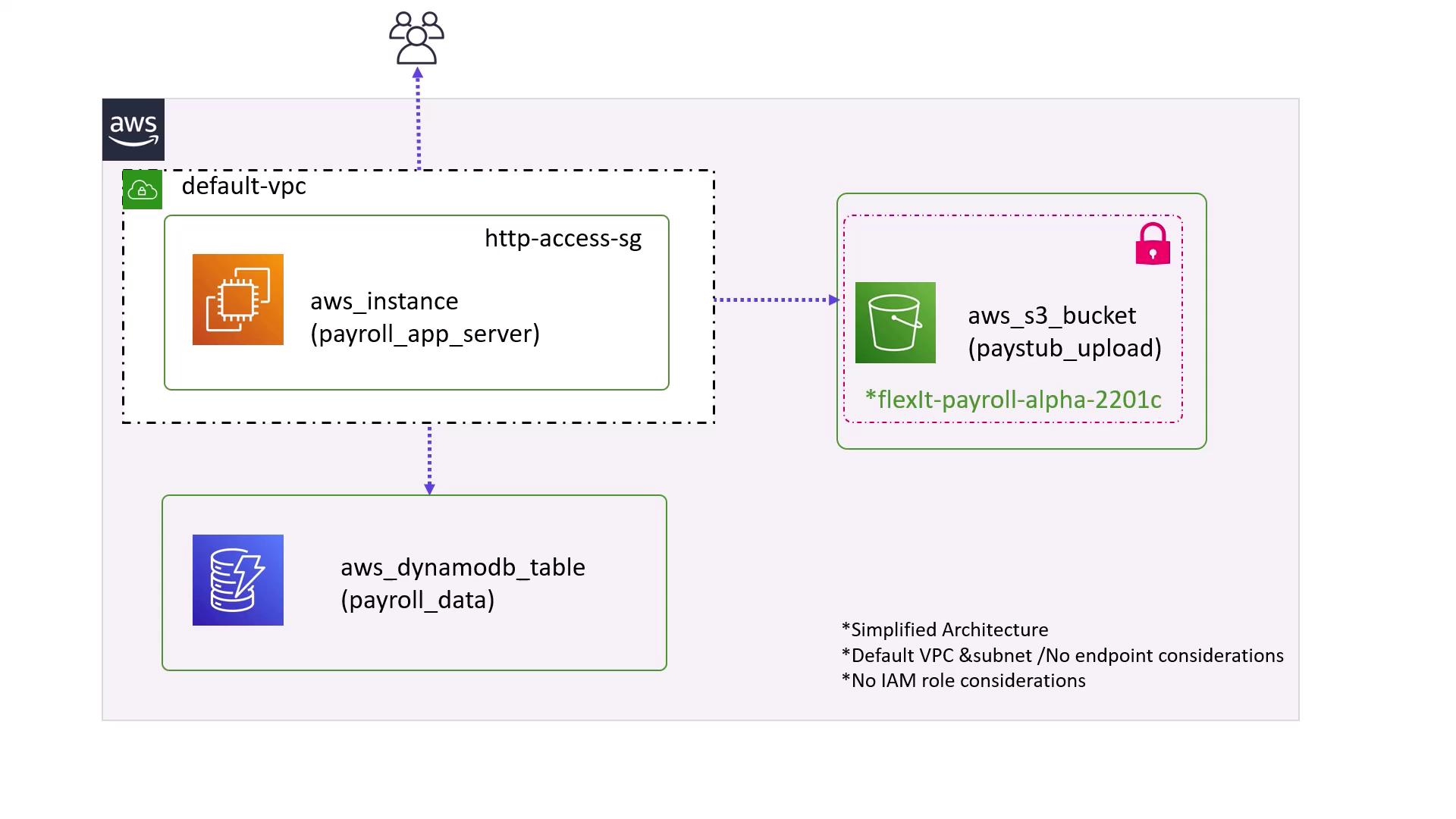
Users access the application hosted on the EC2 instance, and this simplified setup utilizes the default VPC. It does not include advanced configurations such as VPC endpoints or specific IAM roles. The high-level architecture diagram below depicts this setup:
The primary goal is to create a reusable Terraform module that deploys a consistent stack of resources across different regions.
The reusable module will be stored in the modules directory. In this example, we will use the path:/root/terraform-projects/modules/payroll-appThis directory will contain resource definitions for the EC2 instance, S3 bucket, and DynamoDB table. To maintain consistency across environments, some configuration values such as the EC2 instance type, DynamoDB table name, and primary key are hard-coded, while others like the AMI are configurable by the user.
variable "app_region" { type = string}variable "bucket" { default = "flexit-payroll-alpha-22001c"}variable "ami" { type = string}
In these configurations, the AMI and the application region are defined as variables. Meanwhile, the instance type, DynamoDB table name, and primary key are fixed. The S3 bucket name is prefixed with the region to ensure global uniqueness.
Once the module is defined, we can deploy an instance of it. Below are examples of deploying the module in two regions: US East 1 and the UK (London region).
If you need to override the default bucket name, you can specify the bucket variable in this module configuration.
After setting up the directory, initialize Terraform by running:
Copy
Ask AI
$ terraform init
Terraform will download the module from the specified source and the AWS provider required by the module.The initialization output will resemble:
Copy
Ask AI
Initializing modules...- us_payroll in .terraform/modules/us_payrollInitializing the backend...Initializing provider plugins...- Finding latest version of hashicorp/aws...- Installing hashicorp/aws v3.11.0...- Installed hashicorp/aws v3.11.0 (signed by HashiCorp)The following providers do not have any version constraints in configuration,so the latest version was installed.To prevent automatic upgrades to new major versions that may containbreaking changes, we recommend adding version constraints in a required_providersblock in your configuration, with the constraint strings suggested below.* hashicorp/aws: version = "~> 3.11.0"Terraform has been successfully initialized!
Apply the configuration to create the resources:
Copy
Ask AI
$ terraform apply...Terraform will perform the following actions:# module.us_payroll.aws_dynamodb_table.payroll_db will be created+ resource "aws_dynamodb_table" "payroll_db" { + arn = (known after apply) + billing_mode = "PAY_PER_REQUEST" + hash_key = "EmployeeID" + name = "user_data"}...# module.us_payroll.aws_instance.app_server will be created+ resource "aws_instance" "app_server" { + ami = "ami-24e140119877avm" + instance_type = "t2.medium"}...+ resource "aws_s3_bucket" "payroll_data" { + acceleration_status = (known after apply) + acl = "private" + arn = (known after apply) + bucket = "us-east-1-flexit-payroll-alpha-22001c"}Enter a value: yes
The EC2 instance, S3 bucket, and DynamoDB table are created based on the configuration defined in the module and the values provided in the root module.
To deploy the same stack in the UK region, create a directory for the UK payroll application:
Copy
Ask AI
$ mkdir /root/terraform-projects/uk-payroll-app
Inside this directory, create a main.tf file with the following content:
Copy
Ask AI
module "uk_payroll" { source = "../modules/payroll-app" app_region = "eu-west-2" ami = "ami-35e140119877avm"}provider "aws" { region = "eu-west-2"}
In this configuration, the app_region is set to eu-west-2 (London region) and the AMI ID is appropriate for that region. When you run terraform apply, Terraform will create the resources with names prefixed by eu-west-2 to reflect the region-specific deployment.The module output ensures clear resource addressing. For instance, you can reference the DynamoDB table as:
Using reusable modules in Terraform provides several advantages:
Benefit
Description
Simplified Configuration
Organize your infrastructure into modular components rather than maintaining a large monolithic configuration.
Reduced Risk of Human Error
Use a preconfigured and validated module for consistent deployments across various environments.
Improved Reusability
Deploy the same infrastructure in multiple regions while keeping core configurations consistent.
By adopting a module-based approach, you ensure that key configuration aspects such as the EC2 instance type and DynamoDB settings remain constant, while still being able to adjust region-specific variables like the AMI ID and bucket naming.