Demo Deploying voting app on Kubernetes with Deployments
This lesson explains how to deploy a voting app on Kubernetes using
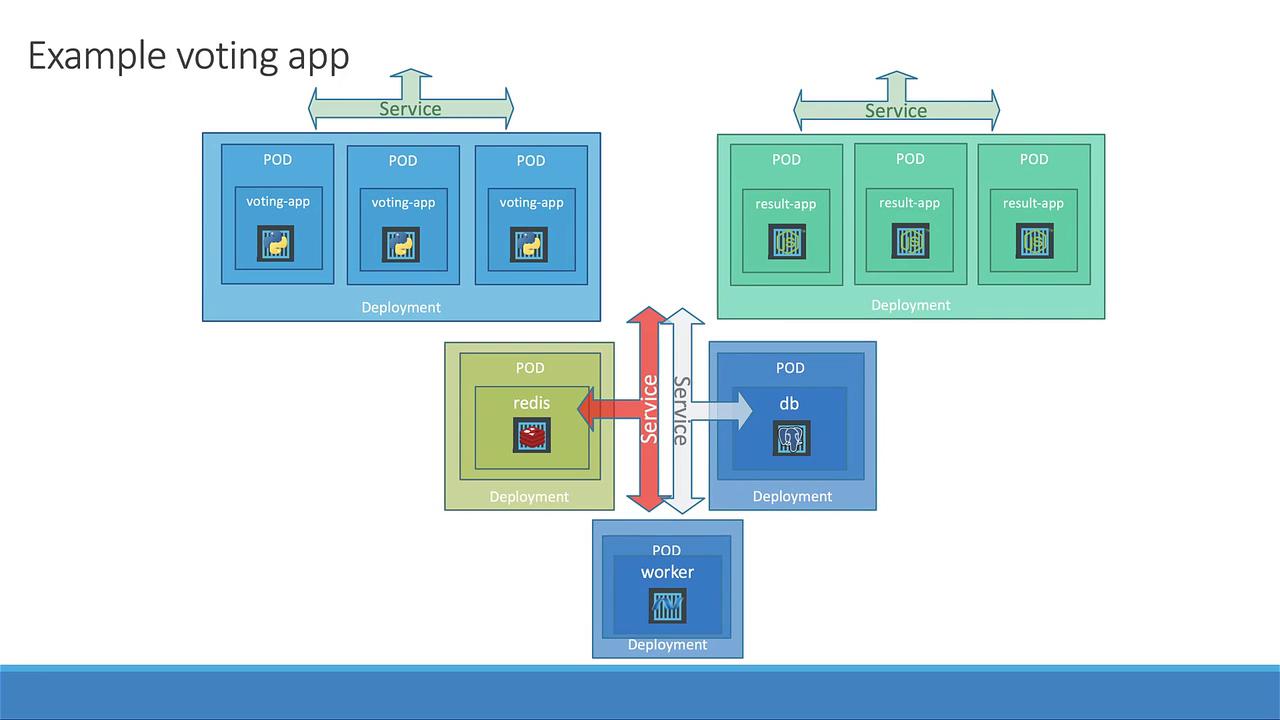
In this lesson, we enhance the initial demo—which deployed Pods and Services directly—by leveraging Kubernetes Deployments. This improved approach addresses the challenges of scaling and updating applications without downtime. By using Deployments, you can automate the management of ReplicaSets, making it simple to scale, roll out updates, and perform rollbacks while retaining a history of revisions.
Deploying individual Pods limits your ability to easily increase the number of service instances or update the container image without downtime. Using Deployments streamlines these processes.
In the upgraded setup, each application component—including the front-end apps (voting and results), databases, and worker applications—is encapsulated within its own Deployment. The project directory now hosts both the original Pod and Service definition files, along with new files for the Deployments.
Then, create a Deployment file (votingapp-deployment.yaml) based on this pod template. Adjust the API version to apps/v1, change the kind to Deployment, and add the selector and replicas fields:
Then, create the Redis Deployment (redis-deploy.yaml) using the same template as the voting app deployment. Update the component names, labels, and container details accordingly:
Similarly, convert the result application from a Pod to a Deployment. Create the file result-app-deploy.yaml, update the names and labels from the original Pod definition, and ensure that the template matches the selector criteria.Your project directory should now include files similar to the following:
Use Minikube to retrieve the URLs for the voting and result services:
minikube service voting-service --urlminikube service result-service --url# Expected output: http://192.168.99.101:30005
Open these URLs in your web browser to interact with the voting app. Load balancing within the Deployment ensures that different pods serve your requests.
Refresh the voting service URL in your browser several times to observe that requests are being handled by multiple pods, confirming that the scaling is effective.This lesson demonstrates how Kubernetes Deployments simplify application management by enabling effortless scaling, rolling updates, and high availability. Happy deploying, and see you in the next lesson!