

- Pointer: Refers to the first accessible element in the underlying array (which may not be the first element of the entire array).
- Length: The number of elements contained in the slice.
- Capacity: The total number of elements in the underlying array starting from the first element in the slice.
len and cap to retrieve these values respectively.
Declaring and Initializing a Slice
Declaring a slice in Go is straightforward and similar to creating an array—except that you do not need to specify its size. When you declare a slice, the compiler creates an underlying array and returns a reference to it. For instance, to create an integer slice namedgrades with the values 10, 20, and 30:
Understanding Slices with Arrays
A slice is essentially a reference to an underlying array. You can construct a slice from an array by specifying a start index and an end index. The slice starts at the given start index and includes elements up to, but not including, the end index. For example:Creating Slices with the make Function
Another method to create a slice is by using the built-inmake function. This function requires the data type, initial length, and capacity. The syntax is:
make function allocates an underlying array of the specified capacity and returns a slice that refers to it. This approach is especially useful when you want to create an empty slice with a predetermined capacity.
For example, this code creates a slice with a length of 5 and a capacity of 8, printing its contents, length, and capacity:
The default zero value for integers is 0. When working with arrays, remember that the array’s capacity is equal to its length. However, for slices, the capacity begins from the first element accessed in the underlying array.
Slices as References
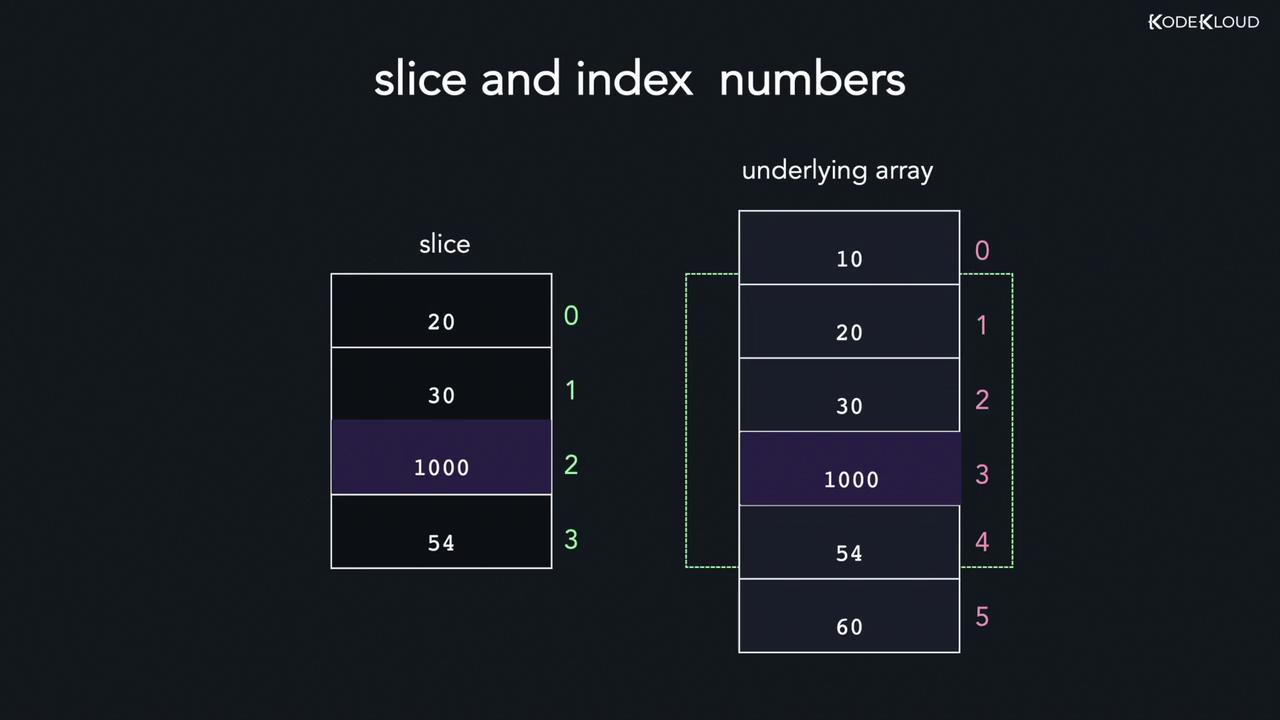
Because a slice is a reference to an underlying array, modifying an element in the slice will also modify the corresponding element in the array. However, keep in mind that the slice maintains its own indexing starting at 0; therefore, the index in the slice does not always match the index in the underlying array.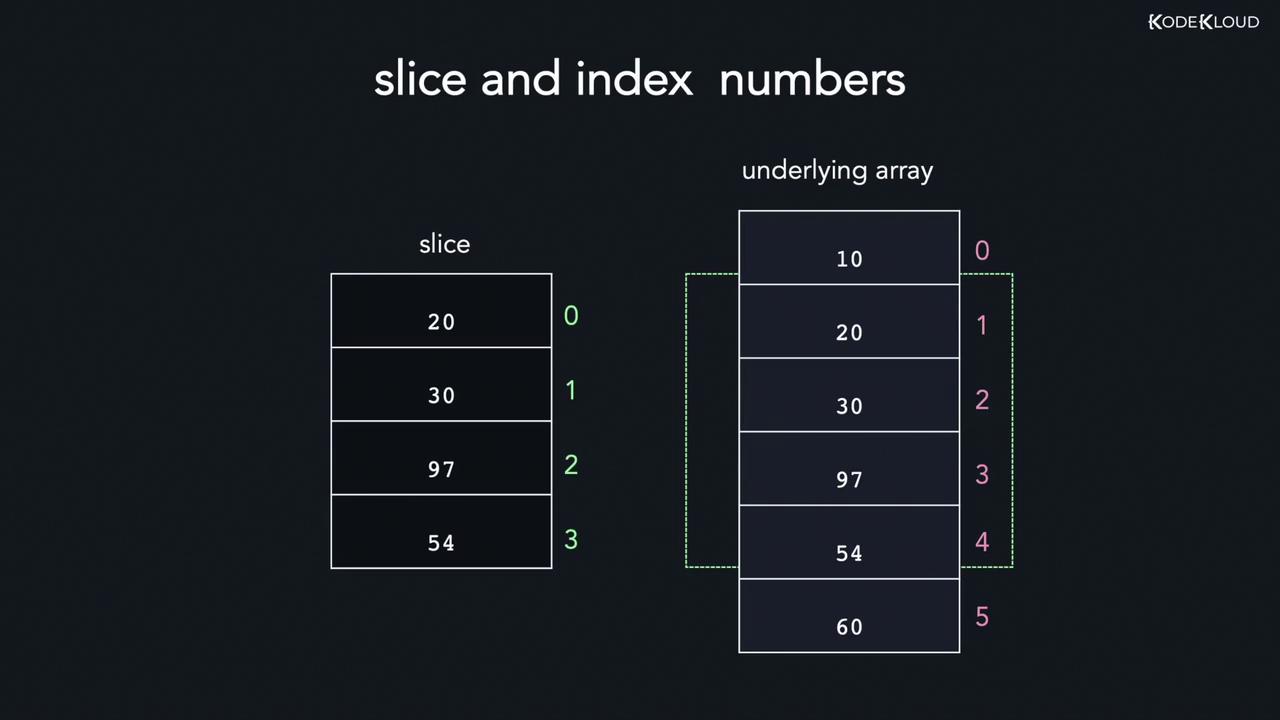
Appending Elements to a Slice
Appending new elements to a slice is done using the built-inappend function. This function takes the original slice followed by new values, and returns a new slice containing both the existing and added elements. If the underlying array lacks sufficient capacity, a new, larger array is allocated—often doubling the previous capacity.
The syntax of the append function is as follows:
append function allocates a new array with increased capacity. The following complete example demonstrates this behavior:
...) operator, which unpacks all elements from the second slice:
Deleting Elements from a Slice
Deleting an element from a slice involves creating a new slice that omits the undesired element. This is typically achieved by:- Slicing elements before the target index.
- Slicing elements after the target index.
- Appending the two slices together.
Copying Elements Between Slices
Go provides a built-incopy function to copy elements from one slice to another. This function returns the number of elements that were successfully copied, which is the minimum of the lengths of the source and destination slices. The syntax is:
Looping Through Slices
Looping through a slice is similar to iterating over an array. Therange keyword offers a concise way to access both the index and value of each element in the slice. Here’s an example:
_) to ignore the index:
That covers the basics of slices in Go. With these examples and explanations, you are now ready to implement slices effectively in your Go programs. Happy coding!