fmt package. These techniques lay the foundation for effectively displaying data in your Go applications.
Printing a String
Begin by declaring a package, importing thefmt package, and using its Print function to output a string. For instance, to print “Hello World”, use the following code:
Printing a Variable
To print a variable, declare and initialize it, then pass it tofmt.Print. For example, the code below declares a variable named city with a value of "Kolkata" and prints it:
Printing Variables and Strings Together
Often, you need to combine static text with variable values. Here’s an example where two variables,name and user, are printed alongside string literals:
Remember that the
fmt.Print function does not append a newline by default. When printing multiple items consecutively, they will appear without any line breaks.Adding Newlines with “\n”
To create line breaks, include the newline character (\n) in your string expressions. The following example demonstrates how to print variables on separate lines:
The newline character (
\n) is interpreted as a line break rather than printed literally.Automatic Newlines with fmt.Println
For convenience, thefmt package offers the Println function, which appends a newline automatically after printing each argument:
Formatted Printing Using fmt.Printf
When managing multiple arguments, formatted printing can simplify your code. Thefmt.Printf function lets you embed format specifiers within a template string to control the output of each variable.
What is String Formatting?
String formatting allows you to integrate variables within a predefined text template. For example:%s specifier indicates where a string variable should be inserted.
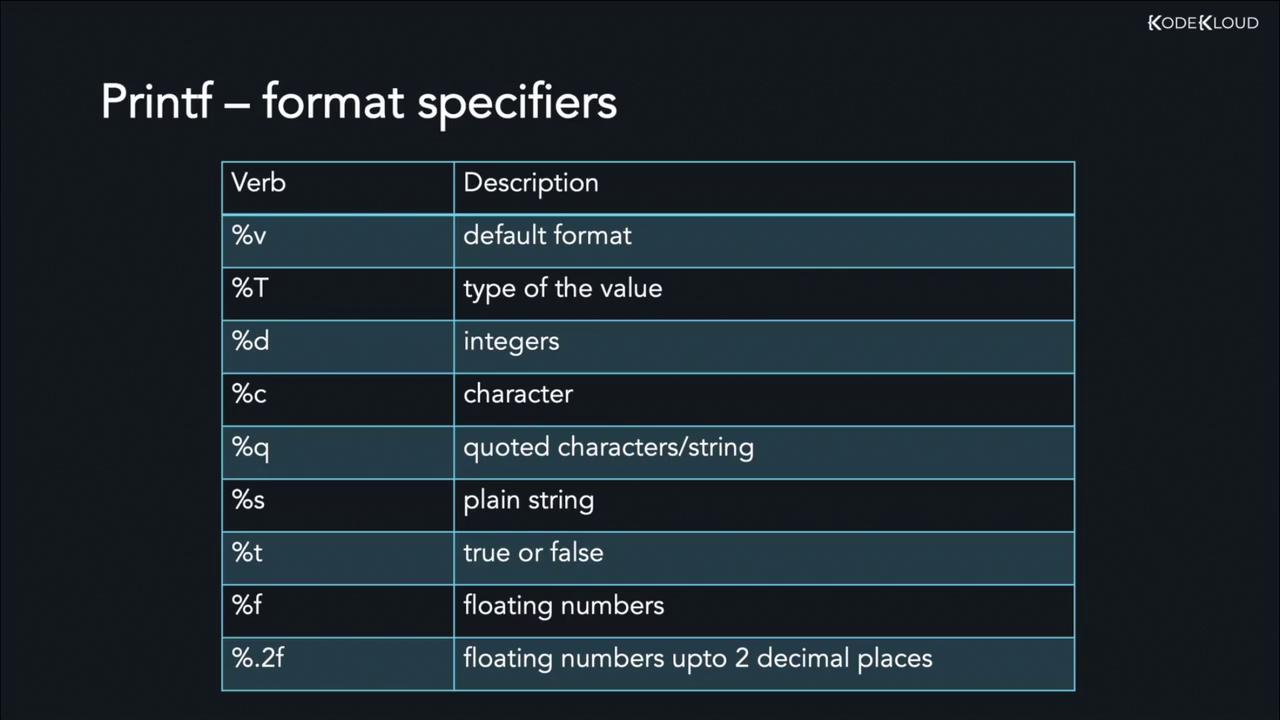
Common Format Specifiers
Below are some frequently used format specifiers in Go:Example: Printing a String with %v
Example: Printing an Integer with %d
Combining Format Specifiers
You can combine multiple format specifiers in a singlePrintf call. For instance, the following example integrates a string and an integer:
Summary of Format Specifiers
Below is an image that summarizes commonly usedfmt.Printf format specifiers in Go: