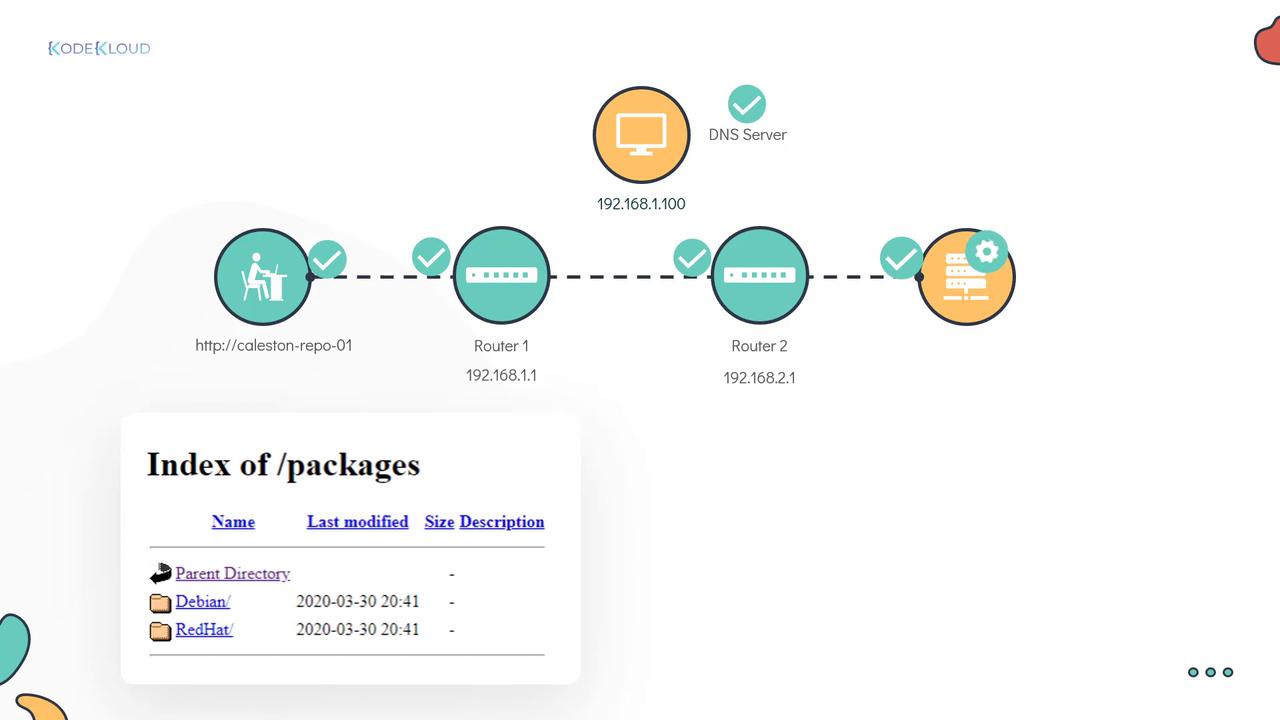
- The local network interface being disconnected.
- Failure of the host to resolve the correct IP address.
- Routing issues to the server.
- Server-side problems, such as connectivity issues or an inactive service.
This troubleshooting guide covers verifying local connectivity, confirming DNS resolution, testing remote connectivity, tracing the network route, and diagnosing the repository server settings.
Step 1: Verify Local Network Interface
Begin by confirming that your local network interface is active. Use theip link command to check its status. In this example, the interface in use is enp1s0f1.
enp1s0f1 is marked as UP, you can be confident that the local connectivity is functioning correctly.
Step 2: Confirm DNS Resolution
Next, ensure that the hostnamecaleston-repo-01 resolves to the correct IP address. The nslookup command verifies whether the DNS server at 192.168.1.100 returns the proper address.
Step 3: Test Remote Connectivity
To further isolate the issue, Jackie used theping command to test remote connectivity to the server.
Step 4: Trace the Network Route
Jackie then employed thetraceroute command to pinpoint where connectivity fails. This tool outlines the route from the source (the laptop) to the repository server and highlights any problematic hops.
The traceroute result revealed two routers:
- The first router: 192.168.1.1
- The second router: 192.168.2.1
Step 5: Troubleshoot the Repository Server
To diagnose the issue further on the server side, Jackie initiated a screen-sharing session with the Linux support team. Although Dave was unavailable, Jackie proceeded with the following steps:-
Check HTTP Process:
Verify if the HTTP service is running on port 80 usingnetstat:This confirms that port 80 is open and the web server is active. -
Inspect Network Interfaces:
Examine the state of the network interfaces:Since the interfaceenp1s0f1was down, Jackie brought it up with the following command:Re-check the interface to ensure it is now operational:With the network interface now active, the root cause of the connectivity issue was identified and resolved.
Final Verification
After these corrective steps, Jackie re-tested the URL. Both she and Bob were now able to successfully access the repository server.Bob expressed his gratitude for the effective troubleshooting, marking the successful resolution of the problem.