This guide explores the differences between Network File System (NFS) and block device storage, focusing on NFSs file-centric approach to network storage.
In this guide, we explore how the Network File System (NFS) differs from block device storage. Unlike block devices that manage data in blocks, NFS stores data as individual files, offering a unique file-centric approach to network storage.NFS utilizes a server-client model to share directories seamlessly across the network. For instance, consider a software repository server that maintains a directory at /software/repos. By exporting this directory using NFS, employee laptops can access its contents as if the files were stored locally—even though they reside on the server.
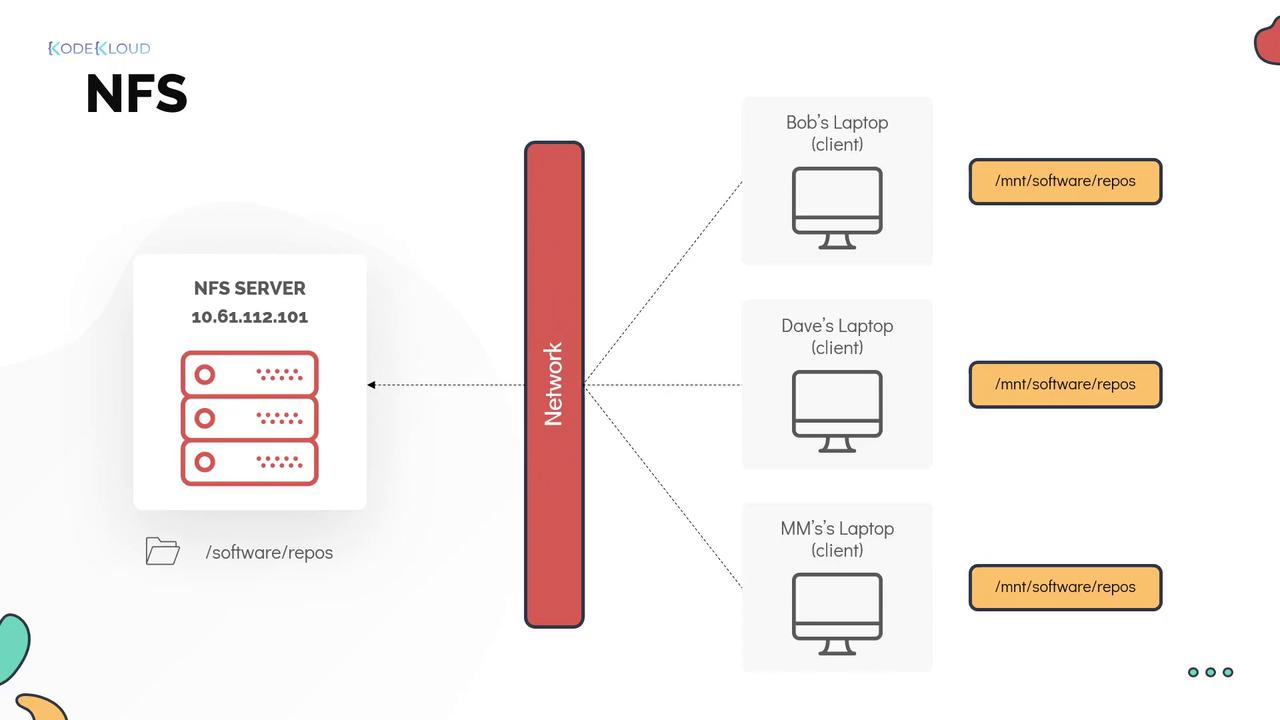
In NFS terminology, “exporting” refers to the process of sharing a directory with client systems.
On the NFS server, directory sharing is managed through the exports configuration file located at /etc/exports. This file specifies which clients are permitted to access the shared directories. For example, if the allowed client IP addresses are 10.61.35.201, 10.61.35.202, and 10.61.35.203, and the NFS server has an IP of 10.61.112.101, the configuration in /etc/exports might look like this:
This snippet demonstrates a basic export configuration. Instead of listing individual IP addresses, you could also specify network ranges or use a wildcard (*) if you want to allow access from any client. Note that in many environments a firewall sits between the server and its clients, requiring specific ports to be opened for NFS traffic.After updating the /etc/exports file on the server, apply the changes and share the directories using the exportfs command. To export all the mounts defined in the exports file, use:
Copy
Ask AI
exportfs -a
Alternatively, to manually export a directory to a specific client, you can run:
Copy
Ask AI
exportfs -o 10.61.35.201:/software/repos
Once the directory is exported on the server, you can mount it on the client machine. To mount the shared directory (for example, to the local directory /mnt/software/repos), use the following command, ensuring that you specify the NFS server’s IP (or hostname) followed by the exported directory separated by a colon:
Copy
Ask AI
mount 10.61.112.101:/software/repos /mnt/software/repos
With these steps, the NFS share should now be successfully mounted on the client system, enabling seamless file access from the server.
While there are several advanced options available with the exportfs command, the examples provided above cover the fundamentals necessary to get started with NFS.