
More processing power usually improves performance, but the relationship isn’t linear. Doubling CPU cores or clock speed rarely halves execution time because software and hardware must coordinate. This page explains why and demonstrates the effect with a simple experiment.
A stylized motherboard illustration with a highlighted CPU, RAM, cooling fan and labeled ports fills the left side. On the right is a presenter standing against a black background wearing a black KodeKloud T-shirt.
Analogy: Imagine Cody ordering sashimi at The Mobo restaurant. On Monday a single chef takes 12 minutes to prepare the dish. On Tuesday there are two chefs — you might expect half the time, but because they must share ingredients, utensils, and counter space the dish takes 7 minutes. On Friday three chefs still need to coordinate and contend for the same resources, and the dish finishes in 6 minutes. This demonstrates that adding workers (CPU cores) speeds up parallelizable tasks only to a point; shared resources and coordination overhead produce diminishing returns. This maps directly to CPU behavior: cores help when work can be divided effectively, but shared buses, memory bandwidth, and caches become bottlenecks as more cores are added. Demo: measuring execution time vs number of cores
  • The demo runs a compute task that can be executed on a single core or split across multiple cores (up to 8).
  • For each run it measures elapsed time, then prints the time for that number of cores.
  • Finally, it plots execution time (vertical axis) against number of cores (horizontal axis).
Run the demo:
python3 cpu_demo.py
Example output from one run:
Testing with 1 CPUs...
CPUs: 1, Time: 9.94 seconds
Testing with 2 CPUs...
CPUs: 2, Time: 6.38 seconds
Testing with 3 CPUs...
CPUs: 3, Time: 4.73 seconds
Testing with 4 CPUs...
CPUs: 4, Time: 3.71 seconds
Testing with 5 CPUs...
CPUs: 5, Time: 3.25 seconds
Testing with 6 CPUs...
CPUs: 6, Time: 3.19 seconds
Testing with 7 CPUs...
CPUs: 7, Time: 2.97 seconds
Testing with 8 CPUs...
CPUs: 8, Time: 2.92 seconds
2025-03-10 15:56:13.722 python3[99187:9726178] +[IMKClient subclass]: chose IMKClient_Modern
2025-03-10 15:56:13.722 python3[99187:9726178] +[IMKInputSession subclass]: chose IMKInputSession_Modern
Quick reference table (sample run)
Number of coresMeasured execution time
19.94 s
26.38 s
34.73 s
43.71 s
53.25 s
63.19 s
72.97 s
82.92 s
Notes on variability and OS behavior
  • The operating system schedules tasks across available cores; background processes or OS services may run on any core, so you can observe minor activity on apparently idle cores.
  • The biggest jump usually occurs from 1 to 2 cores because the workload can be divided. Further cores continue to reduce time but with decreasing gains.
  • Diminishing returns arise from two main sources:
    • Parts of the task that must run serially (cannot be parallelized).
    • Shared hardware resources (memory bandwidth, caches, buses) and synchronization/coordination overhead.
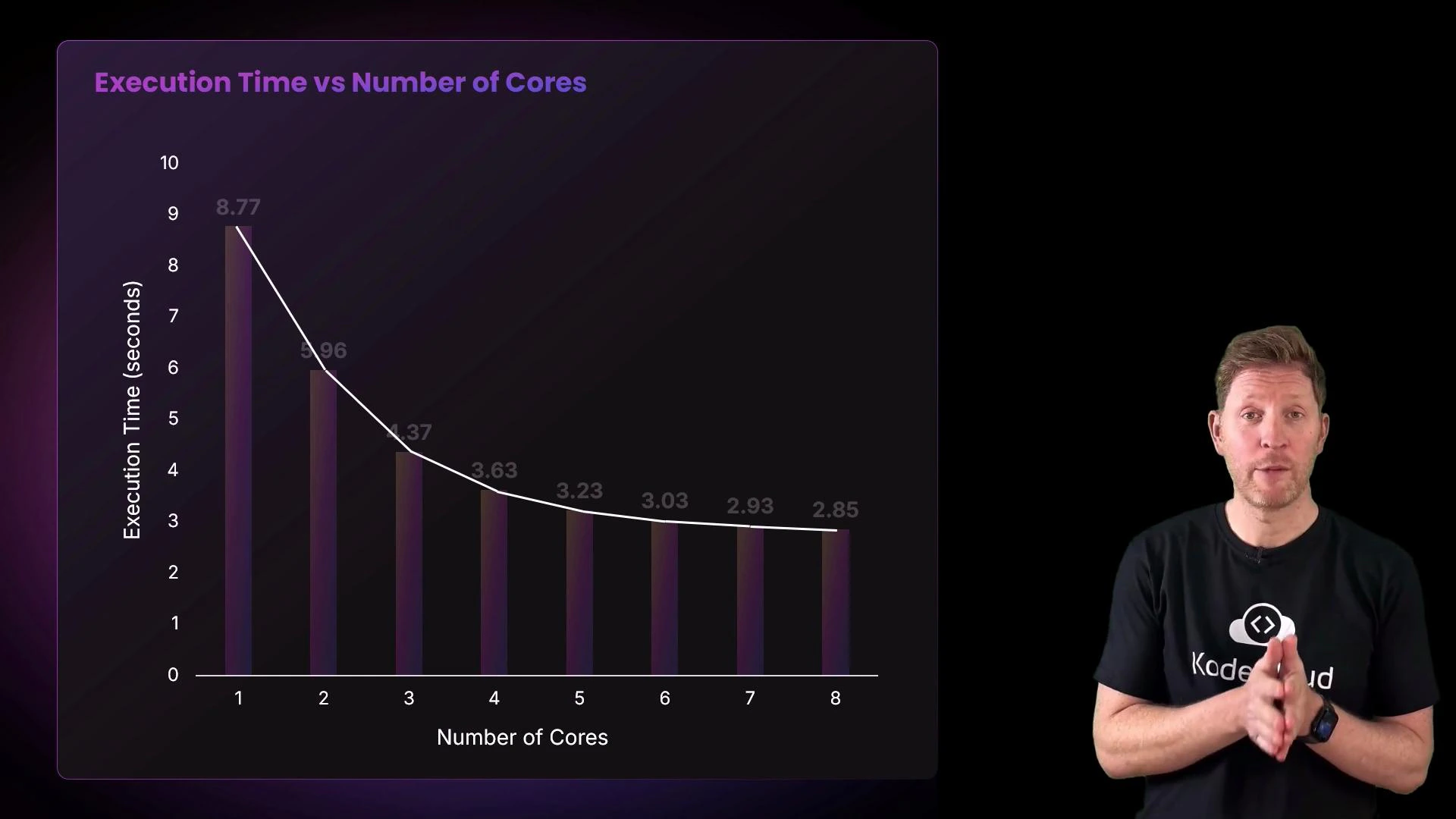
Here is the plotted result from the demo showing execution time vs number of cores.
A chart titled "Execution Time vs Number of Cores" showing execution time dropping from about 8.77 seconds at 1 core to about 2.85 seconds at 8 cores. A presenter in a black t-shirt stands to the right of the chart, gesturing with his hands.
Is this the graph you expected? It typically decreases but not linearly. For a theoretical bound on speedup given the serial fraction of a program, see Amdahl’s Law: https://en.wikipedia.org/wiki/Amdahl%27s_law.
Adding cores speeds up parallelizable work, but coordination overhead and contention for shared resources cause diminishing returns. The actual speedup depends on how well the workload can be divided and on system-level bottlenecks like memory bandwidth and cache behavior.
Recap and practical takeaways
  • Adding processors or cores increases throughput for parallel workloads, but improvements diminish as core count increases due to contention and coordination costs.
  • If a workload has little or no parallelizable portion, additional cores will remain idle and not improve performance.
  • For problems that require massive parallelism (e.g., many graphics or ML workloads), GPUs or other accelerators are better suited than CPUs because they offer thousands of parallel execution units.

A slide titled "Summary" with three purple numbered panels stating that processors can improve performance, that adding processing power gives diminishing returns, and that processors need work to process. A presenter in a black KodeKloud t-shirt stands on the right gesturing.
Key concepts
  • CPUs execute instructions via the fetch–decode–execute cycle.
  • Multiple cores can improve throughput for parallel workloads.
  • Scaling is eventually limited by resource contention and the portion of a workload that is inherently serial.
Links and references

Watch Video