

- Instance Store
- Amazon Elastic Block Store (EBS)
- Amazon Elastic File System (EFS)
1. Instance Store
Instance Store volumes are temporary, high-performance disks physically attached to the host server. They deliver very low-latency I/O but are ephemeral.Data on an Instance Store is lost if the instance stops, hibernates, or terminates. Use it only for non-persistent workloads.
- Ephemeral storage tied to instance lifecycle
- Ideal for scratch data, buffers, and caches
- Automatic deletion on stop/terminate (reboot retains data)
- Temporary caches (e.g., in-memory databases, processing buffers)
- Scratch disks for big data workloads
- High-speed swap or buffer space
2. Amazon Elastic File System (EFS)
Amazon EFS is a fully managed, elastic NFS file system that can be mounted concurrently by multiple EC2 instances across Availability Zones.EFS scales automatically—you pay only for the storage you consume.
- Elastic capacity: grows and shrinks as you add or remove files
- Shared access: mount the same file system on multiple instances
- Fully managed: AWS handles provisioning, patching, and maintenance
- Supports NFSv4.1 and NFSv4.2 protocols
- Web serving and content management
- Shared development or build environments
- Data science, analytics, and media workflows
3. Amazon Elastic Block Store (EBS)
Amazon EBS offers persistent, block-level storage that you can attach to a single EC2 instance at a time. Volumes behave like raw block devices you can format, mount, and use as you would an on-premises disk.
Core features:
- Data Persistence: volumes persist independently of the EC2 instance
- High Availability: data is replicated within the same AZ to prevent hardware failures
- Encryption: AES-256 at rest and in transit (managed with AWS KMS)
- Snapshots: create point-in-time backups stored in Amazon S3
- Dynamically adjustable: modify size, volume type, and IOPS without detaching
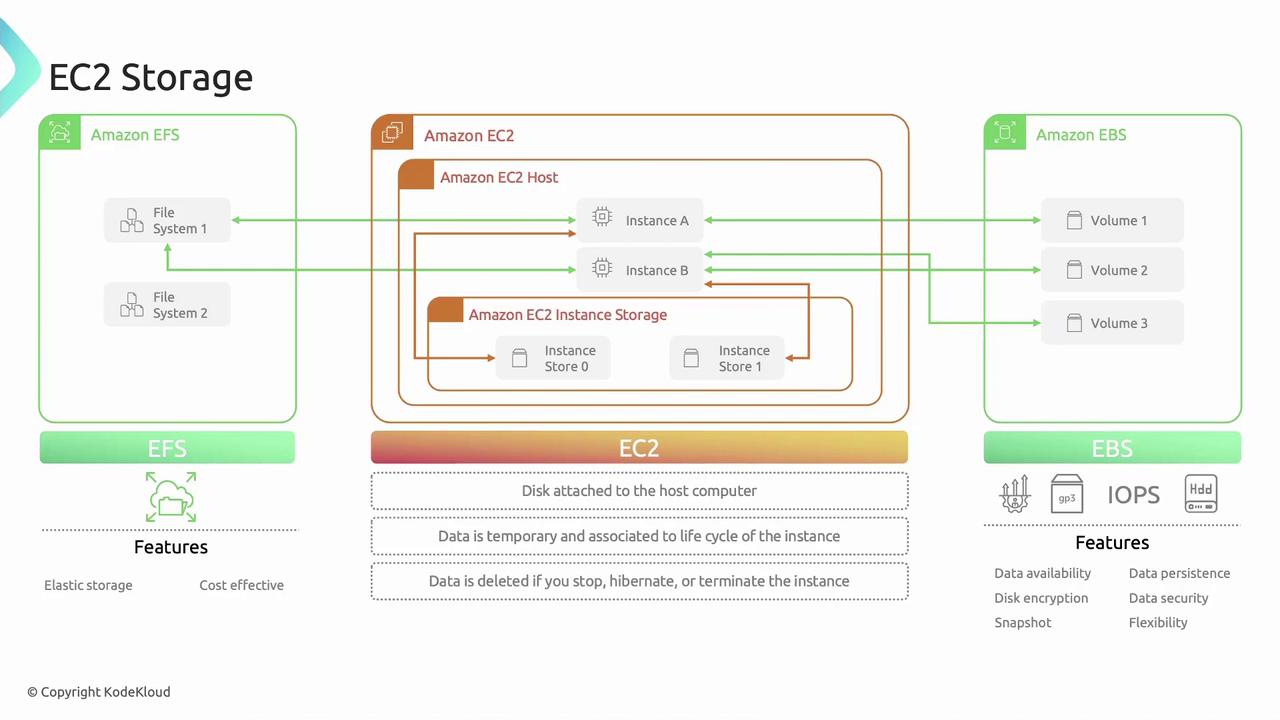
Storage Comparison at a Glance
Links and References
- AWS EC2 Instance Store Documentation
- Amazon EBS Documentation
- Amazon EFS Documentation
- AWS Key Management Service
- Amazon S3