

Network ACLs are stateless: you must explicitly configure both inbound and outbound rules to allow return traffic. In contrast, Security Groups are stateful and automatically permit responses.
Inbound vs. Outbound Rules
- Inbound rules filter traffic entering the subnet.
- Outbound rules filter traffic leaving the subnet.
Example: Allowing Ephemeral Port Traffic
In this scenario, an application subnet (10.10.1.0/24) must communicate with a database subnet. We allow TCP traffic on ephemeral ports (1024–65535) and deny all other traffic.
Inbound Rules
Outbound Rules
Always include a catch-all
DENY rule (*) to block unwanted traffic. Omitting it can leave your subnet exposed.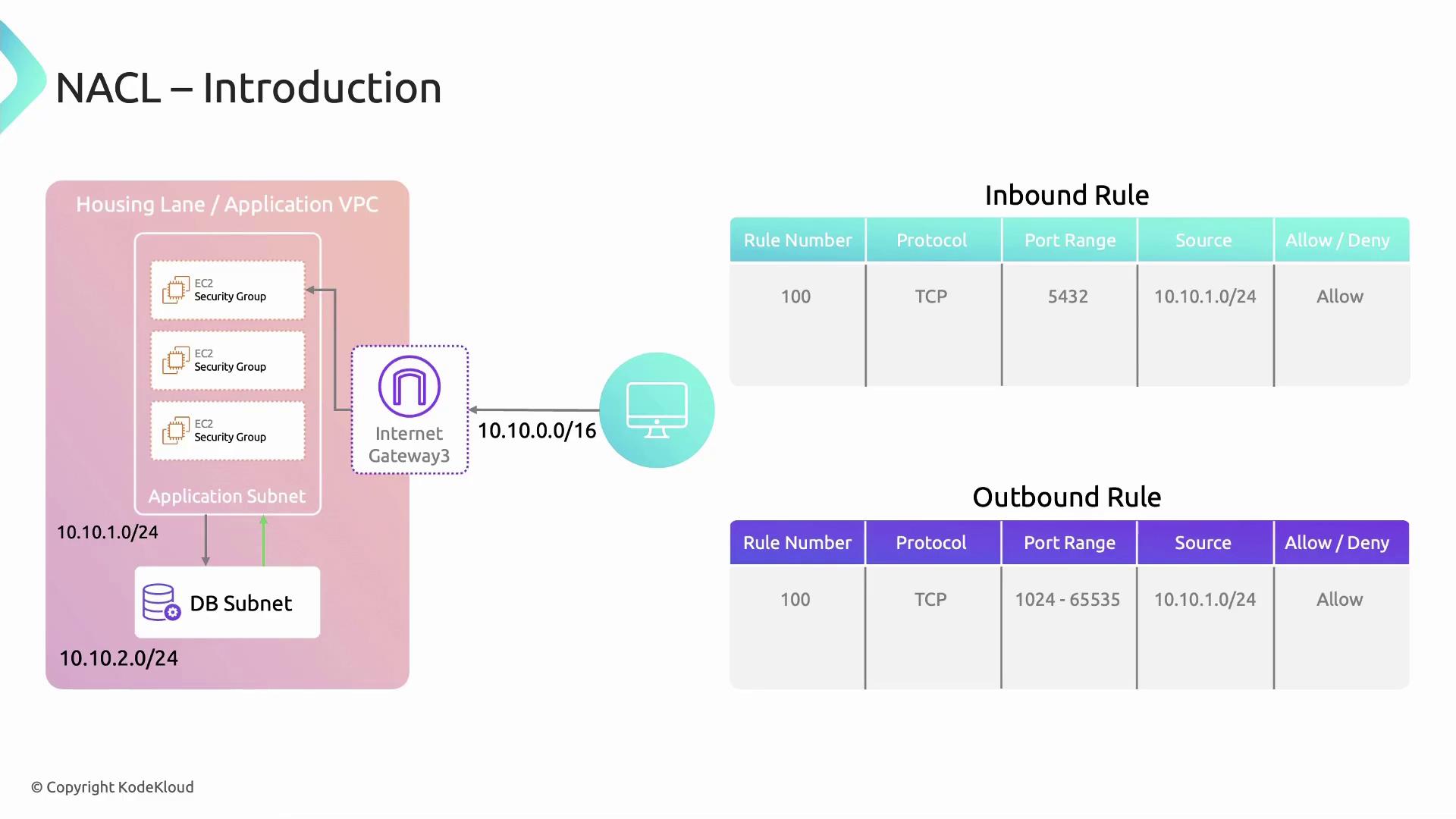
- Combine Security Groups (stateful) and Network ACLs (stateless) for layered defense.
- Use specific rule numbers to group similar rules.
- Regularly audit NACL logs via VPC Flow Logs.
- AWS Network ACLs Documentation
- AWS Security Groups vs. NACLs
- VPC Flow Logs