This article demonstrates the DNS resolution process using a web browser and the Dig command-line tool to retrieve A and AAAA records.
In this lesson, we illustrate the DNS resolution process using two distinct methods: one through a web browser (Google Chrome) and another via the popular command-line tool, Dig. This guide helps you understand how A records (IPv4) and AAAA records (IPv6) are retrieved and interpreted.
Start by opening a new tab in Google Chrome. Right-click on the page, choose “Inspect”, and navigate to the Network tab.
Using the Network tab allows you to monitor all the details of a webpage’s HTTP requests, including DNS resolution. In this example, we will perform a DNS query for “KodeKloud.com” to examine the underlying infrastructure responding to the request.
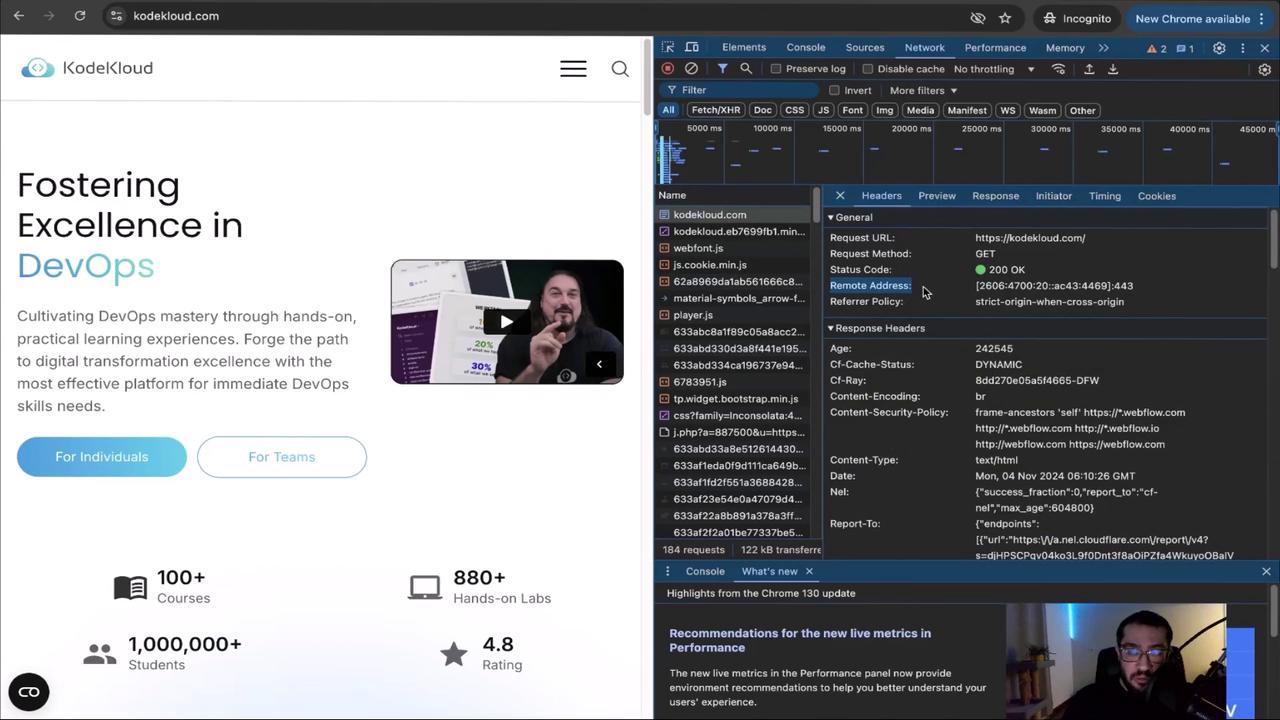
When you enter “KodeKloud.com” in the address bar and hit Enter, the network panel displays multiple entries. Locate the entry with a blue icon labeled “document” (the label may vary slightly), which corresponds to the site you are visiting. Click this entry to view detailed information, including the Remote Address field, where you should see an IPv6 address responding on port 443.Below is an image that demonstrates a split-screen display: the KodeKloud website on the left, and the developer tools on the right showing network activity.
The IPv6 address observed in the browser corresponds to a AAAA record.
Notice that while the browser displayed a single IPv6 address, Dig shows multiple AAAA records. Identify the IPv6 record starting with “2606” and ending with “4469” to match the browser output.
This article demonstrates how a domain name is resolved into both A records (IPv4) and AAAA records (IPv6). Initially, the browser provides a AAAA record, and using Dig, we are able to observe multiple corresponding IPv4 and IPv6 records. This exercise confirms that the DNS resolution process can deliver different record types based on varying network and system configurations.As you progress in the course, you will explore additional DNS record types and gain deeper insights into the DNS resolution process. For further reading, check out the Kubernetes Documentation and other resources to enhance your understanding of network operations.