

Docker containers by default attach to the bridge network. However, you can customize container connectivity by specifying different networks using the network command-line parameter.
Docker Network Types Overview
Bridge Network
The bridge network is a private internal network created by Docker on the host. All containers use this network by default and receive an internal IP address (commonly in the 172.17.x.x range). Containers on the bridge network communicate with each other using these internal IPs. To expose a container externally, Docker maps its internal ports to the host’s ports.Host Network
The host network removes the network isolation between the Docker host and the container. For example, if a web server running on port 5000 inside a container using the host network is started, it is automatically accessible externally on port 5000 without the need for port mapping (using the -p option). However, note that you cannot run multiple containers on the same host if they require the same port.Null Network
Containers attached to the null network are completely isolated. These containers do not have network access to other containers or external networks. Below is an example of running containers with different network configurations:Bridge Network and Overlay Networks
When operating multiple Docker hosts, each host creates its own internal bridge network (e.g., 172.17.x.x) allowing containers on the same host to communicate; however, containers across different hosts cannot communicate directly. To address this limitation, overlay networks come into play. With Docker Swarm, you can create an overlay network encompassing all nodes in the swarm cluster. The command below creates an overlay network:Port Publishing and Ingress Networking
For a standalone container running a web service on port 5000, external access is achieved by mapping the container port to a host port, as shown below:Ingress Networking in a Multi-Node Cluster
Imagine a three-node Docker Swarm cluster running two instances of a web service. Without ingress networking, a user accessing a node that does not actually host an instance (e.g., node three) might not reach the service. With ingress networking—a special overlay network—the built-in load balancer accepts requests on any node’s IP address and routes the traffic to a node running the service. This routing mesh guarantees that incoming requests are always directed to an active service instance.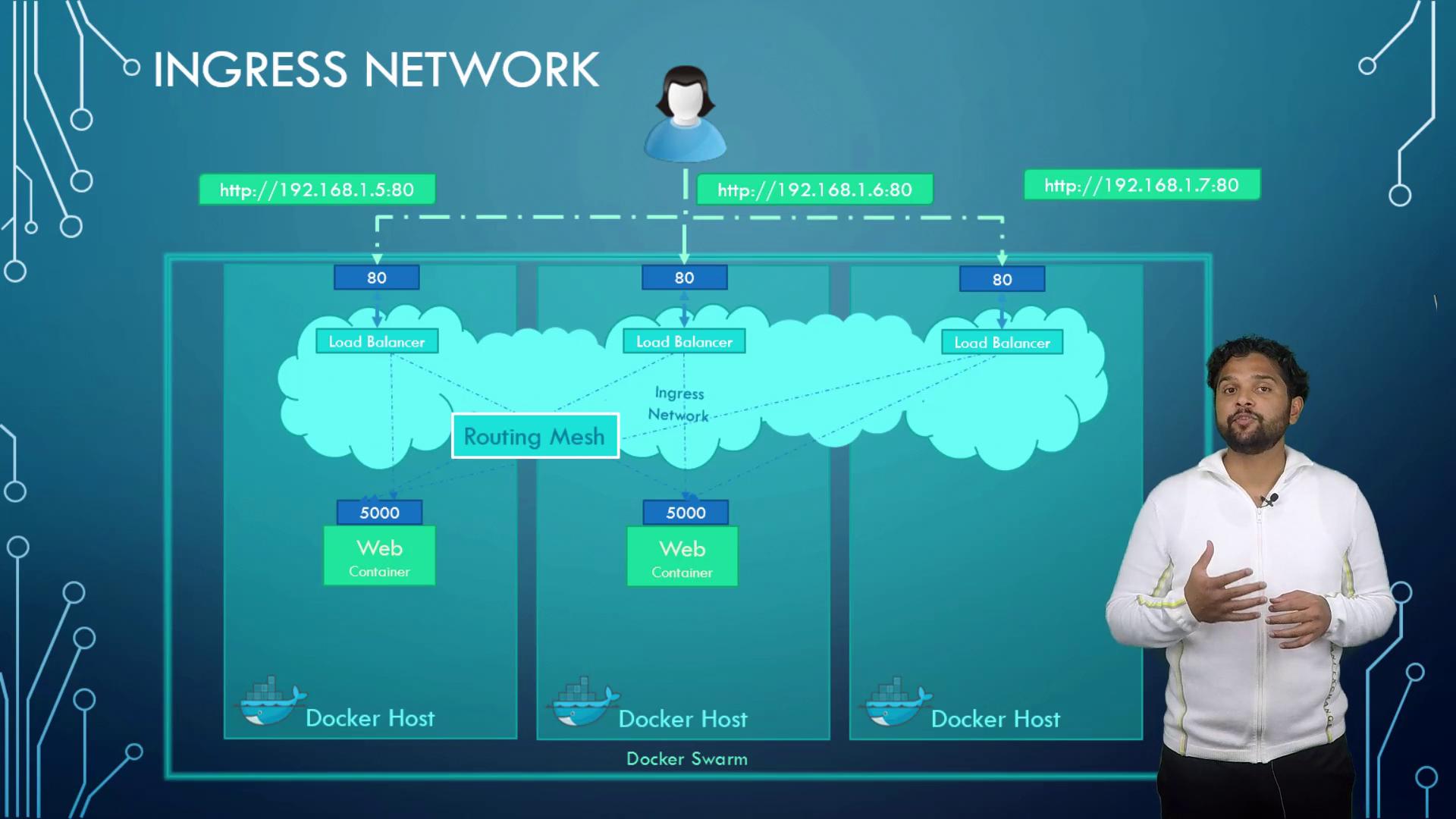
Container-to-Container Communication
In many scenarios, containers need to communicate with each other, such as a web service accessing a MySQL database running on the same host. While using the internal IP address of a container (for example, 172.17.0.3) might seem viable, it is not reliable as IP addresses can change when containers restart. The recommended approach is to use container names. Docker’s built-in DNS server allows containers on the same host to resolve each other by name automatically. For example, instead of using a static IP address, a service can connect using:Always consider using container names for service discovery to maintain stability during container restarts or scaling.