

- Provisioned mode — you specify reads and writes per second (RCUs/WCUs) ahead of time and pay for that capacity whether fully used or not. Provisioned mode also provides temporary burst capacity.
- On-demand mode — DynamoDB automatically scales reads and writes and you pay per request. This mode is suitable for unpredictable traffic but can cost more per request than provisioned capacity.

Key definitions and quick reference
Always round up fractional units. WCUs are measured in 1 KB increments; RCUs are measured in 4 KB increments. For eventually consistent reads, each RCU supports two reads per second for items up to 4 KB.
Write Capacity Unit (WCU) — calculation and examples
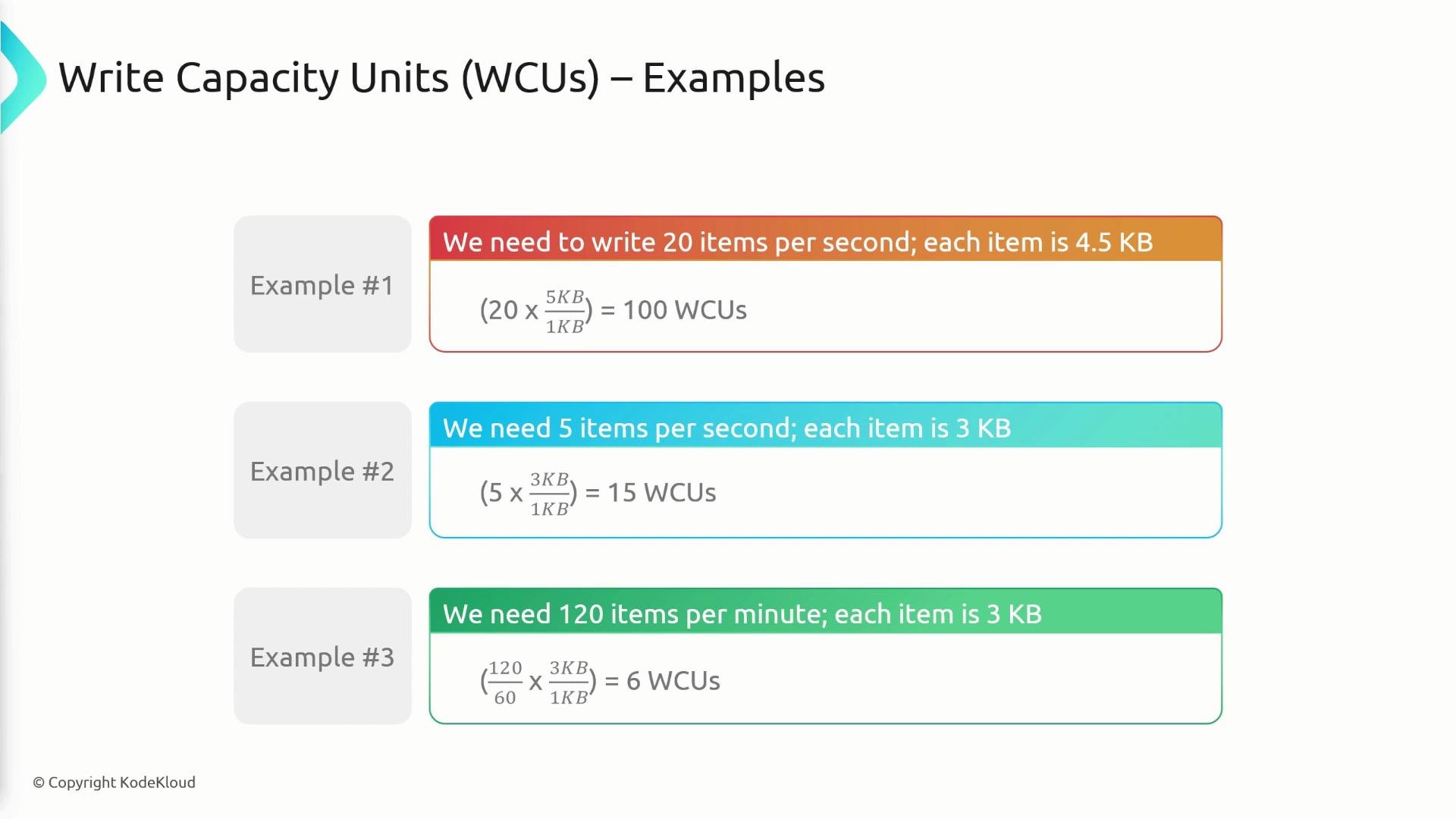
WCU sizing is based on 1 KB increments. For each write you must calculate how many 1 KB chunks the item consumes, round up, then multiply by the number of writes per second. Formula:- 20 writes/sec, item size 4.5 KB
per-item WCUs =ceil(4.5 / 1) = 5→ total =20 × 5 = 100 WCUs - 5 writes/sec, item size 3 KB
per-item WCUs =ceil(3 / 1) = 3→ total =5 × 3 = 15 WCUs - 120 writes/min → 120/60 = 2 writes/sec, item size 3 KB
per-item WCUs =ceil(3 / 1) = 3→ total =2 × 3 = 6 WCUs
Strongly consistent vs eventually consistent reads
- Strongly consistent read: always returns the latest committed write and costs 1 RCU per 4 KB read (per read per second).
- Eventually consistent read: may return stale data right after a write (reads from replicas that lag). One RCU supports two eventually consistent reads per second for items up to 4 KB.
ConsistentRead = true (or the equivalent parameter in your SDK).

Read Capacity Unit (RCU) — calculation and examples
Recommended approach: compute per-read RCU-equivalents, then apply consistency rules and round up. Steps:- Compute per-read RCU-equivalents:
- For strongly consistent reads:
- For eventually consistent reads:
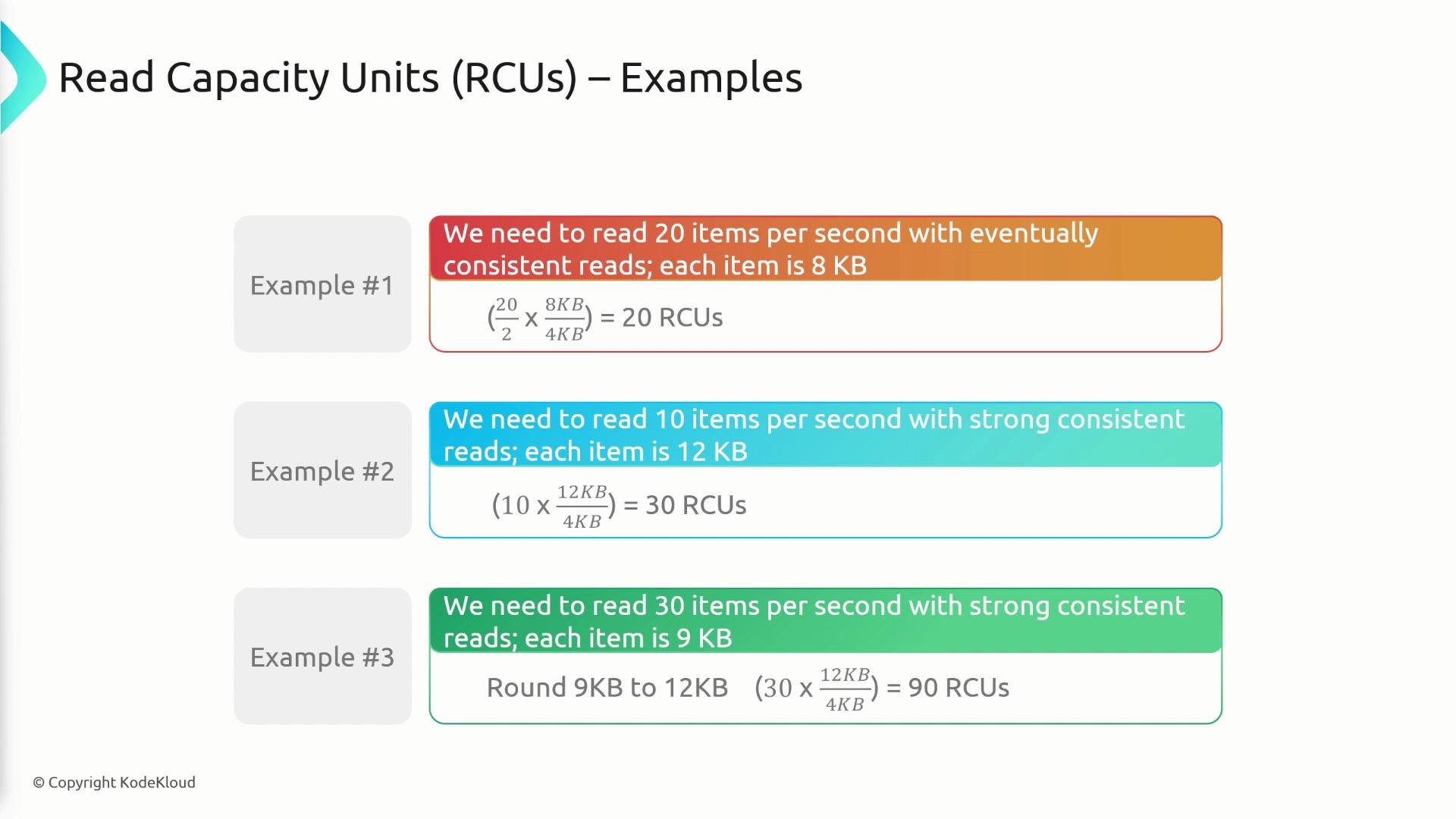
- 20 reads/sec, eventually consistent, item size 8 KB
per_read_equivalents = ceil(8 / 4) = 2
per-second demand =20 × 2 = 40→ divide by 2 →40 / 2 = 20 RCUs - 10 reads/sec, strongly consistent, item size 12 KB
per_read_equivalents = ceil(12 / 4) = 3→ total =10 × 3 = 30 RCUs - 30 reads/sec, strongly consistent, item size 9 KB
per_read_equivalents = ceil(9 / 4) = 3→ total =30 × 3 = 90 RCUs
Throttling: ProvisionedThroughputExceededException
When your application exceeds provisioned RCUs or WCUs, DynamoDB returns aProvisionedThroughputExceededException. Common causes include:
- Aggregate throughput (table-level RCUs/WCUs) exceeded.
- Hot partition(s): a single partition key receiving a disproportionate number of requests.
- Low partition key cardinality or uneven key distribution.
- Very large items that consume many RCUs/WCUs per operation.
- Re-design partition keys to distribute traffic (increase cardinality or add sharding/suffixes).
- Implement exponential backoff and retries on throttled requests.
- For read-heavy workloads, consider DynamoDB Accelerator (DAX) to reduce RCU consumption — DAX provides cached, eventually consistent reads only and does not reduce WCUs.
If you’re being throttled, don’t retry aggressively. Use exponential backoff with jitter and monitor throttled request metrics to identify hot keys or insufficient capacity.

Summary and best practices
- Choose provisioned mode when you can predict throughput and want lower per-request cost; choose on-demand for highly variable or unpredictable traffic.
- WCUs are measured per 1 KB (round up); RCUs are measured per 4 KB (round up).
- Eventually consistent reads use half the RCUs of strongly consistent reads for the same item size (one RCU → two eventual reads/sec for ≤4 KB).
- Avoid hot partitions by increasing partition key cardinality or adding traffic-distributing patterns (hash suffix, composite keys).
- Implement exponential backoff and jitter for retries; monitor throttling and CloudWatch metrics (ConsumedReadCapacityUnits, ConsumedWriteCapacityUnits, ThrottledRequests).
- Consider DAX for read-heavy workloads to lower RCU usage — but remember DAX offers eventually consistent cached reads and does not reduce write costs.
Links and references
- Amazon DynamoDB Pricing
- DynamoDB Developer Guide — Read/Write Capacity Modes
- DynamoDB Best Practices for Designing and Architecting