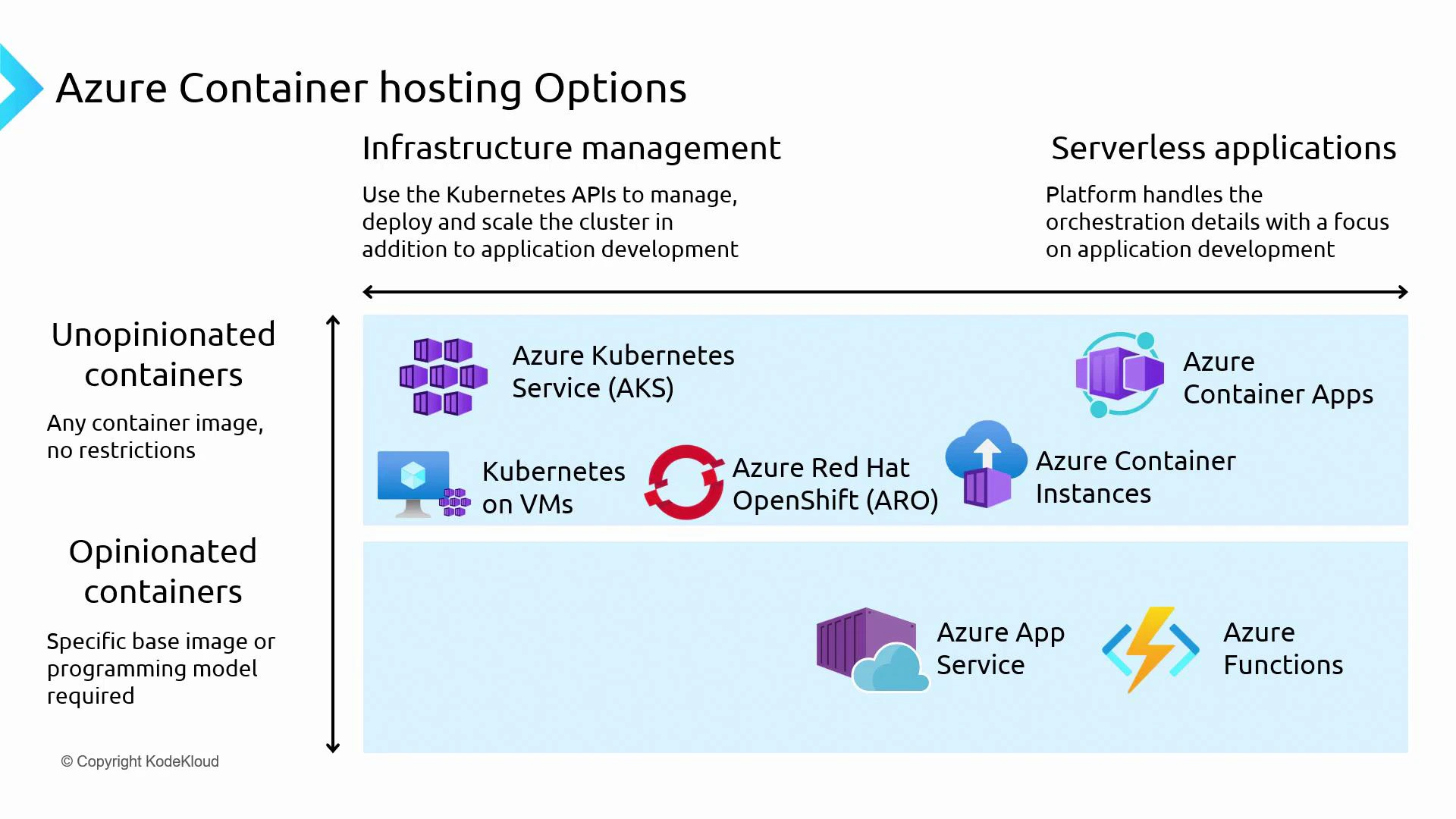
When you need full control: AKS, Kubernetes on VMs, Azure Red Hat OpenShift
- AKS, self-managed Kubernetes on VMs, and Azure Red Hat OpenShift provide a full Kubernetes/OpenShift cluster experience.
- These options expose cluster APIs so you can install operators and CRDs, run custom controllers, customize networking (custom CNI), and tune ingress, storage, and scheduling.
- Choose these when you require:
- Fine-grained orchestration control
- Custom networking or ingress setups
- Operator-managed software stacks or custom controllers
- Advanced multi-tenant or hybrid scenarios
AKS supports both Linux and Windows containers via node pools. Windows containers are supported but have platform-specific constraints and fewer features compared to Linux node pools — factor this into planning and architecture decisions.
Self-managed Kubernetes and managed OpenShift (ARO) typically increase operational overhead and may incur additional licensing or management costs. Choose them only when you need the extra flexibility they provide.
Developer-focused managed platforms
-
Azure Container Apps
- Built on Kubernetes but provides a higher-level, developer-centric experience.
- The platform manages the underlying cluster; developers work with services, revisions, and DAPR-style service invocation instead of cluster APIs.
- Built-in autoscaling (KEDA), traffic splitting, and observability make it excellent for microservices where you want rapid delivery with minimal ops.
-
Azure Container Instances (ACI)
- Runs containers as single, isolated instances with strong container-level isolation.
- No VM or cluster management — ideal for short-lived jobs, burst capacity, or isolated test environments.
- ACI can be integrated as virtual nodes into AKS for burst scenarios.
-
Azure App Service
- A PaaS for web apps and APIs with platform-managed runtimes or custom container support.
- Two models: the “code” model (use platform runtime images) and the “container” model (Web App for Containers).
- Good when you want a platform-managed web host with integrated deployment, authentication, and scaling.
-
Azure Functions
- Event-driven, serverless compute for short-lived or event-triggered code.
- Supports the Functions programming model, and can be deployed in containers when needed.
- Use for lightweight, highly event-driven workloads with automatic scale-to-zero and bindings.
Quick comparison table
Decision guidance — pick by workload needs
- If you need maximum control, advanced networking, or operators: choose AKS, ARO, or self-managed Kubernetes.
- If you want Kubernetes benefits without operating a cluster: choose Azure Container Apps.
- For single-container, short-lived tasks or fast-start isolated runs: choose ACI.
- For traditional web apps with minimal infra management: choose App Service (code model or container).
- For event-driven, short-duration logic with minimal ops: choose Azure Functions.
Useful links and references
- Kubernetes documentation
- Azure Kubernetes Service (AKS) documentation
- Azure Container Apps documentation
- Azure Container Instances documentation
- Azure App Service documentation
- Azure Functions documentation