

- Design a long-lived context project that’s easy to iterate on.
- Keep notes and session state so context can be recovered or handed off.
- Implement a secure, maintainable Flask app for image optimization.
- Single-image optimization web app with a drag-and-drop UI.
- Support JPEG, PNG, WebP (reject SVG and GIF).
- Rate-limit to 30 requests/min per IP.
- Max 25 MB upload size.
- Store temp files in a secure temporary directory and remove them on exit.
- Show a “Before” preview immediately and an “After” placeholder until optimization completes.
- Use Pillow for I/O and keep OpenCV available for future enhancements.
- Provide Docker/Gunicorn notes for deployment (optional).
- Deliver a complete project: app code, HTML, JS/CSS, and session notes.
Key dependencies (requirements.txt)
Core application (app.py)
Below is a concise, corrected, and robust skeleton covering configuration, upload route, optimization handler, cleanup, and error handlers. It integrates the required functionality: upload validation, optimization pipeline, thread-safe temp-file tracking, and error handling.
- Secure temporary directory created via
tempfile.mkdtemp()and cleaned up on exit. - UUID-based filenames avoid collisions and make file tracking straightforward.
- The original upload is preserved so users can iterate optimizations without re-uploading.
- RGBA images are converted to RGB when saving to JPEG to avoid format errors.
- UnsharpMask percent is converted to integer; blur uses GaussianBlur for negative sharpen values.
- Clear JSON responses include
beforeandoptimizedURLs so the front end can fetch previews.
- Drag-and-drop upload with file browser fallback.
- Immediately show a “Before” preview once the upload completes.
- Display an “After” placeholder until optimization completes.
- Provide sliders and toggles for:
- Quality (1–95)
- Resize percentage (10–200)
- Strip metadata
- Auto-orient (EXIF)
- Sharpen/Blur
- Contrast and Brightness
- Format selection: JPEG / PNG / WebP
- Presets (speed, balanced, max)
- Users can upload once and apply multiple optimization iterations; the app keeps the original in temporary storage.
- Flask-Limiter in-memory store warning — fine for local testing. For production, configure a persistent store like Redis. See Flask-Limiter docs.
- Port conflicts on macOS (port 5000) — AirPlay Receiver may bind that port. Either disable it (System Settings → Sharing → AirPlay Receiver) or run on a different port.
- If
pipfails, usepython3 -m pip install .... - To find what’s using a port:
Important: The provided app is suitable for local testing and prototyping. For production, ensure you:
- Configure Flask-Limiter with a persistent backend (e.g., Redis) to avoid losing rate-limit state on restarts.
- Add scheduled cleanup for orphaned temp files (e.g., a background job that removes files older than N hours).
- Run behind a WSGI server like Gunicorn and place the app behind a reverse proxy (e.g., Nginx) for TLS, buffering, and static file serving.
- Set a secure
SECRET_KEYvia environment variables — do not use the development secret in production.
Keep work in small, well-documented chunks and maintain a session notes file (like
SESSION_NOTES.md). When a session becomes large or the assistant’s responses degrade, start a fresh session and load the session notes plus the minimal necessary files to rehydrate context. This reduces hallucinations and improves reproducibility.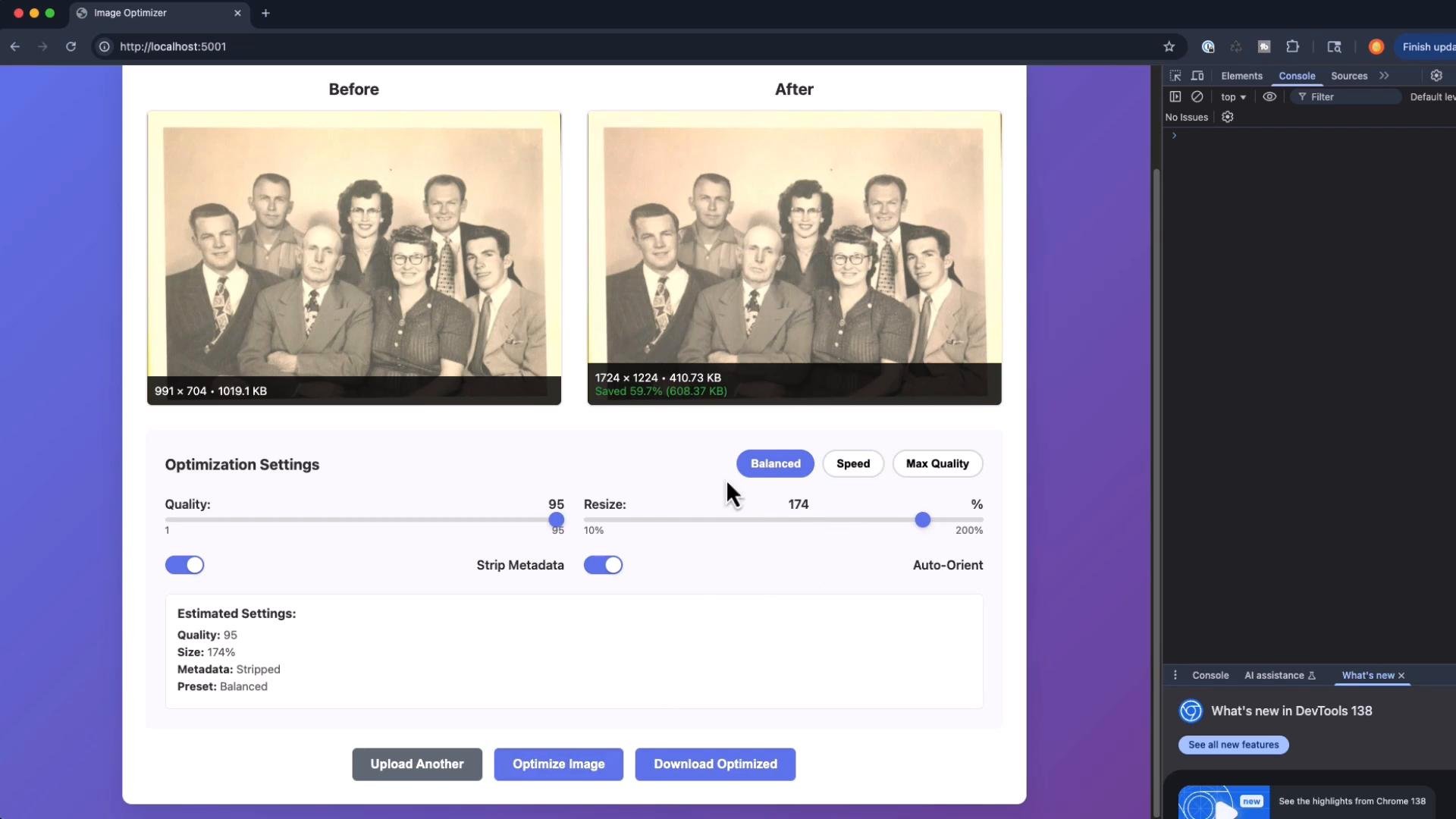
- This guide demonstrated building a Flask image optimizer while modeling patterns for managing long-running sessions and maintaining context.
- Use
SESSION_NOTES.mdto summarize decisions, TODOs, and next steps so team members or future assistant sessions can quickly pick up where you left off.