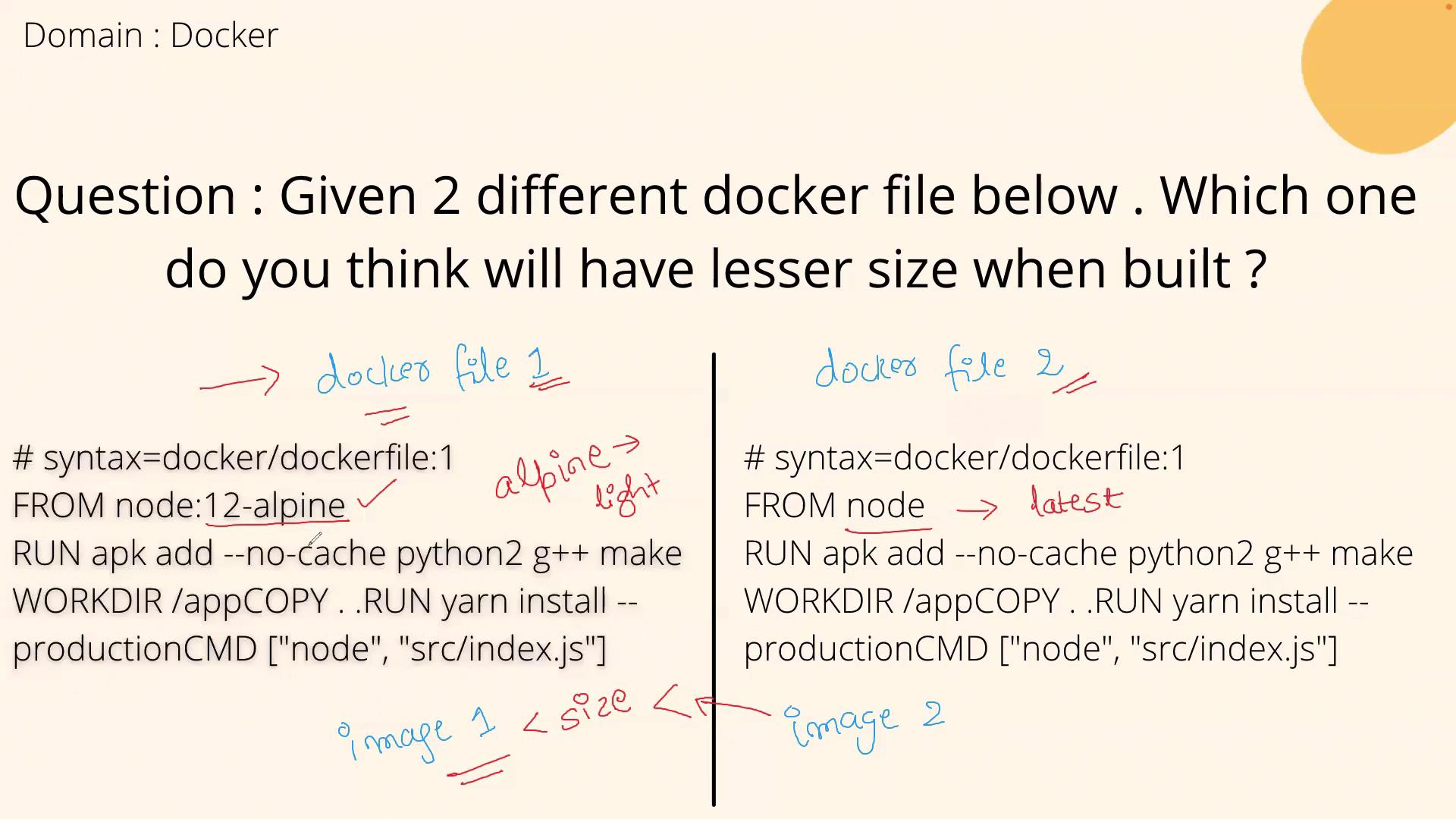
Detailed Examination of the Dockerfiles
Below are the final, corrected versions of both Dockerfiles:For Dockerfile 2, although the command uses
apk for package installation, the default “node” image is typically based on a Debian-derived distribution that uses apt-get. You may need to adjust the package installation command for compatibility.Why Dockerfile 1 Results in a Smaller Image
By using the “node:12-alpine” base image, Dockerfile 1 benefits from Alpine Linux’s minimalistic design. Alpine images include only the essential packages required for many applications, leading to a significantly leaner and more efficient build. In contrast, Dockerfile 2’s default “node” image often contains additional packages and dependencies, resulting in a larger file size.Key Takeaways for Interview Discussions
When explaining this topic in an interview, you might say: “In comparing the two Dockerfiles, Dockerfile 1’s use of the ‘node:12-alpine’ base image—a lightweight Alpine Linux-based image—results in a leaner build. On the other hand, Dockerfile 2 employs the more comprehensive ‘node’ image, which tends to be heavier due to extra packages and dependencies. Therefore, Dockerfile 1 is preferable when optimizing for image size.”Visual Comparison