

How Blue-Green Deployment Works
Blue-green deployment involves maintaining two parallel environments:-
Environment Setup:
- Blue Environment: Initially idle and reserved for new deployments.
- Green Environment: Actively running the current stable version of the application.
-
Initial State:
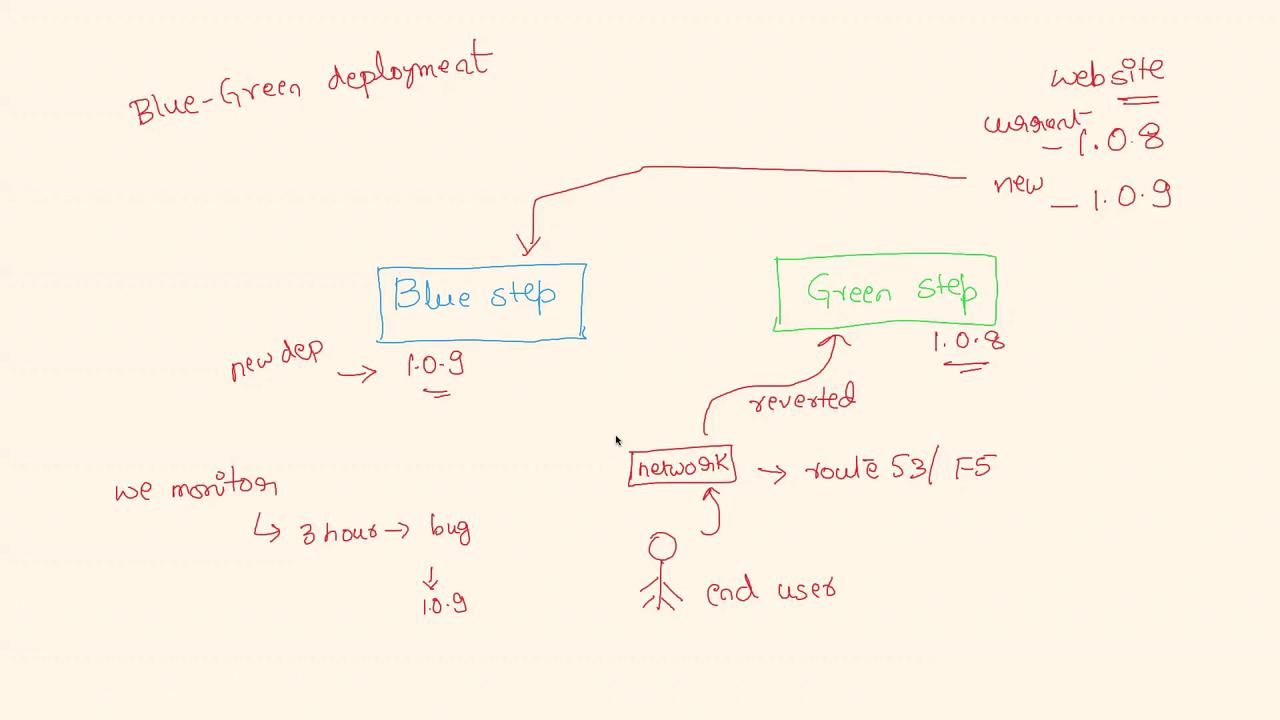
- Assume the current version of your website is 1.0.8 running on the green environment. Network traffic is directed exclusively to this environment using a network switch or DNS management tools such as Amazon Route 53 or F5.
-
Deployment Process:
- When a new version (for example, 1.0.9) is ready, it is deployed onto the blue environment rather than updating the green environment directly.
- Once the blue deployment is successfully completed, the network routing is updated to shift all traffic from the green environment to the blue environment.
-
Cutover and Rollback:
- After the switch, the blue environment becomes live with version 1.0.9, while the green environment retains the previous stable version (1.0.8).
- This configuration allows for a quick rollback. If monitoring identifies issues (even after several hours), traffic can be reverted back to the green environment by reconfiguring the network routing.
This strategy significantly reduces service interruptions during deployments by ensuring that any issues with the new release can be promptly addressed with minimal disruption.
Diagram Overview
Real-World Example
Consider the following scenario:- The green environment is running version 1.0.8.
- A new version 1.0.9 is deployed to the blue environment.
- Traffic is switched from green to blue after thorough monitoring.
- In case issues arise with version 1.0.9, the routing can be quickly reversed, sending traffic back to the green environment with minimal disruption.