

The Importance of Logging
Logging is the process of recording information about your application’s operations. This includes details about user activities, system events, and errors, which are typically logged in formats like JSON or plain text. Without comprehensive logging, diagnosing and debugging issues can be extremely challenging since you lose visibility into what your application was doing at any given moment. Consider an example with an Amazon Elastic Compute Cloud (EC2) instance running a web API. In a traditional, non-scalable environment, logs might be stored locally (e.g., in/var/log/app.log or /var/log/app.txt). However, when your application employs an auto-scaling mechanism, EC2 instances are dynamically created and terminated. Once an instance is terminated, its local logs are lost, making troubleshooting far more complex.
Always ensure your logging is designed to scale with your application. Transitioning from local to centralized logging early in your deployment strategy can save significant time during debugging.
The Need for Centralized Logging
Centralized logging collates logs from various sources into a single, unified location. This is especially important for applications deployed across many servers. By consolidating logs, you gain a comprehensive view of your system’s actions, making it easier to analyze and diagnose errors, warnings, and debug information. Centralized logging is essential in production environments where applications run on multiple servers. It simplifies the process of monitoring system behavior and accelerates root cause analysis during incidents. Below is a diagram outlining the logging process in a scalable environment: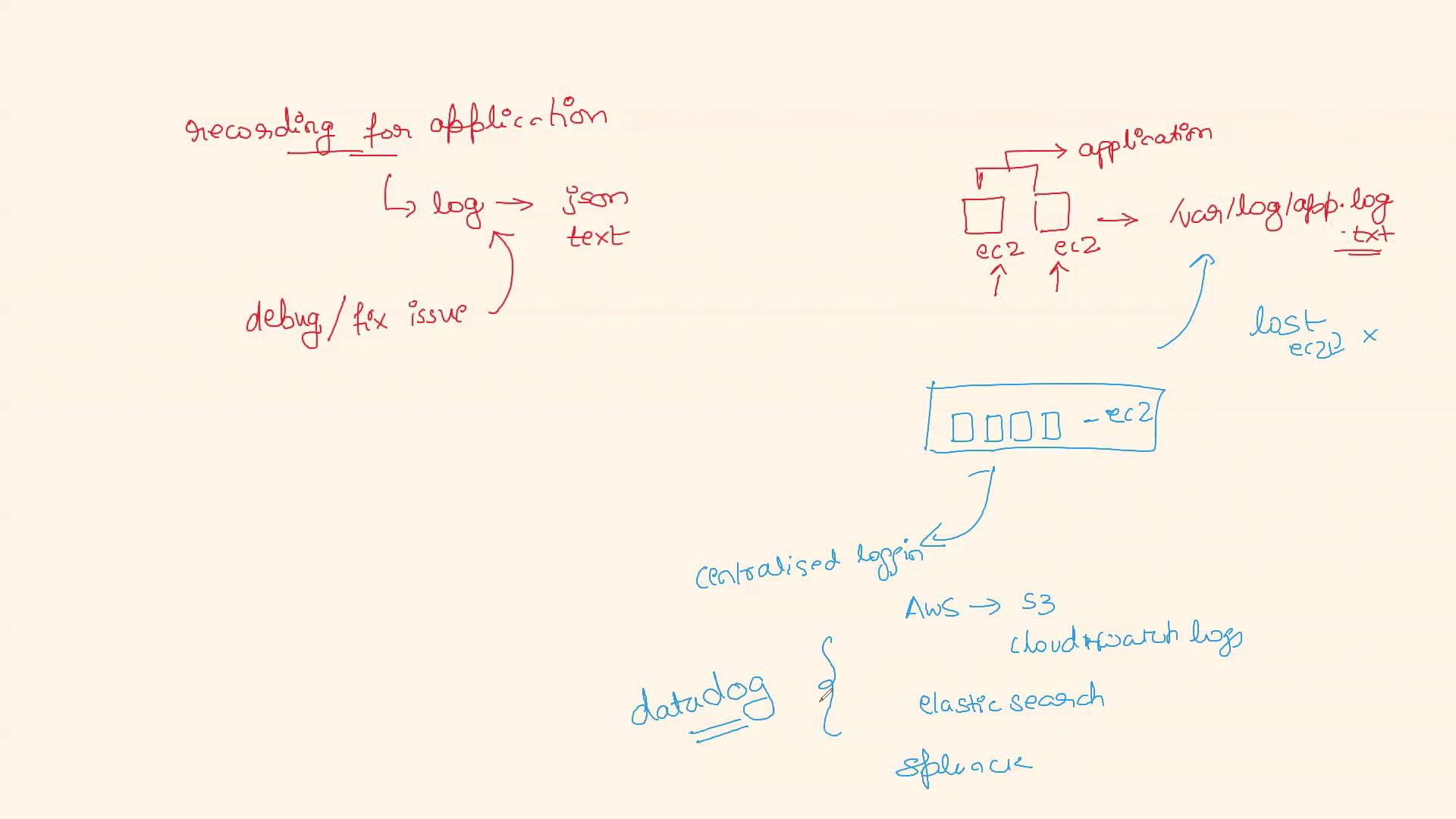
Tools for Centralized Logging
Cloud platforms such as AWS offer several tools that facilitate centralized logging. Here are some popular options:- AWS S3 & CloudWatch Logs: Use these services to store and monitor logs from all instances.
- Elasticsearch & Splunk: These tools provide robust log search and analysis capabilities.
- Datadog: This log aggregator offers comprehensive monitoring features that enhance the visibility of your distributed systems.
Interview Insight: Explaining Logging and Centralized Logging
When discussing logging in an interview, you can frame your response like this: “Logging is critical for tracking and understanding our application’s operations, particularly in production environments where applications run on multiple, dynamically managed machines. Localized logging can result in data loss if an instance is terminated. To address this challenge, we implement centralized logging systems such as AWS S3, CloudWatch Logs, Elasticsearch, Splunk, or Datadog. These systems aggregate logs from all sources, providing a complete view of the application’s behavior, which is essential for effective debugging and rapid issue resolution.”Be prepared to discuss specific tools you’ve used and the benefits they provided in your logging strategy. Real-world examples can significantly strengthen your answer.
By understanding and implementing centralized logging, you ensure better observability, easier maintenance, and quicker resolution of issues in large-scale environments. For further study on related topics, consider exploring additional resources and official documentation on AWS Logging Solutions and Centralized Logging Best Practices.