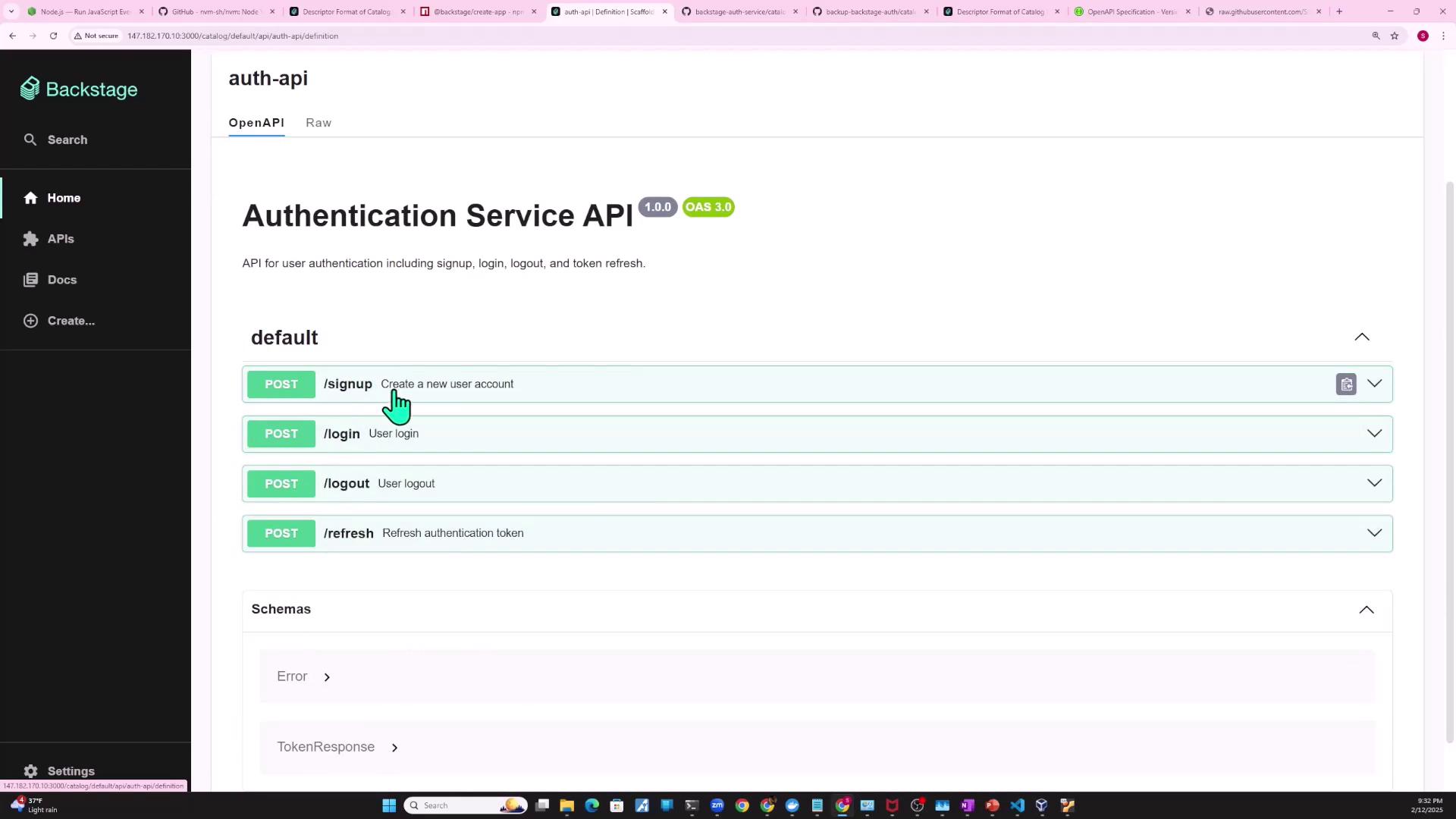
This guide explains how to create and consume API entities in Backstage, linking components and visualizing relationships in the catalog.
In this guide, we’ll walk through how to define an API entity in Backstage, link it to the component that provides it (the authentication service), and show how another component (e.g., a shopping cart) consumes it. You’ll learn how to embed or reference your OpenAPI spec, configure Backstage to fetch external files, and visualize relationships in the catalog.
1. Import the Existing Authentication Service Component
First, ensure you have already registered your auth-service component in the catalog. This service will expose the API that downstream services use to verify user authentication.
apiVersion: backstage.io/v1beta1kind: Componentmetadata: name: auth-service description: Authentication service for user login and token management tags: - javascript links: - url: https://admin.example.com title: Admin Dashboard icon: dashboard type: admin-dashboardspec: type: service lifecycle: production owner: guests
Co-locate the API definition with the component in your catalog-info.yaml. Add the providesApis field to the component, then define a new API entity.
apiVersion: backstage.io/v1beta1kind: Componentmetadata: name: auth-service description: Authentication service for user login and token management tags: - javascriptspec: type: service lifecycle: production owner: guests providesApis: - auth-api---apiVersion: backstage.io/v1alpha1kind: APImetadata: name: auth-api description: Service API for verifying user authentication statusspec: type: openapi lifecycle: production owner: guests apiProvidedBy: auth-service # definition goes below
The definition property accepts inline specs or external references. Backstage supports formats such as OpenAPI, AsyncAPI, GraphQL, and gRPC.
For small APIs or quick demos, embed your definition inline under definition: |. For production, reference an external spec to keep your catalog readable.
spec: type: openapi lifecycle: production owner: guests apiProvidedBy: auth-service definition: | openapi: "3.0.0" info: version: 1.0.0 title: Authentication Service API license: name: MIT servers: - url: https://auth.example.com/v1 paths: /signup: post: summary: Create a new user account responses: '201': description: Created
Store your OpenAPI YAML in your repo (e.g., openapi/auth-api-spec.yaml) and reference its raw GitHub URL.
apiVersion: backstage.io/v1alpha1kind: APImetadata: name: auth-api description: Service API for verifying user authentication statusspec: type: openapi lifecycle: production owner: guests apiProvidedBy: auth-service definition: $text: https://raw.githubusercontent.com/your-org/backstage-auth-service/main/openapi/auth-api-spec.yaml