Backstage can automatically discover entities by scanning GitHub repositories for catalog-info.yaml files. In this guide, you’ll install and configure the GitHub Entity Provider to import components, systems, APIs, and more—without manual registration.
1. Install the GitHub Discovery Plugin Backstage provides a dedicated backend module for GitHub discovery. From your repo root, run:
yarn --cwd packages/backend add @backstage/plugin-catalog-backend-module-github
2. Register the Plugin in the Backend Edit packages/backend/src/index.ts to include the GitHub module:
// packages/backend/src/index.ts import { createRouter } from '@backstage/plugin-catalog-backend' ; import githubDiscovery from '@backstage/plugin-catalog-backend-module-github' ; export default async function main () { const backend = await createBackend (); // Core plugins backend . add ( import ( '@backstage/plugin-search-backend' )); backend . add ( import ( '@backstage/plugin-search-backend-module-pg' )); backend . add ( import ( '@backstage/plugin-search-backend-module-catalog' )); backend . add ( import ( '@backstage/plugin-search-backend-module-techdocs' )); backend . add ( import ( '@backstage/plugin-kubernetes-backend' )); backend . add ( import ( '@backstage/plugin-catalog-backend' )); // Add GitHub discovery backend . add ( import ( '@backstage/plugin-catalog-backend-module-github' )); await backend . start (); }
If you see duplicate registrations for the GitHub module, remove the extras to avoid startup errors.
Now restart the backend:
cd packages/backend yarn dev
Add a github provider under catalog.providers in app-config.yaml:
catalog : providers : github : personalAccount : organization : 'Sanjeev-Thiyagarajan' catalogPath : '/catalog-info.yaml' filters : branch : 'main' repository : '.*' schedule : frequency : { minutes : 20 } timeout : { minutes : 3 } import : entityFilename : catalog-info.yaml pullRequestBranchName : backstage-integration rules : - allow : [ Component , System , API , Resource , Location , Group , User , Domain ]
Configuration Key Description providerId Unique identifier (personalAccount in this example) organization GitHub user/org name (where to scan for entities) catalogPath Path to each repo’s catalog-info.yaml filters.branch Branch to scan (e.g., main) filters.repository Regex for repo names (e.g., .* for all) schedule.frequency How often to poll GitHub (e.g., every 20 minutes) schedule.timeout Max time per scan (e.g., 3 minutes)
Ensure catalogPath matches your catalog-info.yaml location exactly. A mismatch prevents discovery.
4. Verify Automatic Discovery Restart your Backstage frontend:
Backstage will poll your GitHub account and import any entities it finds. For example, you might see:
Under the hood, it scans each repo’s main branch for catalog-info.yaml:
catalog : providers : github : personalAccount : organization : 'Sanjeev-Thiyagarajan' catalogPath : '/catalog-info.yaml' filters : branch : 'main' repository : '.*' schedule : frequency : { minutes : 20 } timeout : { minutes : 2 } import : entityFilename : catalog-info.yaml pullRequestBranchName : backstage-integration
For example, the backstage-shopping-cart repo contains:
5. Importing from a GitHub Organization To import from another GitHub org (e.g., shopping-hub), add a second provider block:
catalog : providers : github : personalAccount : organization : 'Sanjeev-Thiyagarajan' catalogPath : '/catalog-info.yaml' filters : branch : 'main' repository : '.*' schedule : frequency : { minutes : 20 } timeout : { minutes : 2 } shoppingHub : organization : 'shopping-hub' catalogPath : '/catalog-info.yaml' filters : branch : 'main' repository : '.*' schedule : frequency : { minutes : 20 } timeout : { minutes : 2 } import : entityFilename : catalog-info.yaml pullRequestBranchName : backstage-integration rules : - allow : [ Component , System , API , Resource , Location , Group , User , Domain ]
Here’s the GitHub UI showing three private repos in shopping-hub:
After restarting, Backstage imports all three:
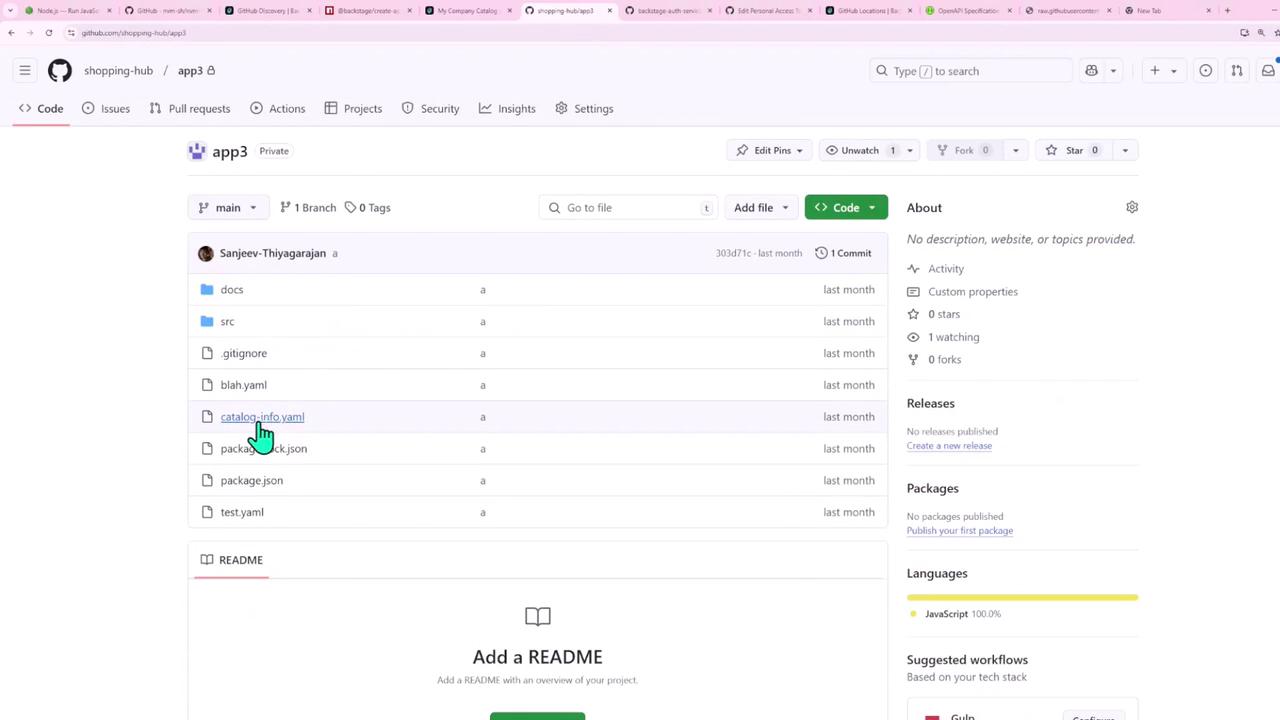
Each repo has its own catalog-info.yaml. For instance, app3 contains YAML and JSON definitions:
Next Steps Backstage supports additional entity providers such as GitLab, Amazon S3, and more.Backstage documentation for full integration guides and advanced configuration.
Links and References