Learn to use ArgoCD applications and projects for effective deployment and management of applications in Kubernetes clusters.
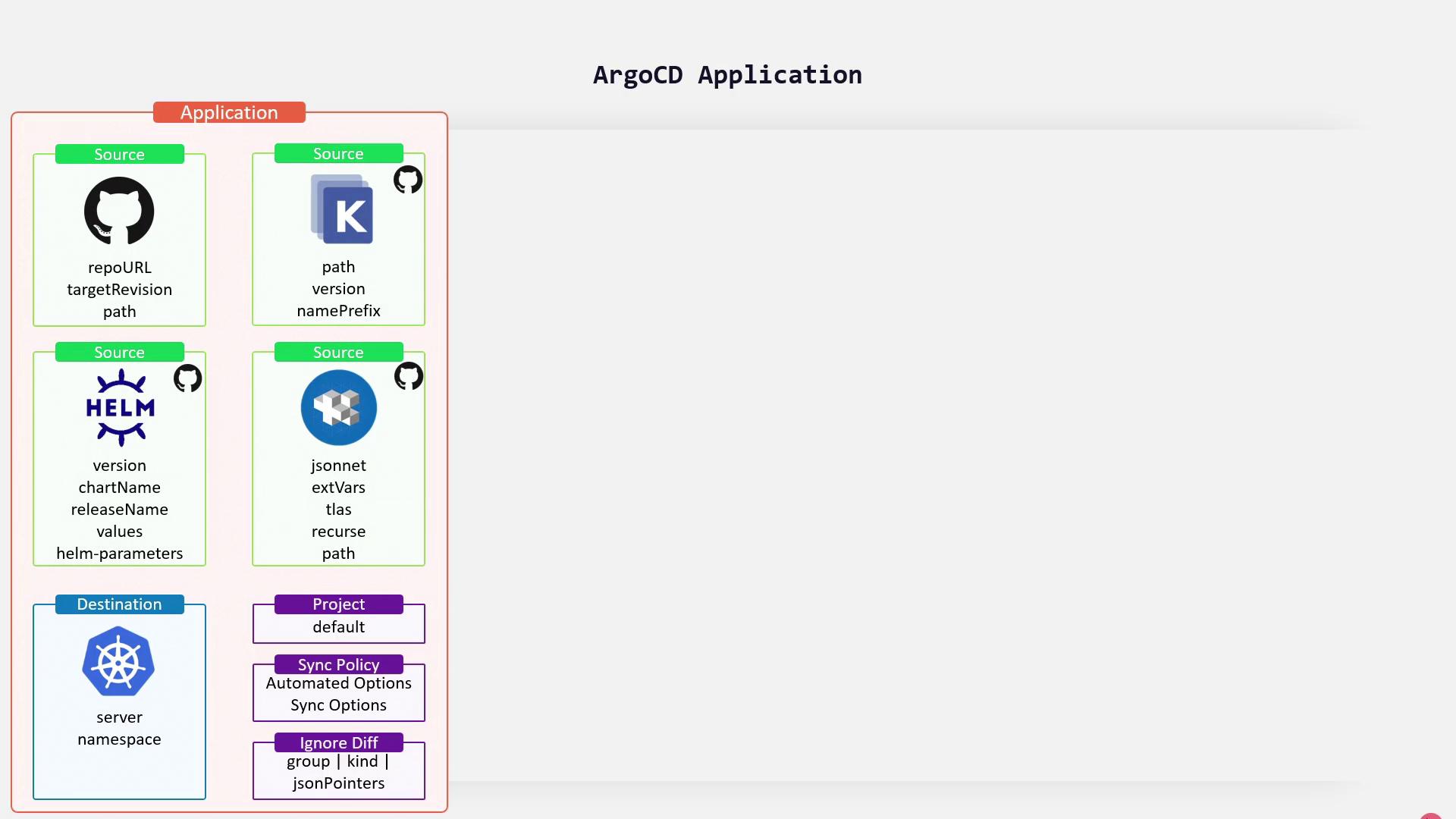
Discover how to leverage ArgoCD applications and projects to deploy and manage applications in Kubernetes clusters effectively. In this guide, we explore the core concepts of ArgoCD, explain how to create applications using both the CLI and YAML, and provide detailed code examples.ArgoCD revolves around two main concepts: the application and the project.An application in ArgoCD is a Custom Resource Definition (CRD) that represents a deployed instance within your Kubernetes cluster. It includes two primary components:
Source:
Points to the Git repository (or supported alternatives like Helm charts, Kustomize, or Jsonnet) where the desired state of your Kubernetes manifests is defined.
Destination:
Defines the target Kubernetes cluster and namespace where the resources will be deployed.
Additionally, an application specifies the project it belongs to and incorporates synchronization policies that ensure the deployed state stays in sync with the source repository.
There are several methods to create an ArgoCD application, including using the CLI, YAML specification, or the user interface.
When choosing the creation method, consider your team’s workflow. The CLI is great for quick operations while YAML is preferred for version-controlled deployments.
When managing ArgoCD via the Command Line Interface (CLI), you supply critical parameters including the repository URL, manifest path, destination Kubernetes server, and destination namespace. Use the following example:
$ argocd app create color-app \ --repo https://github.com/sid/app-1.git \ --path team-a/color-app \ --dest-namespace color \ --dest-server https://kubernetes.default.svcApplication `color-app` created
After running this command, ArgoCD retrieves the manifest from the provided Git repository and deploys the resources to the specified namespace.
For a more declarative approach, you can define your application using a YAML file. Below is a sample YAML manifest for an ArgoCD application, where the application is created within the default ArgoCD project:
The manifest details illustrate how the components—source, destination, and sync policy—integrate to ensure consistent deployment and automatic rollback if needed.
For additional guidance on managing and configuring ArgoCD projects, explore our detailed documentation and recommended practices.
ArgoCD projects offer a way to centrally manage permissions and settings across multiple applications, providing a more scalable approach to modern GitOps workflows.For more detailed information, check out the following resources:
By integrating these best practices into your GitOps pipeline, you can streamline application deployments and maintain robust, scalable infrastructure management in Kubernetes.