This article explains deploying Helm charts with ArgoCD and managing them from various sources.
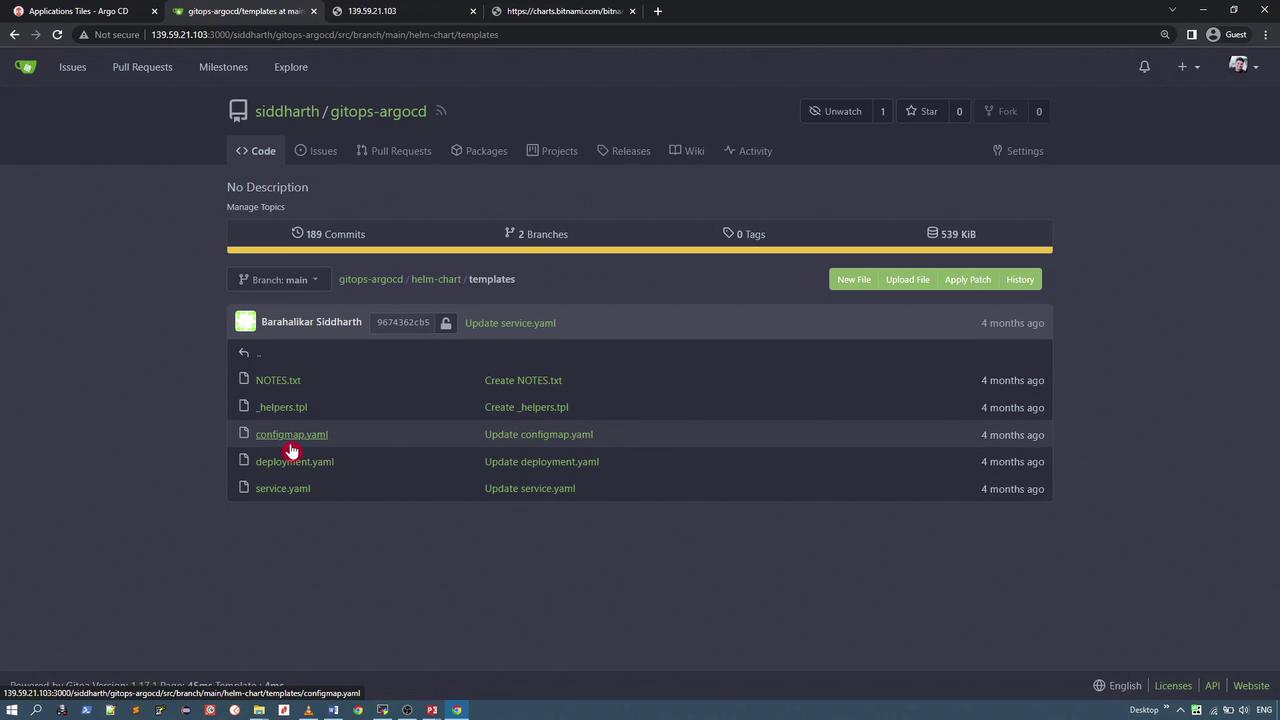
This article explains how to deploy a Helm chart using ArgoCD and demonstrates how to manage Helm charts from multiple sources. The GitOps ArgoCD repository includes a Helm chart that defines three Kubernetes resources: a ConfigMap, a Deployment, and a Service. The chart dynamically replaces template values using the configurations specified in the values.yaml file.
The Deployment template leverages values from the values.yaml file for settings such as the replica count and container image details. Below is an excerpt from the Deployment template:
The ConfigMap template assigns color values for each shape as defined in the values.yaml file. This configuration overrides the default shape colors, as shown below:
The default values.yaml file provides hardcoded configurations such as the replica count, image credentials, and default colors for shapes. Notably, all shapes are initially set to black and the service is configured as type ClusterIP:
replicaCount: 1image: repository: siddharth67/php-random-shapes:v1 pullPolicy: IfNotPresent # Overrides the image tag whose default is the chart appVersion. tag: ""imagePullSecrets: []nameOverride: ""fullnameOverride: ""service: type: ClusterIP port: 80 targetPort: 80color: circle: black oval: black triangle: black rectangle: black square: black
You can create an application in ArgoCD using either the CLI or the UI. In this example, the CLI is used to create an application named “helm-random-shapes”. The command specifies the repository URL, path, and overrides some default values via the --helm-set parameter. For instance, the command sets the replica count to 2, updates the colors for the circle and square to pink and green respectively, and changes the service type to NodePort.
After creating the application, the CLI returns a confirmation message:
application 'helm-random-shapes' created
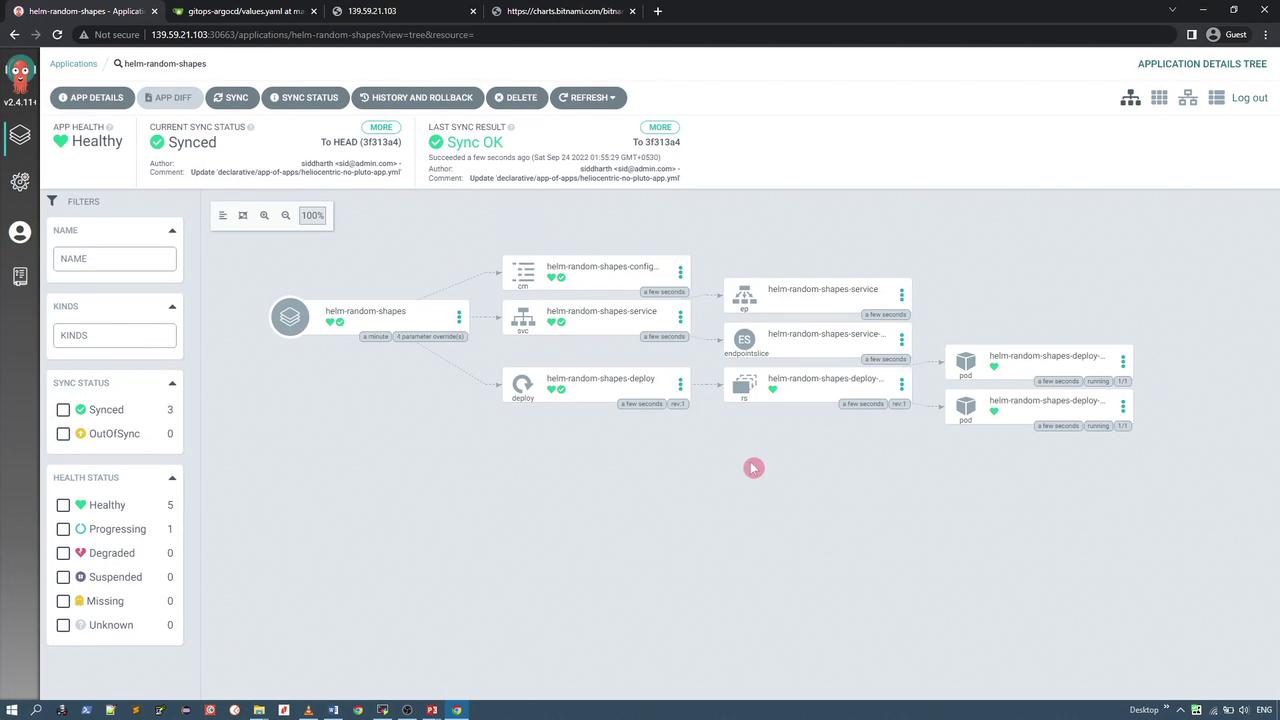
You can verify the deployment by accessing the ArgoCD UI. The new application may initially show an out-of-sync status until you click “Synchronize” to deploy the resources.
To inspect the application manifest, navigate to the application details in the ArgoCD UI and click on “Manifest”. The manifest confirms Helm as the source and includes the parameters set with the --helm-set flags:
The service is now listening on a specific NodePort (e.g., 32142). Among the five shapes, the circle and square are overridden to pink and green, while the remaining shapes retain the default black color.
Once ArgoCD deploys the Helm chart, it assumes full management of the application. Consequently, running a standard helm ls command will not display the application, since it is exclusively managed by ArgoCD.
GROUP KIND NAMESPACE NAME STATUS HEALTH HOOK MESSAGEapps ConfigMap default helm-random-shapes-configmap Synced Healthy configmap/helm-random-shapes-configmap created Service default helm-random-shapes-service Synced Healthy service/helm-random-shapes-service created Deployment default helm-random-shapes-deploy Synced Healthy deployment.apps/helm-random-shapes-deploy created
ArgoCD can also manage Helm charts hosted in external repositories such as Bitnami. For example, you might deploy an application using the Bitnami Nginx chart.
Below is an excerpt of a Helm chart specification from Bitnami that demonstrates how charts include metadata, dependencies, and other parameters:
apiVersion: v1entries: airflow: - annotations: category: WorkFlow apiVersion: v2 appVersion: 2.3.4 created: "2022-09-21T10:26:03.089700388Z" dependencies: - condition: redis.enabled name: redis repository: https://charts.bitnami.com/bitnami version: 17.x.x - condition: postgresql.enabled name: postgresql repository: https://charts.bitnami.com/bitnami version: 11.x.x - name: common repository: https://charts.bitnami.com/bitnami tags: - bitnami-common version: 2.x.x description: Apache Airflow is a tool to express and execute workflows as directed acyclic graphs (DAGs). It includes utilities to schedule tasks, monitor task progress and handle task dependencies. digest: f128dfb6320c79d19cca88384412389f7a0a7cdf9ec459de9bdc2f8fa086d home: https://github.com/bitnami/charts/tree/master/bitnami/airflow icon: https://bitnami.com/assets/stacks/airflow/img/airflow-stack-220x234.png keywords: - apache - airflow - workflow - dag maintainers: - name: Bitnami
Another example, for the Discourse chart, is shown below:
tags: - bitnami-commonversion: 1.x.xdescription: Discourse is an open source discussion platform with built-in moderation and governance systems that let discussion communities protect themselves from bad actors even without official moderators.digest: sha256:d52bdba510f98909bf3fee38b9eecc106d6ded76737351422d1161880f4837home: https://github.com/bitnami/charts/tree/master/bitnami/discourseicon: https://bitnami.com/assets/stacks/discourse/img/discourse-stack-220x234.pngkeywords: - community - forummaintainers: - email: containers@bitnami.com name: Bitnami - email: username.taken@gmail.com name: paulzcan - email: pretluca@gmail.com name: lucapretename: discoursesources: - https://github.com/bitnami/bitnami-docker-discourse - https://github.com/spinnaker - https://www.discourse.org/urls: https://charts.bitnami.com/bitnami/discourse-7.0.16.tgzversion: 7.0.16annotations: category: Forum apiVersion: v2 appVersion: 2.8.3 created: "2022-04-19T13:33:08.1651570512Z"dependencies: condition: redis.enabled name: redisrepository: https://charts.bitnami.com/bitnami
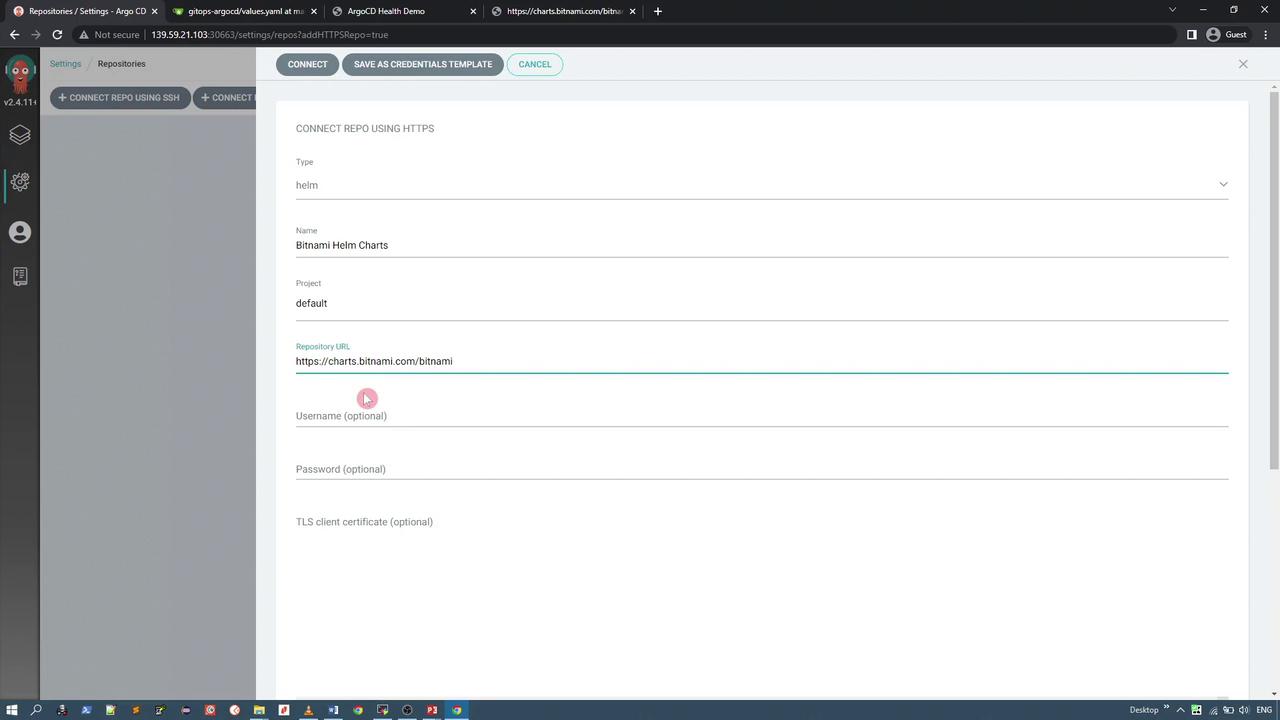
Configure the Helm repository in ArgoCD by providing the repository URL (for example, charts.bitnami.com), selecting the repository type (Helm), and including any necessary credentials. The diagram below illustrates the repository connection interface:
Deploying an Application from the Bitnami Helm Repository
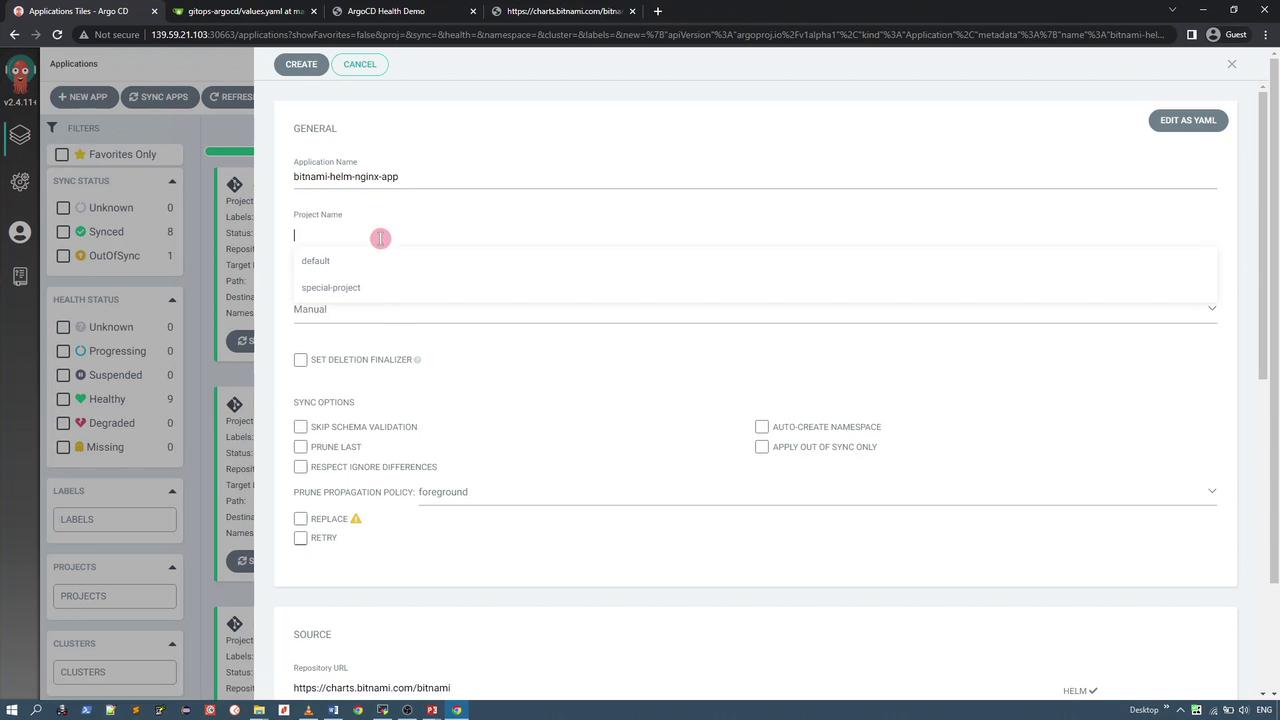
For this demonstration, we deploy the Bitnami Nginx chart. Using the ArgoCD UI, create an application by selecting the Bitnami Helm repository and choosing the desired chart (e.g., Nginx). You can specify the chart version (such as 12.0.3) and set the destination namespace (e.g., Bitnami). Override any necessary parameters; for example, change the service type from LoadBalancer to NodePort if not using a cloud-based service.
After setting your parameters, the application manifest displays a configuration similar to the following:
Synchronize the application to deploy the resources. In this example, the deployment includes a Deployment and a Service. The Service is assigned a NodePort (for instance, 31640). Below is an excerpt of the deployed Service configuration:
Once the deployment is healthy and the pod is running, you can access the NGINX homepage via the assigned NodePort, confirming a successful deployment.
Even though Helm CLI commands (e.g., helm ls) may not display these applications because ArgoCD manages them exclusively, you can still retrieve comprehensive details using the ArgoCD CLI:
argocd app get helm-random-shapesargocd app get bitnami-helm-nginx-app
The output provides metadata such as resource names, health statuses, and sync states. An example output for the helm-random-shapes application is as follows:
Name: helm-random-shapesProject: defaultServer: https://kubernetes.default.svcNamespace: defaultURL: http://10.98.110.228:443/applications/helm-random-shapesRepo: http://139.59.21.103:3000/siddharth/gitops-argocdPath: helm-chartSync Window: Sync AllowedSync Policy: <none>Sync Status: Synced to (3f313a4)Health Status: HealthyGROUP KIND NAMESPACE NAME STATUS HEALTH HOOK MESSAGEapps ConfigMap default helm-random-shapes-configmap Synced Healthy configmap/helm-random-shapes-configmap created Service default helm-random-shapes-service Synced Healthy service/helm-random-shapes-service created Deployment default helm-random-shapes-deploy Synced Healthy deployment.apps/helm-random-shapes-deploy created
Similarly, the Bitnami Nginx application details can be viewed with:
In this article, we have demonstrated how to deploy and manage Helm charts using ArgoCD. We covered two key scenarios: deploying a Helm chart stored in a Git repository and managing a chart sourced from an external repository like Bitnami. With ArgoCD managing these deployments, you can ensure that your applications remain in-sync and healthy—even if standard Helm CLI commands do not list them.Thank you for reading.