

- “Why was I charged twice this month?”
- “The app crashes every time I hit Save.”
- “Where do I find my past orders?”
- Router returns an Event (or similar) with a
routefield set to a route label (string). - The workflow must declare a route map that maps route labels to target nodes.
- Always include a fallback route (for example,
"GENERAL") so unknown inputs still get processed.
Always provide a fallback route so the workflow can handle unexpected or unknown inputs without failing.
Example router function (Python)
This simple router looks for keywords and returns matching route labels:- The router returns an
Eventwhoseroutefield is a string label. - Route labels are compared exactly (case-sensitive) against the route map keys — be consistent in casing.
Mapping routes to nodes
A sequential edge is simply a list of nodes to run in order. A routing edge contains the router node and a dictionary that maps route labels to destination nodes. You declare all branches up front in the workflow’s edges so the runtime knows every allowed path before messages arrive. Example workflow definition with a route map:
Remember: the dictionary keys (route labels) must match the string returned by the router exactly.
Visualization: how the graph changes
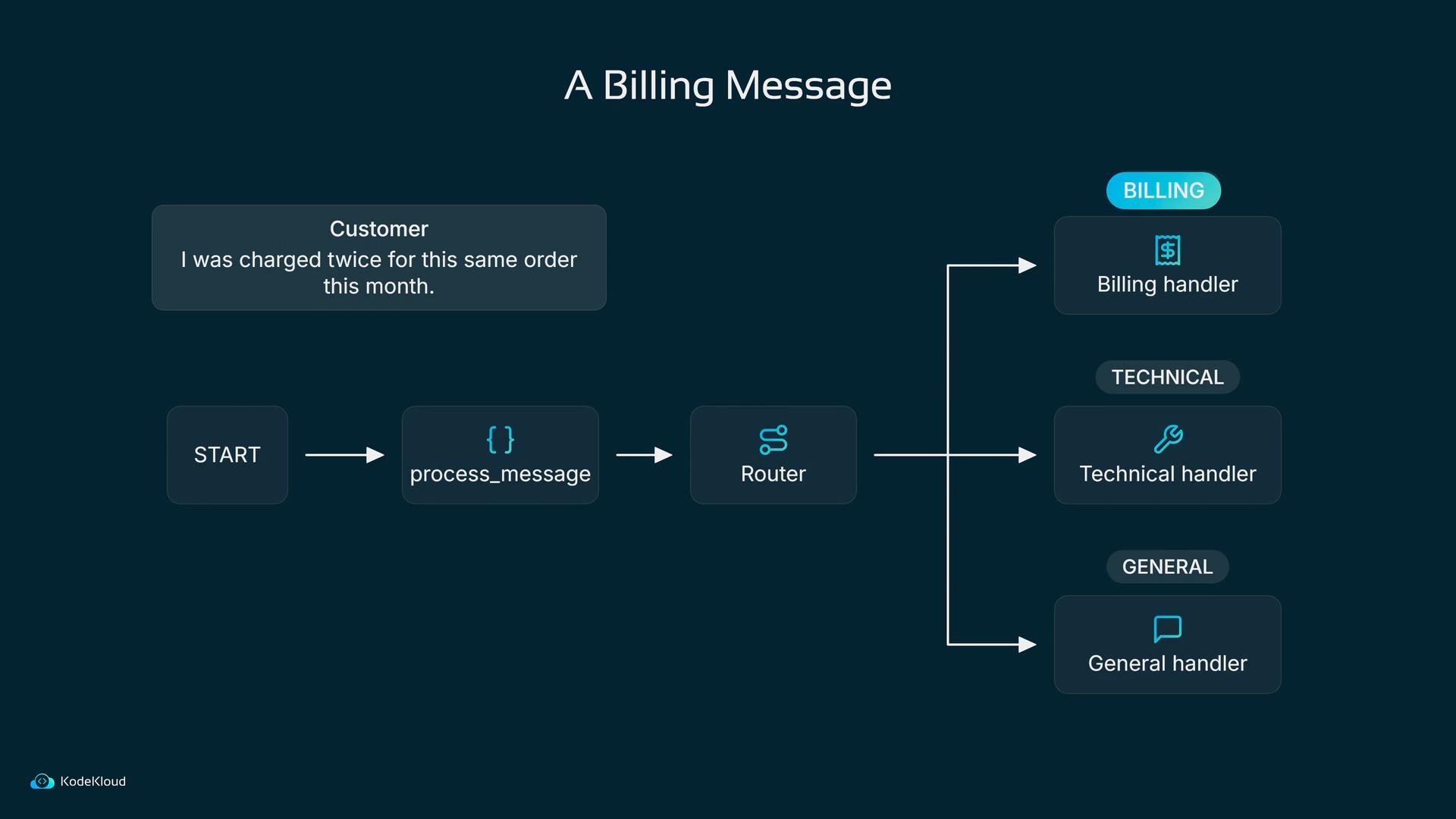
Think of the graph transforming from a single line into a fork: start → process_message → Router → { BILLING → billing_handler, TECHNICAL → technical_handler, GENERAL → general_handler } When a message flows through:- A customer sends: “I was charged twice for this same order this month.”
The workflow runs START → process_message → route_message. The router inspects the text and returnsroute="BILLING". The runtime looks up"BILLING"in the route map and runs only the billing branch; the technical and general handlers are not executed.
- Marcus sends: “The app crashes every time I hit Save.”
The router returnsroute="TECHNICAL", and the runtime follows the technical branch. The same graph and same code run — only the router’s returned label differs.
Best practices and common pitfalls
- Use clear, consistent route labels (e.g., uppercase constants like
"BILLING"). Route label matching is exact —"billing"≠"BILLING". - Always include a fallback route (e.g.,
"GENERAL") to avoid dead-ends for unexpected input. - Keep router logic focused on routing decisions (keywords, intent classification, simple heuristics). Heavy processing should remain in handler nodes.
- Log the chosen route for observability and easier debugging.
- If you support many routes, consider using structured classification (ML model or intent detection) rather than a large chain of keyword checks.
Quick checklist
- Router returns an
Eventwith aroutestring. - Workflow edges include a route map that lists all allowed labels.
- Include a fallback route like
"GENERAL". - Route label keys and router return values match exactly (case-sensitive).
- Handlers are focused on resolving the routed issue.