In this guide, we’ll explore how to streamline repetitive Terraform configurations in OpenTofu using dynamic blocks and splat expressions . You’ll learn to replace verbose nested blocks with a DRY, scalable approach, and extract attributes efficiently from generated resources.
Looping with count and for_each
Traditionally, you can create multiple resources by using the count or for_each arguments:
resource "aws_instance" "backend" {
ami = var . ami
instance_type = var . instance_type
count = length (var . backend_servers )
tags = {
Name = var.backend_servers[count.index]
}
}
variable "ami" {
default = "ami-06178cf087598769c"
}
variable "instance_type" {
default = "m5.large"
}
variable "backend_servers" {
type = list ( string )
default = [ "server1" , "server2" ]
}
Here, two EC2 instances (server1 and server2) are instantiated by leveraging count.
Building a VPC, Subnet, and Security Group
Let’s set up:
A new VPC
A private subnet
A security group allowing SSH (port 22) and HTTP (port 8080)
A VPC provides an isolated network (10.0.0.0/16), and the subnet uses 10.0.2.0/24. The security group acts as a virtual firewall.
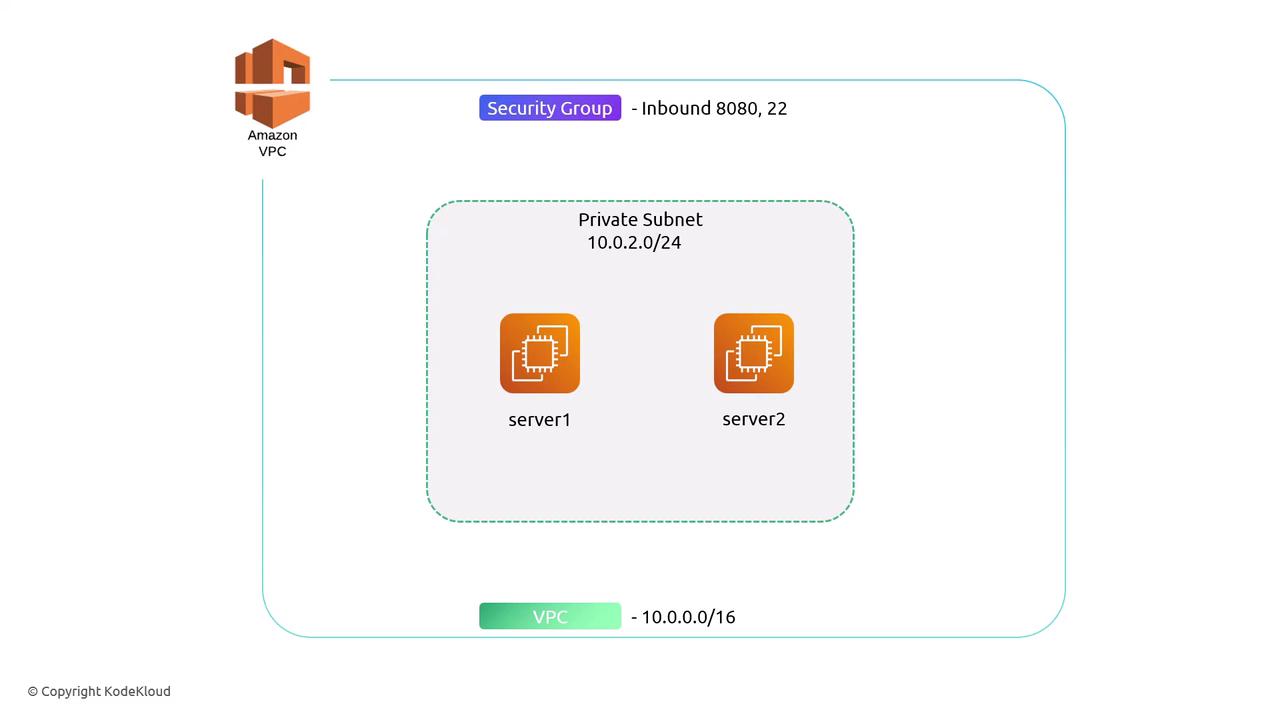
First, declare the VPC and subnet:
resource "aws_vpc" "backend_vpc" {
cidr_block = "10.0.0.0/16"
tags = {
Name = "backend-vpc"
}
}
resource "aws_subnet" "private_subnet" {
vpc_id = aws_vpc . backend_vpc . id
cidr_block = "10.0.2.0/24"
tags = {
Name = "private-subnet"
}
}
Next, define a security group with two hard-coded ingress blocks:
resource "aws_security_group" "backend_sg" {
name = "backend-sg"
vpc_id = aws_vpc . backend_vpc . id
ingress {
from_port = 22
to_port = 22
protocol = "tcp"
cidr_blocks = [ "0.0.0.0/0" ]
}
ingress {
from_port = 8080
to_port = 8080
protocol = "tcp"
cidr_blocks = [ "0.0.0.0/0" ]
}
}
Adding more ports would require additional nested ingress blocks, quickly becoming repetitive.
Simplifying with Dynamic Blocks
With a dynamic block , you can loop over a list of ports and generate as many ingress entries as needed.
Declare an input variable for ports:
variable "ingress_ports" {
type = list ( number )
default = [ 22 , 8080 ]
}
Replace the static blocks with one dynamic block:
resource "aws_security_group" "backend_sg" {
name = "backend-sg"
vpc_id = aws_vpc . backend_vpc . id
dynamic "ingress" {
for_each = var . ingress_ports
content {
from_port = ingress . value
to_port = ingress . value
protocol = "tcp"
cidr_blocks = [ "0.0.0.0/0" ]
}
}
}
You can rename the default iterator (ingress) to anything meaningful.
Example: dynamic "ingress" {
iterator = port
for_each = var . ingress_ports
content {
from_port = port . value
to_port = port . value
protocol = "tcp"
cidr_blocks = [ "0.0.0.0/0" ]
}
}
Splat Expressions
After generating multiple ingress rules, you might want to output all to_port values at once. Use a splat expression:
output "to_ports" {
value = aws_security_group . backend_sg . ingress [ * ] . to_port
}
Be aware that splat expressions return a list. If your security group has no ingress rules, you’ll get an empty list rather than a single value.
Compare Approaches
Approach Description Pros Static Blocks Individual ingress blocks for each port Simple for few ports Dynamic Blocks One block looping over var.ingress_ports DRY, maintainable Splat Expressions Extracts list of attributes from resources Concise outputs
Apply and Inspect
Execute your plan:
$ tofu apply --auto-approve
aws_vpc.backend_vpc: Creating...
aws_vpc.backend_vpc: Creation complete after 0s [id=vpc-593470c0]
aws_subnet.private_subnet: Creating...
aws_security_group.backend_sg: Creating...
aws_subnet.private_subnet: Creation complete after 1s [id=subnet-fdd6b762]
aws_security_group.backend_sg: Creation complete after 1s [id=sg-a5aa3b711157d4a2b]
Apply complete! Resources: 3 added, 0 changed, 0 destroyed.
Retrieve the generated ports:
$ tofu output
to_ports = [
22,
8080,
]
By leveraging dynamic blocks and splat expressions, your OpenTofu configurations become more expressive , concise , and easier to maintain .
References