

- Instances launched without a public IP An instance in a public subnet still needs a public IPv4 address (or an EIP) to access the internet directly. If an instance has only a private IP and the subnet has no auto-assign setting enabled, it cannot reach the internet even when the route table points to an IGW.
- Enable “Auto-assign public IPv4 address” for the subnet, or
- Assign an Elastic IP (EIP) to the instance when launching (or attach one later).
- Route table misconfiguration (missing default route) Public subnets require a default route for non-local traffic (0.0.0.0/0) that points to the internet gateway. Without that entry, only VPC-local traffic (the “local” route) will work.
- Firewall rules: security groups vs NACLs Understand the difference and where to apply rules:
- Security groups (stateful): You only need to allow the outbound or inbound direction for a connection; return traffic is automatically permitted.
- Network ACLs (stateless): You must define both inbound and outbound rules for the same traffic to succeed.
Security groups are stateful and simpler to manage for instance-level access control. NACLs are stateless—if you use them, add matching inbound and outbound allow rules for the same ports and CIDR ranges.
- Internet Gateway (IGW) not created or not attached A VPC must have an IGW attached to provide direct internet access for public subnets. Common mistakes:
- Forgetting to create an IGW.
- Creating an IGW but not attaching it to the correct VPC.
- Pointing the route table to an incorrect IGW ID.
- The IGW exists and is attached to the intended VPC.
- The route table for public subnets has a 0.0.0.0/0 target that matches the IGW ID.
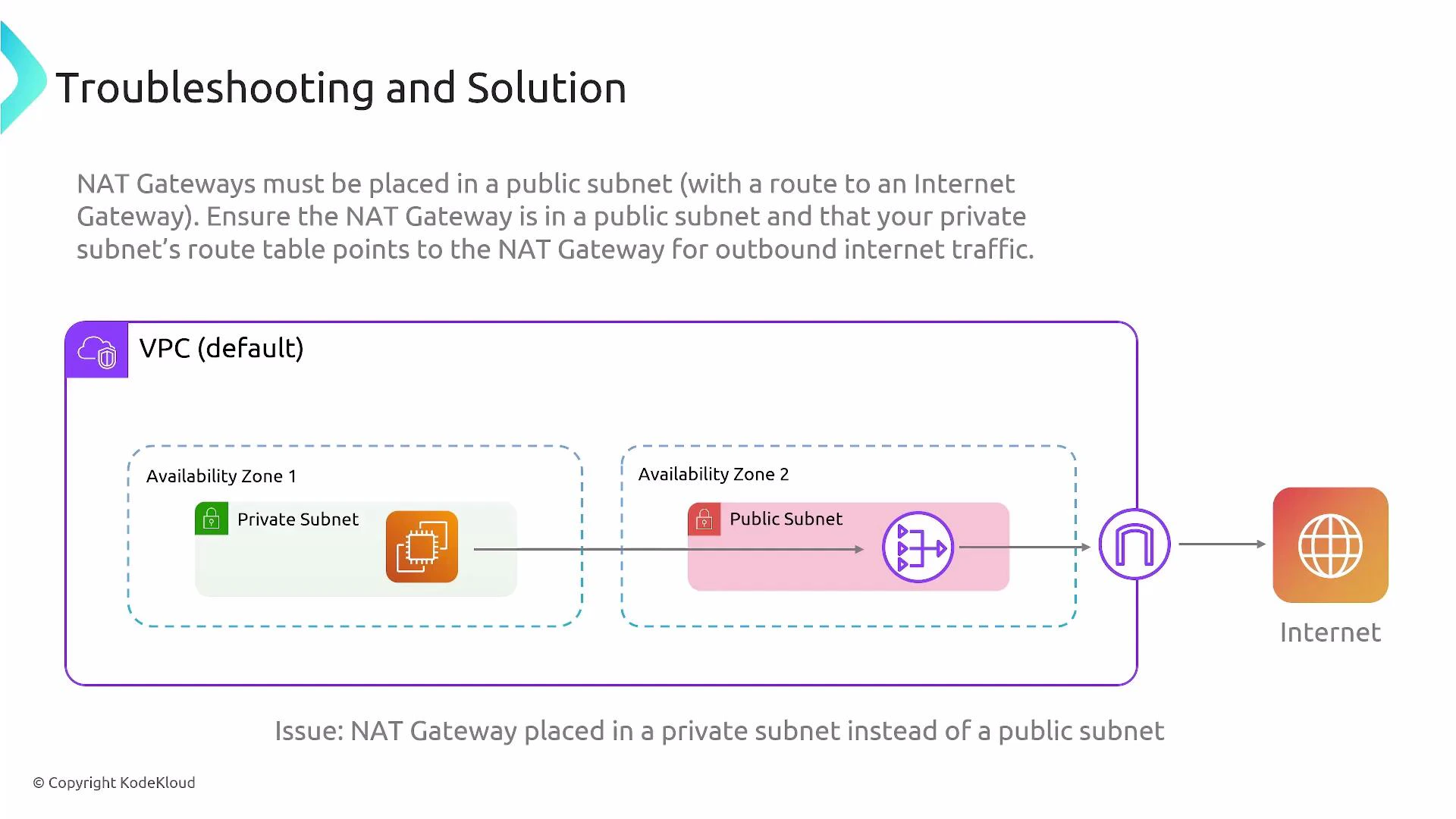
- NAT gateway placement and routing for private subnets Private subnets need a NAT gateway to access the internet for updates, package downloads, and other outbound-only needs. Typical mistakes include:
- Placing the NAT gateway in a private subnet (incorrect). NAT gateways must be created in a public subnet that has a route to the IGW and an Elastic IP assigned.
- Failing to add a private-subnet route that sends 0.0.0.0/0 to the NAT gateway.
NAT gateways must reside in a public subnet and require an Elastic IP. For high availability, deploy a NAT gateway in each Availability Zone and configure private-subnet route tables so instances use the NAT gateway in the same AZ. A NAT gateway placed in a private subnet will not provide outbound internet access.
- Security groups: open only required ports and restrict sources (avoid 0.0.0.0/0 for management ports like SSH/RDP).
- NACLs: if used, ensure matching inbound and outbound allow rules for each required port/protocol.
- IGW: there is one IGW per VPC—ensure route tables reference the correct IGW ID.
- NAT gateways: assign an Elastic IP and place them in public subnets; deploy one per AZ for resilience.
- Route tables: each subnet can be explicitly associated with a route table—verify subnet-to-route-table associations.
References and further reading
- Amazon VPC User Guide (AWS)
- NAT Gateways (AWS)
- Internet Gateways (AWS)
- Security Groups for Your VPC (AWS)
- Network ACLs (ACLs) (AWS)