

Amazon EventBridge (formerly CloudWatch Events) provides a fully managed event bus for building scalable, event-driven architectures. In this guide, you’ll learn how EventBridge ingests, routes, and processes events—then see it in action with an e-commerce order processing use case.Documentation Index
Fetch the complete documentation index at: https://notes.kodekloud.com/llms.txt
Use this file to discover all available pages before exploring further.
EventBridge offers both a default event bus and the ability to create custom buses. You can also subscribe to partner SaaS event sources directly.
Key Features of EventBridge
| Feature | Description |
|---|---|
| Advanced Routing and Patterns | Use content-based filters and transforms to route specific events to the right targets. |
| Reliable Ingestion and Delivery | Benefit from high throughput, built-in retries, and durable delivery guarantees. |
| Flexible Event Sources | Connect AWS services, custom applications, and third-party SaaS partners on the same event bus. |
| Schema Registry and Code Bindings | Define, discover, and enforce JSON schemas—then auto-generate client libraries in multiple languages. |
Be sure to clean up unused rules, buses, and schemas to avoid incurring unexpected charges. See EventBridge pricing.
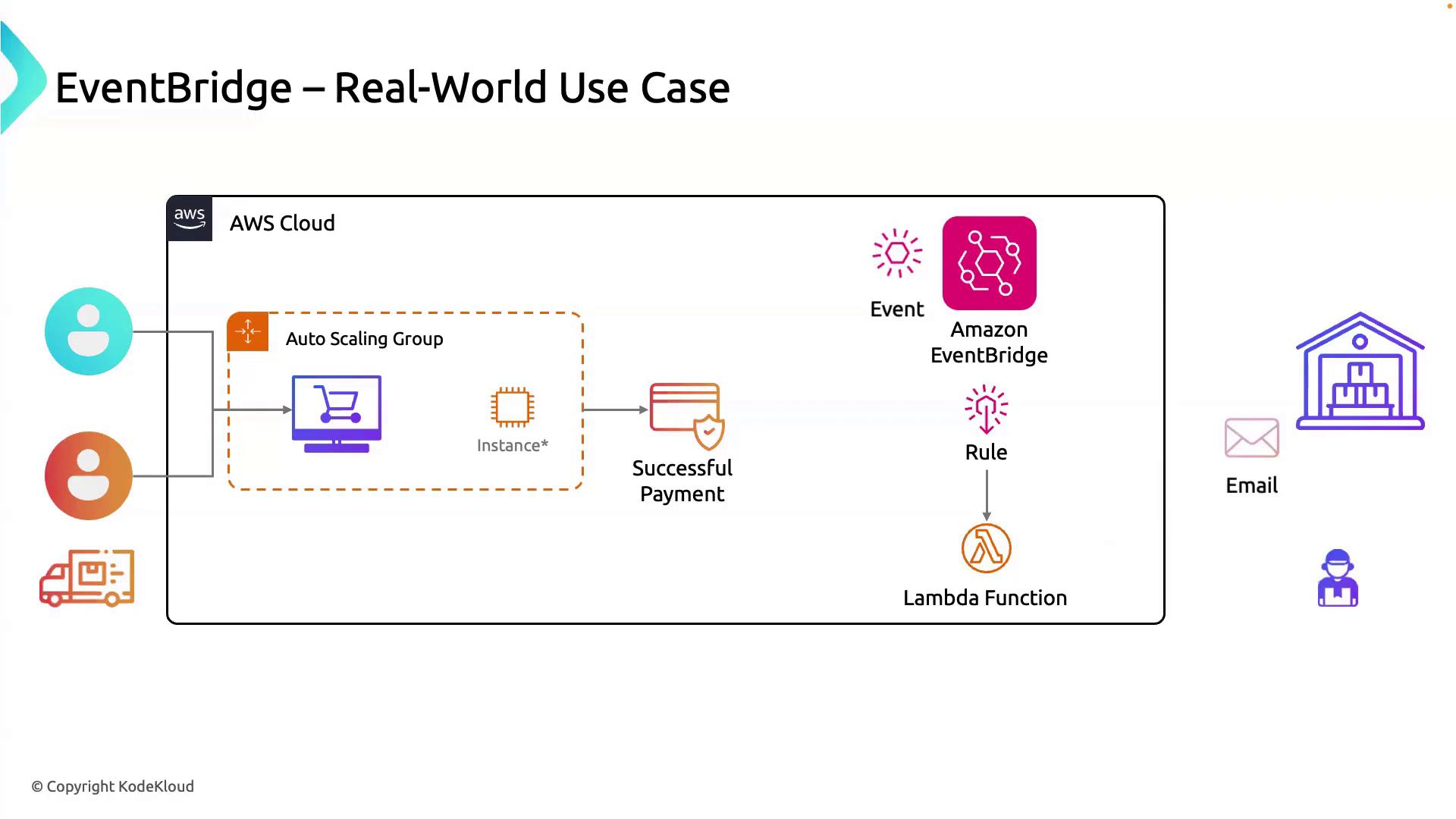
Real-World Use Case: Order Processing Notifications
Imagine an e-commerce site where, after a successful payment, warehouse staff automatically receive shipping instructions:- A customer places an order via your website, running on an Auto Scaling group of EC2 instances.
- The application publishes a
PaymentSucceededevent to a custom EventBridge bus. - An EventBridge rule matches on
"detail-type": ["PaymentSucceeded"]and forwards the event to a Lambda function. - The Lambda function formats order details and sends an email to the warehouse team.
- Warehouse staff receive the notification, pack the items, and dispatch the shipment.
Sample EventBridge Rule (AWS CLI)
Next Steps
- Define additional event patterns for order cancellations, returns, or promotions.
- Explore the EventBridge schema registry to generate strongly typed client code in Java, Python, or TypeScript.
- Integrate third-party SaaS partners (e.g., Stripe, Zendesk) for richer cross-system workflows.
Links and References
- Amazon EventBridge Developer Guide
- Working with Event Buses
- AWS Lambda Integration
- EventBridge Schema Registry