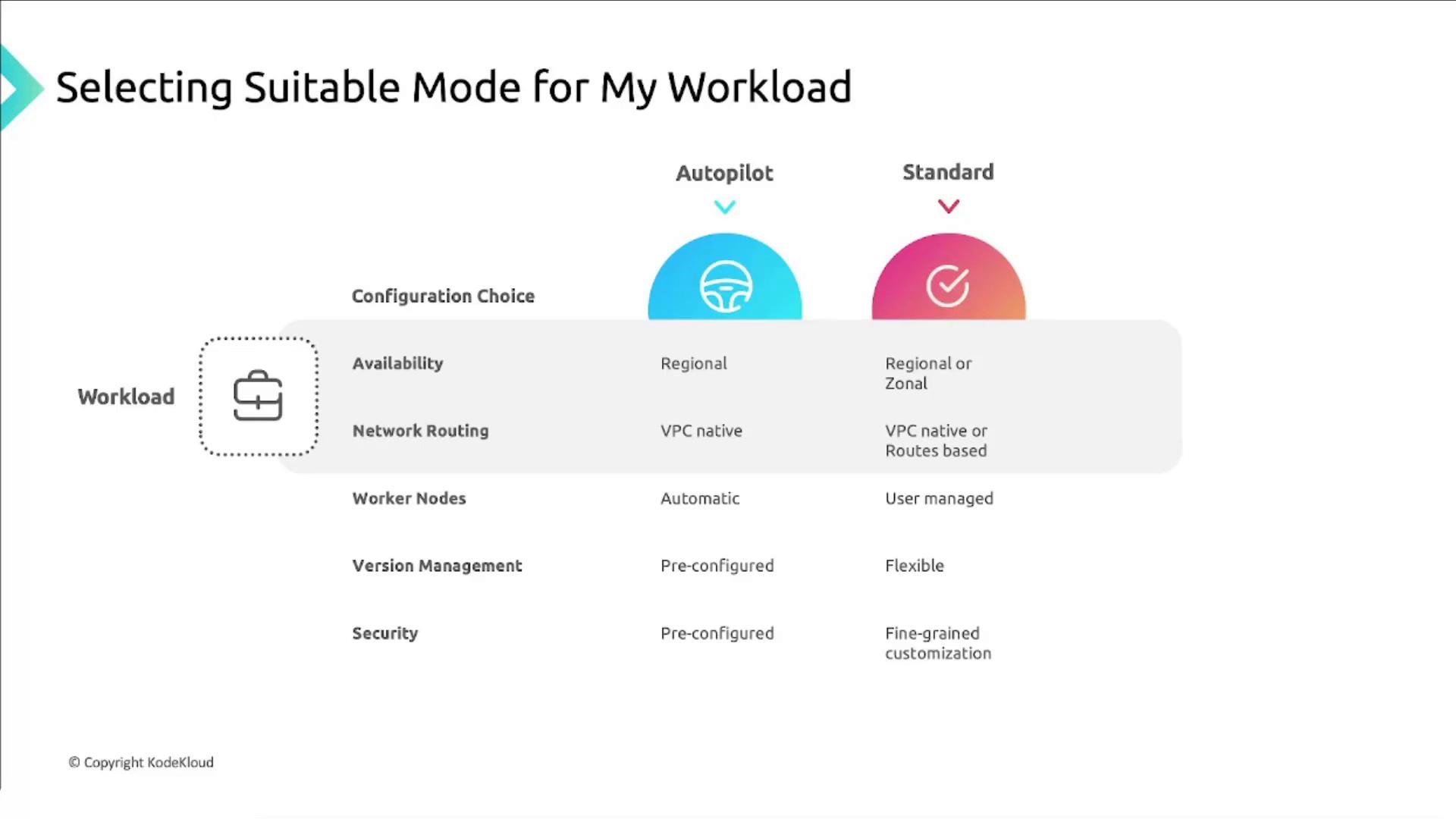
- Autopilot: a fully managed, opinionated mode where Google manages node lifecycle, autoscaling, upgrades, and many security defaults so you focus on deploying workloads.
- Standard: a self-managed node model that gives you full control over node types, node pools, and low-level configuration, at the cost of more operational responsibility.
GKE Autopilot (managed)
Autopilot shifts node and infrastructure management to Google. You specify and deploy pods, and GKE provisions and manages the nodes, security baseline, and control plane behavior. Key benefits:- Managed node lifecycle: Google configures worker nodes, performs automatic upgrades and repairs, and scales node capacity as needed.
- Pay-for-pod pricing: Billing aligns to pod resource requests (CPU, memory, ephemeral storage) to reduce waste from idle node capacity.
- Opinionated security and best practices: Autopilot applies recommended security settings and patches automatically.
- Lower operational burden: No need to manage node images, OS patching, or low-level tuning.
Autopilot provides a managed, optimized experience that suits most production workloads. Choose Standard only if you need node-level control or custom actions not supported on Autopilot.
When Autopilot is a good fit
- You want to minimize cluster operations and ongoing management overhead.
- Workloads follow Kubernetes best practices and do not require node-level changes.
- You prefer a billing model that more closely matches actual pod resource consumption.
Autopilot limitations to consider
- Node-level changes are restricted: you cannot install arbitrary software on nodes or change many sysctls.
- Restricted features: policies that require privileged host access (e.g., privileged containers, arbitrary
hostPathmounts,hostNetwork, or certain DaemonSets) are limited or disallowed. - Some advanced or custom node configurations available in Standard mode are not supported.
If your workloads require host-level access, custom kernel parameters, or installing software directly on nodes (for example, specialized monitoring agents or kernel modules), Autopilot may not meet your requirements.
GKE Standard (self-managed nodes)
Standard mode gives you control over the worker VMs (nodes) and node pools while Google manages the control plane. This mode is suited to workloads that need specific hardware, custom node configuration, or node-level software. What you control:- Node machine type, size, and zone/region placement.
- Node pool configuration and upgrade strategy.
- Node autoscaling settings and scaling behavior.
- Node-level security, installed software, and custom sysctls.
- Specialized hardware like GPUs and custom images.
Cluster topologies in Standard mode
Standard clusters can be zonal, multi-zonal, or regional. The choice affects control plane redundancy, node placement, and availability characteristics.
Notes on regional clusters:
- By default, the control plane and node pools are distributed across multiple zones (often three) in the region.
- You can restrict node pools to specific zones within the same region if needed.
- All zones for node pools must be within the same region as the control plane.
- Regional clusters offer higher availability and control-plane redundancy.
- Zonal clusters are less expensive because the control plane consumes fewer resources.
Comparison: Autopilot vs Standard
Summary: selecting the right mode
Consider these factors when deciding:-
Control and customization:
- Choose Standard if you need node-level access, custom drivers, or kernel tuning.
- Choose Autopilot if you prefer an opinionated, managed environment without node management.
-
Operational overhead:
- Autopilot minimizes operations (node lifecycle, upgrades, patching).
- Standard requires you to manage node lifecycles and maintenance.
-
Cost model:
- Autopilot charges per pod resource usage, helping reduce wasted capacity.
- Standard charges for VM capacity; it can be more efficient for high, steady utilization or specialized hardware.
-
Availability and topology:
- Use a regional Standard cluster for cross-zone control-plane redundancy.
- Zonal Standard clusters are less expensive but provide less control-plane resilience.
- Autopilot abstracts many topology decisions while providing managed availability guarantees.
When to prefer Standard mode
- You need to install or modify software on nodes or run privileged/host-level components.
- You must set node-level kernel parameters or advanced sysctls.
- You require specific node types, GPUs, or other hardware configurations not available on Autopilot.
- Your architecture depends on DaemonSets or host networking that Autopilot restricts.
When to prefer Autopilot
- You want a hands-off experience with Google handling node lifecycle, scaling, and security patching.
- You want billing aligned to pod resource usage and to minimize idle capacity costs.
- Your workloads follow Kubernetes best practices and do not require node-level changes.
Links and references