

name, its description, and its inputSchema. If the inputSchema doesn’t constrain arguments precisely, the model may guess and send the wrong type — causing runtime failures.
Example: the model built and sent this request:
PL-4417 (a string). Because the inputSchema did not require a string, the model sent a number (4417) instead of a string. The server returned a 500 error and the user saw a failure.
The missing schema constraint was a single line:
inputSchema, the model sent "PL-4417" and the call succeeded.
Before fixing the schema, let’s review the three kinds of messages used by this protocol.
Message types
- Request: includes an
idand expects a response. - Response: contains the same
idand either aresultor anerror(never both). - Notification: has no
idand therefore expects no reply.
Request example:
id):
Servers must not assume they can initiate requests to clients. Requests are one-way (client → server) in the current protocol; servers should only send responses or notifications back.
inputSchema written using JSON Schema. A complete inputSchema does the following:
- Names each argument.
- Declares each argument’s type (
string,number,object, etc.). - Marks which arguments are
required.
inputSchema is required for every tool. If an argument is unconstrained (e.g., any), the model may choose the wrong type and cause runtime errors on the server.
Correct inputSchema for get_shipment:
outputSchema that describes the structure of the response the tool returns. Providing an outputSchema is not mandatory, but it makes it much easier for host and client code to consume structured results.
Example outputSchema (optional):
- The model reads the
inputSchemato decide which tool to call and to construct the arguments. - The client validates arguments against the
inputSchemabefore sending the request. - The server validates arguments against the
inputSchemaon arrival and should reject requests that violate the schema, even if they originated from a trusted client.
Always validate on the server. Client-side validation can be bypassed; the server must enforce the schema to prevent runtime failures and protect backend logic.
inputSchema, the model requested the tool again and sent the shipment as a string ("PL-4417"). The call succeeded and the server returned both a structured result and a human-readable text summary.
Human-readable text (for display):
outputSchema):
uri(its identity)name- optional
titleanddescription mimeType(e.g.,text/plain,application/pdf)- optional
size - contents as either
text(for text data) or a base64-encodedblob(for binary)
blob):
- The host discovers a server and lists the tools and resources it offers.
- The host assembles the tool names, descriptions, and schemas into the model context.
- The user asks a question.
- The model decides a tool is needed and selects one based on the provided schemas and descriptions.
- The host requests user approval (if applicable).
- Once approved, the host sends a
tools/callrequest to the server. - The server executes the tool and returns a result.
- The host feeds the result back to the model, which produces the final user-facing answer.
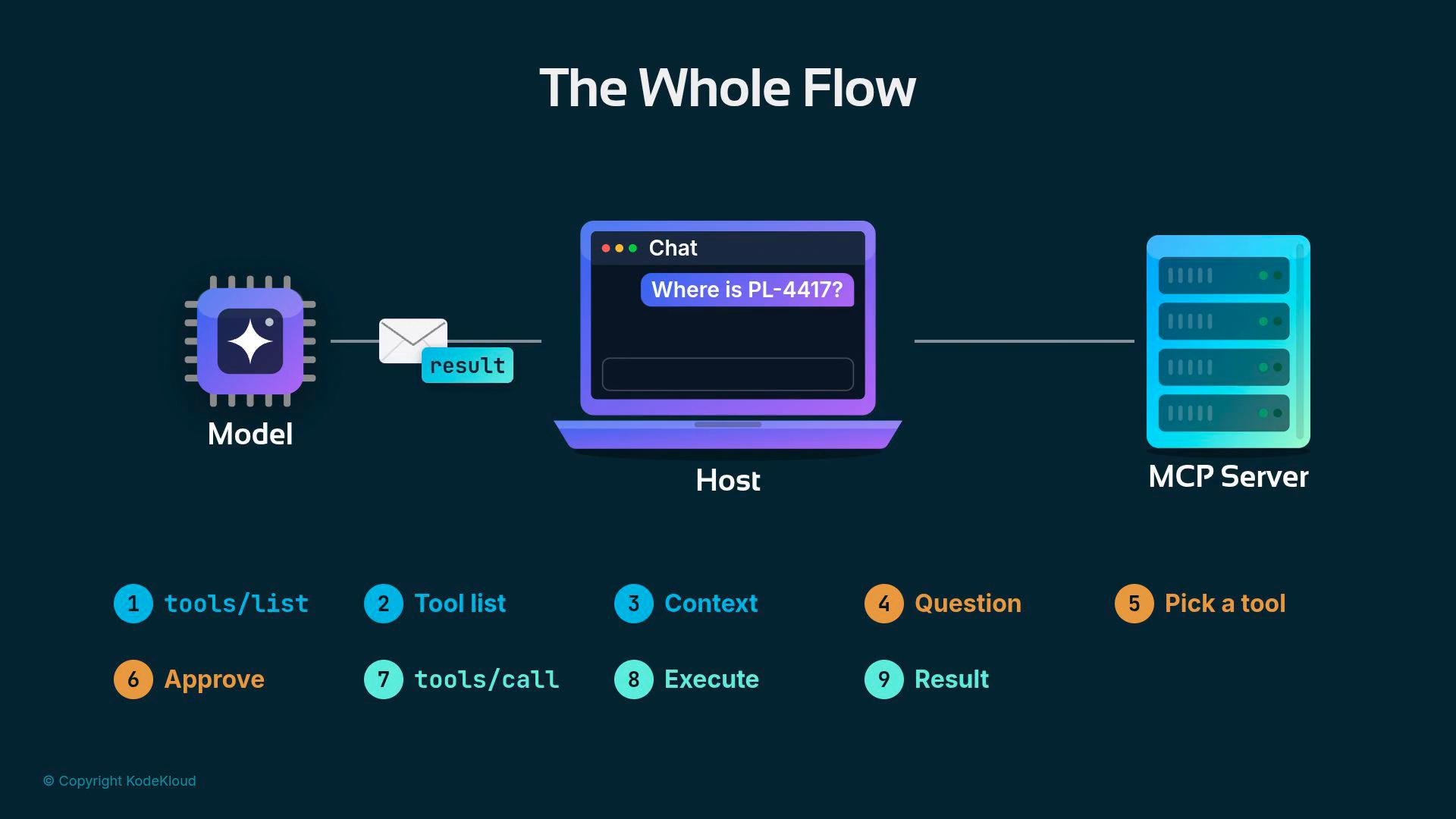
name, description, and inputSchema the host provides, and then it emits a request describing the tool name and arguments to pass.
Example: what the model sees (model context) vs. what the host sends when calling the tool
- JSON Schema specification: https://json-schema.org/
- Designing secure server-side validation: https://owasp.org/www-project-top-ten/
- Best practices for API schemas and contracts (general guidance)