

Why integrate with an issue tracker?
Most organizations rely on a centralized issue tracker to triage, assign, and track remediation work. By persisting structured findings as tickets, the agent turns observations into operational work items that teams can act on, prioritize, and measure. Common issue-tracking targets include:- Atlassian Jira
- GitHub Issues
- Linear
- Google Sheets (used as a lightweight tracker in some organizations)
Here, “MCP” refers to the tool’s connector/integration endpoint (the integration surface and authentication method your agent can use). It could be a REST API, webhooks, or a managed connector provided by the vendor.
What you need from the issue tracker (connector requirements)
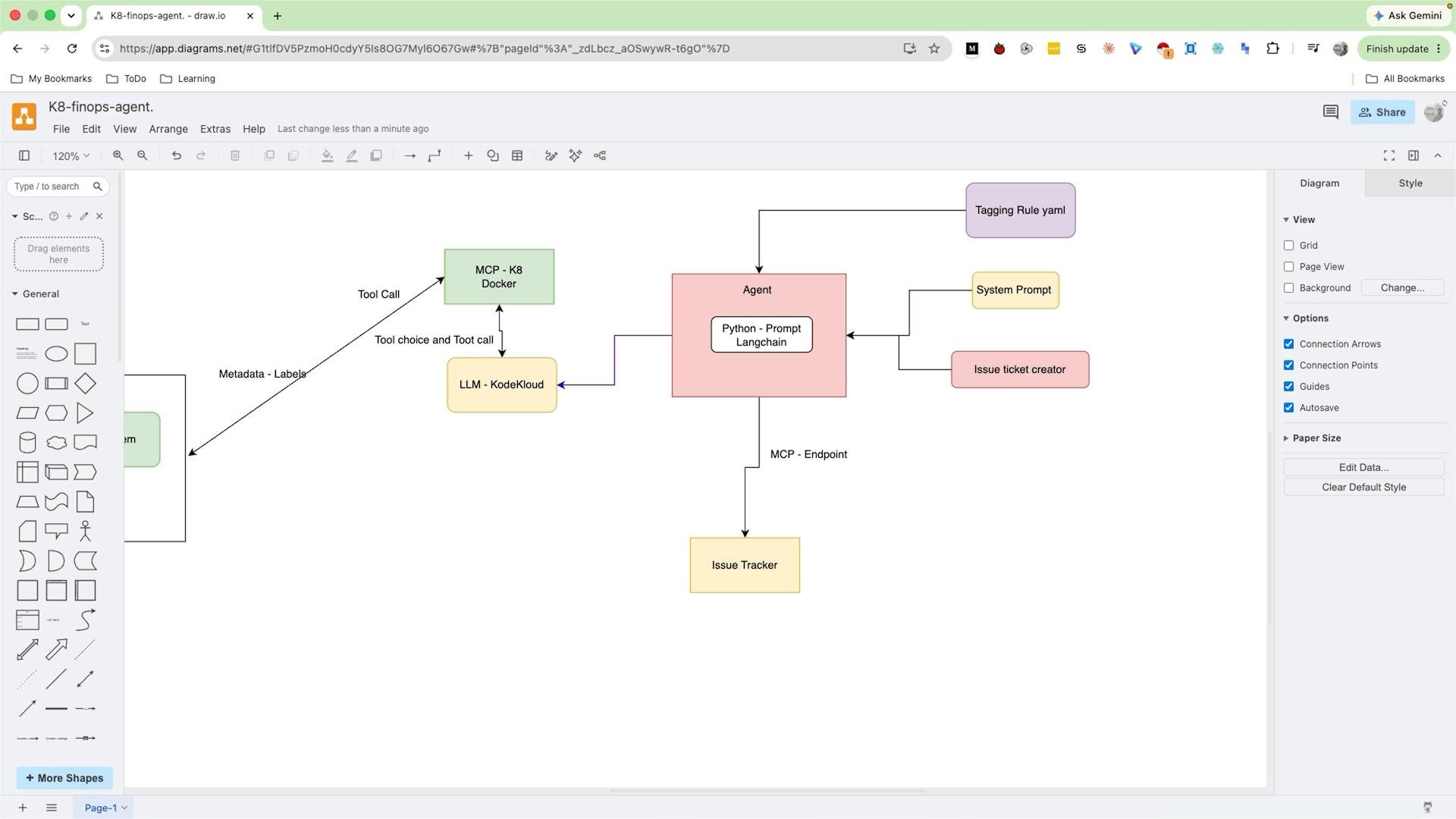
To keep the example concrete, assume we have an internal, custom Issue Tracker (easily replaceable with Jira, GitHub Issues, Linear, etc.). The agent needs an “issue ticket creator” component to convert findings into tickets and persist them via the MCP.
Issue ticket creator — responsibilities
- Consume the agent’s structured output (for example, the tagging-rules.yaml processed results and the final finding metadata).
- Convert that structured output into a ticket payload containing title, description, labels, priority, assignee, and other metadata.
- Call the issue tracker via its MCP to create or update tickets, and record the resulting ticket IDs for correlation and deduplication.
How the agent should interact with the MCP
- Build the ticket payload from the agent’s structured output, using standardized fields for easier downstream filtering and reporting.
- Authenticate to the MCP using the configured method (API key, OAuth token, or service account).
- POST (or call the connector’s create-ticket operation) the payload to the MCP endpoint.
- Handle responses: persist the created ticket ID in agent logs or metadata, and update existing tickets on repeated findings using idempotency keys.
Ensure the integration uses a least-privilege credential and that your token or service account has only the permissions needed to create/update tickets. Also account for rate limits and error handling (retries, idempotency).
The diagram below illustrates an agent core (Python / prompt + LangChain) connected to components such as the LLM, MCP connector, tagging rules, system prompt / issue ticket creator, and the issue tracker. The issue ticket creator uses the MCP to persist structured tickets instead of writing free-form logs.
Next steps (implementation checklist)
- Implement the issue ticket creator that reads the agent’s structured output and formats ticket payloads according to the MCP schema.
- Wire authentication and MCP endpoint configuration into the agent runtime using a secrets manager or environment-backed credentials.
- Add robust error handling: retries with exponential backoff, handling 429/5xx responses, and idempotency keys to avoid duplicate tickets.
- Log and persist mapping between
finding_idandticket_idso the agent can update or close tickets as findings evolve.