

- Vague prompts yield inconsistent, noisy outputs that are hard to validate or automate.
- A canonical
tagging-rules.yamlcaptures the authoritative schema for tags, types, patterns, and allowed values. - Combining that rules file with a locked-down system prompt forces the agent to return only schema-compliant results, enabling automated validation, auditing, and remediation.
- Tagging rules file (
tagging-rules.yaml): your organization’s canonical schema and policy for tags. This file varies across orgs and defines required tags, allowed values, and validation patterns. - System prompt: an authoritative, version-controlled instruction set provided to the LLM that end users cannot override. It defines the required output format (for example, a JSON object matching the tagging schema) and how to behave when fields are unknown or ambiguous.
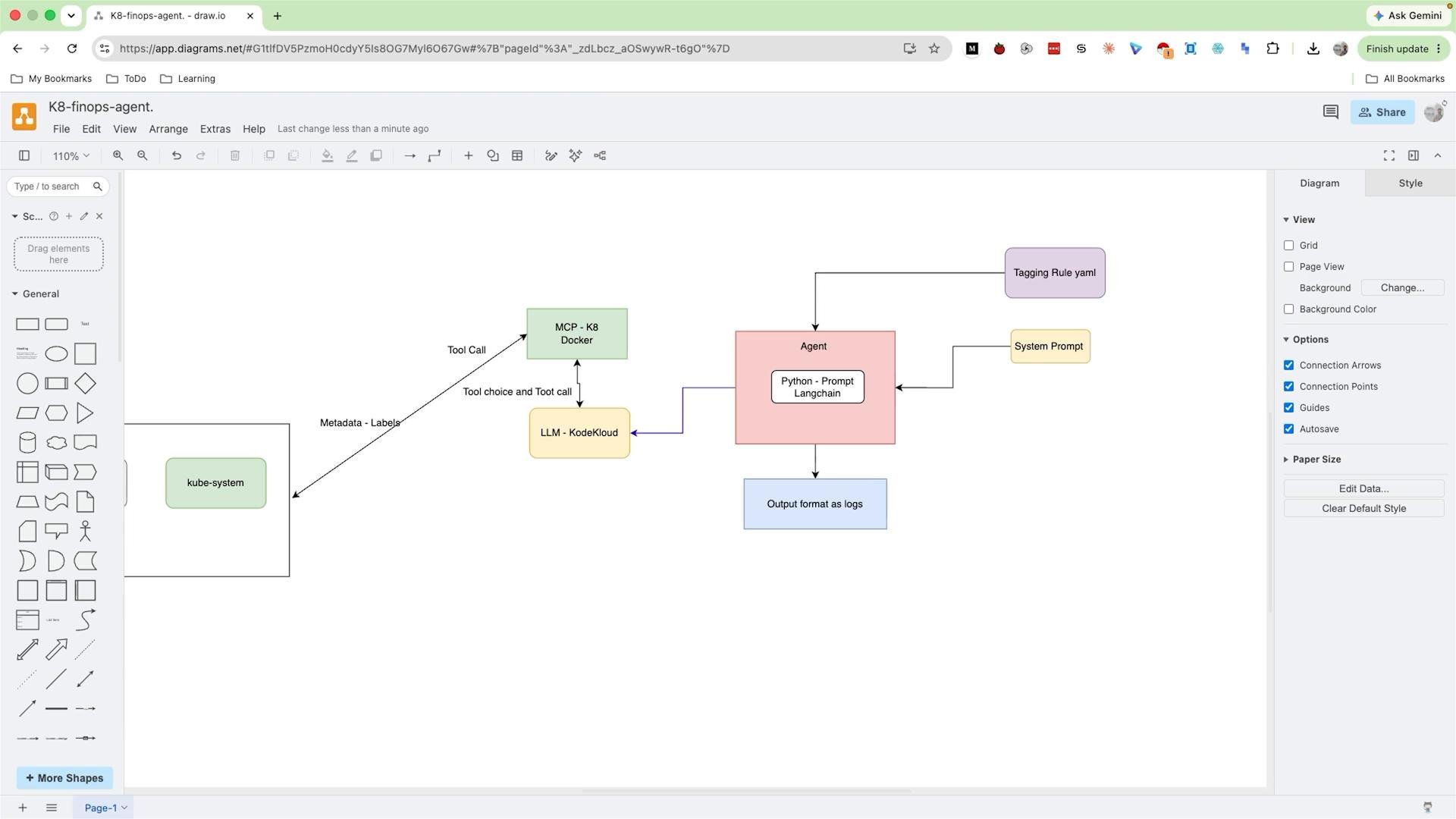
tagging-rules.yaml to the agent and guarantee structured output
-
Supply the rules as model context
- Inject either a concise representation or the relevant subset of
tagging-rules.yamlinto the system prompt or as a separate tool input. - If the rules file is large, only surface the applicable subset to keep within token/context limits.
- Prefer a normalized representation (key names, types, enums, regex patterns) that the model can apply directly.
- Inject either a concise representation or the relevant subset of
-
Enforce compliance with a strict system prompt
- The system prompt must require a single structured output (e.g., JSON) and forbid any free-text outside that structure.
- Keep the system prompt short, authoritative, version-controlled, and editable only by a small, trusted team (SRE/DevOps/Platform).
- Use the system prompt to define behavior when data is missing: set required fields to
nulland include anerrorsarray describing missing/ambiguous fields.
Tip: Surface only the subset of the tagging rules relevant to the resource being analyzed. This reduces token usage and keeps the model focused on what’s important.
-
Require and validate a strict output format
- Ask the model to return JSON that maps exactly to the tagging schema.
- Implement an automatic validation step against your schema and:
- Accept and process valid outputs.
- On validation failures, either return a deterministic fallback, re-run the agent with clarifying context, or flag for manual review.
- Log both the raw model output and validation results for auditing and continuous improvement.
-
Use model-assisted enforcement tools (optional)
- Use function-calling, output-parsers, or typed response features if your LLM provider supports them.
- Consider a small parser/validator microservice that receives model output, runs schema validation, and returns clean, sanitized results to downstream consumers.
tagging-rules.yaml (illustrative)
Warning: Never allow end users to modify or override the system prompt or the canonical tagging rules. This can introduce policy drift and enable outputs that break automation or compliance requirements.
- Version the tagging rules file and the system prompt together so changes are auditable.
- If you use regex patterns in
tagging-rules.yaml, include unit tests for edge-case inputs (e.g., unusual email formats, utf-8 characters). - Consider exposing a schema introspection API for the model wrapper; the wrapper can fetch only the relevant tag definitions for a given resource type.
- If your LLM supports function-calling or typed return values, prefer those mechanisms for strong enforcement of types and shapes.
- JSON Schema overview: https://json-schema.org/
- Designing effective system prompts for LLMs: https://platform.openai.com/docs/guides/system-roles
- Using function calling and typed outputs (LLM provider docs): check your provider’s “function calling” or “response schema” documentation.