

What we built so far
- An MCP layer running Supergateway that authenticates using a local
kubeconfigfor testing. - The MCP is packaged and executed via
Docker. - Basic connectivity validated: the MCP can reach the Kubernetes API and return data (we used
curlas a quick verification method).
Current interaction pattern
- Today, the MCP communicates directly with Kubernetes using raw HTTP calls (e.g.,
curl) to query cluster resources. - This pattern is suitable for smoke tests, but it is not the final user-facing workflow.
Planned (target) interaction and end-to-end flow
We will introduce an LLM layer that receives user prompts and orchestrates Kubernetes operations via an MCP client. The target flow:- A user sends a natural language prompt to the LLM.
- The LLM decides to call an external tool — the MCP client — to perform specific Kubernetes API calls (for example, read labels, list pods, or inspect resources).
- The MCP client performs the API requests against the Kubernetes cluster and returns structured results.
- The LLM consumes the results, formats a final response, and returns it to the user.
Diagram notes
- The prompt flow goes: User → LLM → MCP → Kubernetes API.
- Responses travel back along the same path: Kubernetes → MCP → LLM → User.
- Arrows between LLM and MCP, and between MCP and Kubernetes, are bidirectional in the diagram to emphasize request/response semantics.
- MCP-specific arrows are visually distinguished to clarify which communication paths are handled by the MCP layer versus standard Kubernetes traffic.
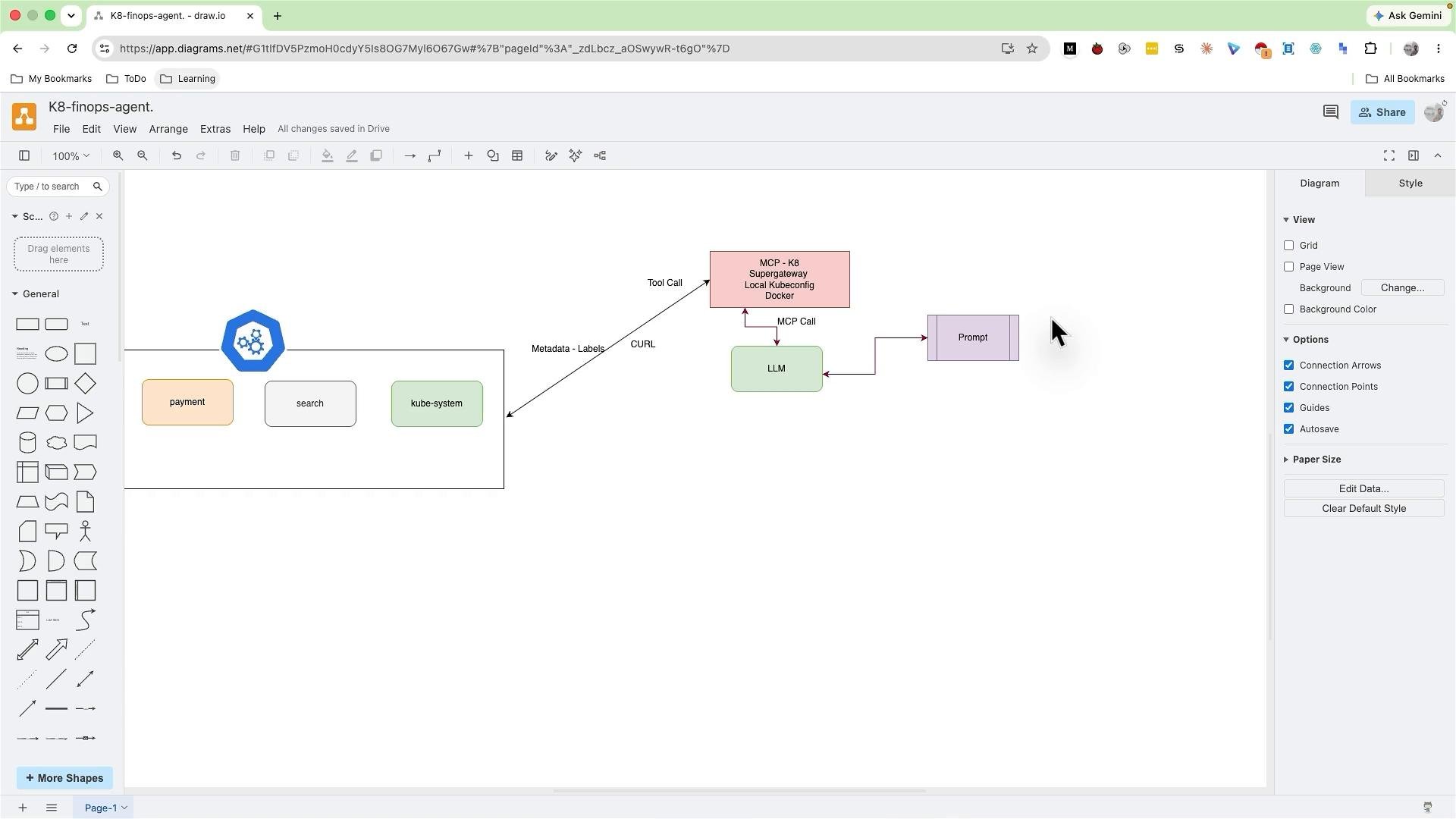
Components at a glance
Next steps (high level)
- Implement the LLM-to-MCP tool interface so prompts can trigger Kubernetes operations via the MCP client.
- Replace brittle
kubeconfig-based local testing with secure credential handling (short-lived tokens, service accounts, or a secrets manager). - Replace
curl-based tests with full LLM-driven flows and end-to-end integration tests.
Note: For production, avoid storing or distributing plain
kubeconfig files. Use secure secret management, least-privilege service accounts, and short-lived credentials for the MCP to access the Kubernetes API.Links and references
- Kubernetes Basics
- Kubernetes Authentication and Authorization
- Consider LLM tool-call patterns (e.g., OpenAI tool calling / custom tool integration approaches) when designing the MCP-to-LLM interface.