

- The dataset the API serves (CSV excerpt)
- The existing endpoints in the route file
- How to instruct the AI to remove write endpoints (POST/PUT/DELETE)
- A minimal, cleaned
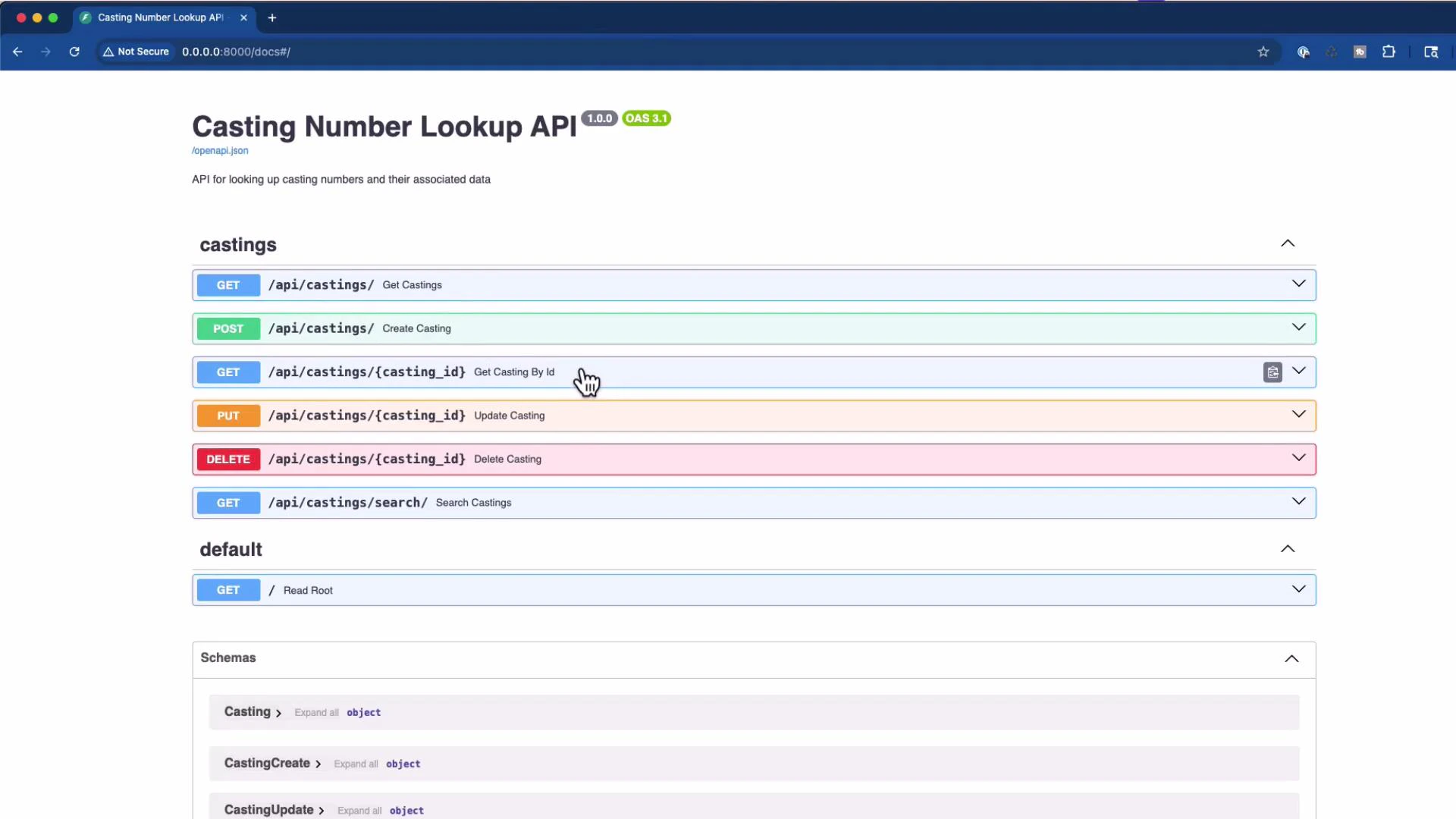
casting.pyafter the change - Verifying the result in Swagger/OpenAPI and with curl
- Notes on related dependencies (SQLAlchemy, Pydantic)
- FastAPI: https://fastapi.tiangolo.com/
- Swagger / OpenAPI UI: https://swagger.io/tools/swagger-ui/
- SQLAlchemy: https://www.sqlalchemy.org/
- Pydantic v2: https://docs.pydantic.dev/latest/
- File:
app/api/endpoints/casting.py - This is the starting point for the AI assistant; it includes GET, POST, PUT, DELETE, and SEARCH routes.
- POST /api/castings/ — create_casting
- PUT /api/castings/ — update_casting
- DELETE /api/castings/ — delete_casting
Minimal, cleaned
casting.py
- Remove the write route handlers and the now-unused schema imports (
CastingCreate,CastingUpdate). - Leaving only read/search routes keeps the OpenAPI surface minimal and easier to audit.
orm_mode, update your schema models to use from_attributes=True in Pydantic v2 model configs. See the Pydantic migration guide for details: https://docs.pydantic.dev/latest/
Best practices when using an AI assistant to refactor
- Start with a narrow context: provide the single target file (e.g.,
app/api/endpoints/casting.py) first. - Be explicit about the desired change (e.g., “remove POST/PUT/DELETE endpoints and unused schema imports”).
- If the AI needs more context, iteratively provide only the adjacent files it imports (schemas, models, and the DB dependency), not the entire repo.
- Re-run your tests and check the Swagger/OpenAPI UI after edits to confirm only the intended endpoints are exposed.
- Start small: give the AI one or a few files that are directly relevant to the change you want.
- Be explicit about what you want removed or changed (e.g., remove POST/PUT/DELETE).
- Verify that unused imports are removed (e.g., schema types you no longer use).
- Check Swagger/OpenAPI after the edit to confirm the intended surface is exposed.
- If needed, gradually add more context (related modules, terminal output, or recent git commits) until the AI has enough information.
Start with a single, focused file as context (e.g.,
casting.py). If the AI’s edits are incomplete, iteratively add only the adjacent files it imports (schemas, models, or database) rather than the entire repository. Smaller, relevant context often produces more reliable edits.