Guide to Cline’s Plan and Act modes for AI-driven planning versus automated execution, demonstrated by scaffolding a FastAPI SQLite casting lookup service.
In this lesson we cover Cline’s Plan and Act mode — a two-step, AI-guided workflow for structured development: think first, act second. Use Plan mode to analyze context and propose a sequence of steps without touching files. Switch to Act mode when you want Cline to perform the work (create/edit/delete files, run commands, run tests, or launch processes).Plan mode is ideal for design, architecture, and step-by-step strategies. Act mode is for execution and automation. Many developers use Plan-only workflows to preserve understanding; others prefer Act for speed. Choose the approach that fits your workflow.
Plan mode is for analysis, architecture, and step-by-step strategy (no file changes). Act mode performs the actual modifications and commands when you’re ready.
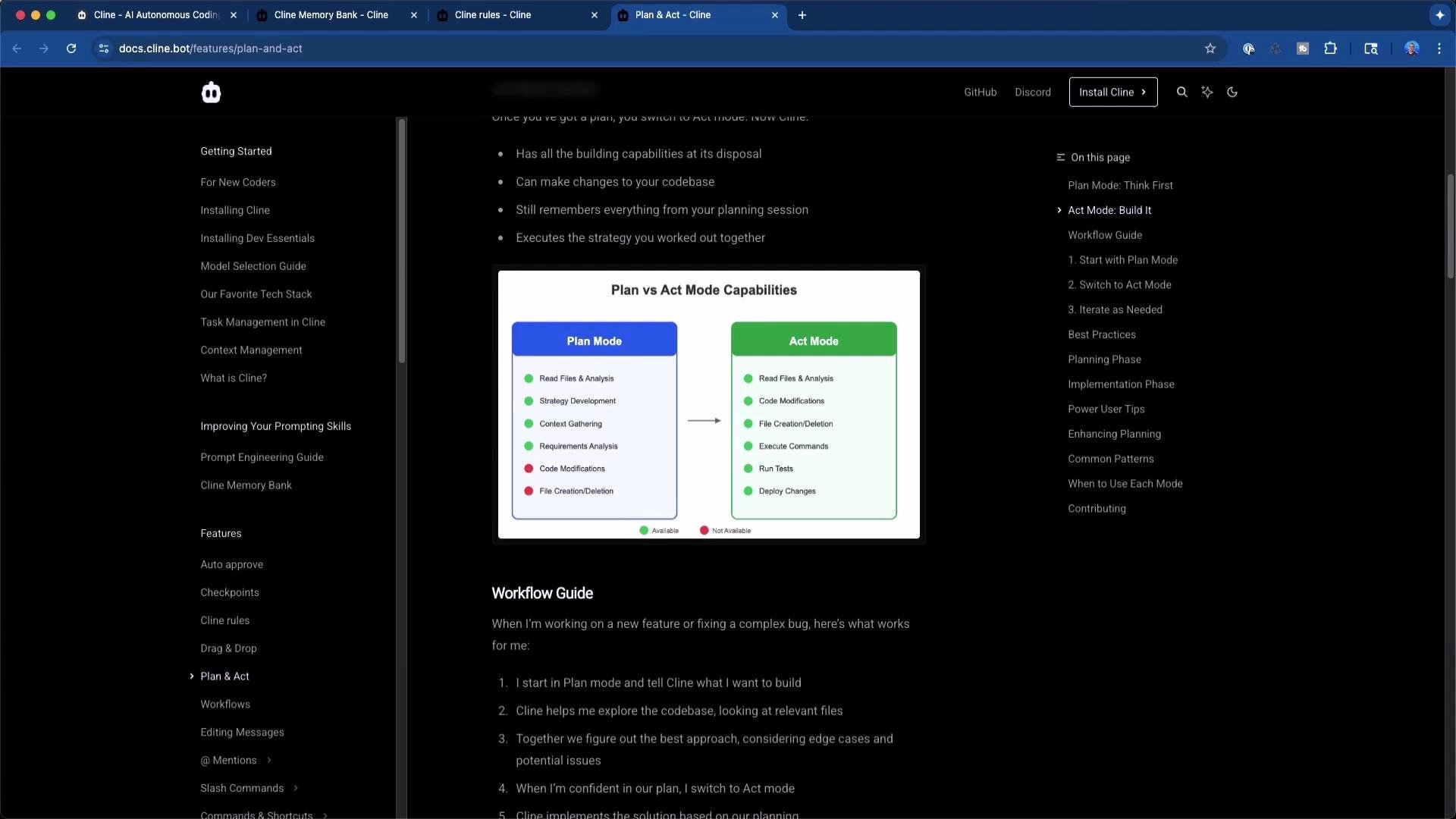
Plan vs Act — capabilities at a glance
Capability
Plan mode
Act mode
Read repository files and project context
✓
✓
Produce architecture and step-by-step plans
✓
✓
Modify code / create / delete files
✕
✓
Run shell commands, tests, or processes
✕
✓
Launch external tools (browsers, services)
✕
✓
Best for
Reviewing and designing changes
Applying and testing changes automatically
Demo walkthrough — summary and cleaned-up code snippetsThis walkthrough demonstrates using Plan mode to design a small project, then switching to Act mode to scaffold and implement it. The example builds a “casting number lookup” API:
Consumer sends an integer casting number; API returns metadata for that number.
Data persisted in SQLite.
Implementation in Python + FastAPI.
CSV import for bulk data.
Start in Plan mode and provide a clear task prompt. Example goals:
Build a FastAPI service to expose casting lookup endpoints.
Use SQLAlchemy with SQLite for persistence.
Provide a CSV import utility to populate the DB.
Add Pydantic schemas, basic validation, and tests.
A typical synthesized plan includes:
Create a standard FastAPI project layout.
Add SQLite + SQLAlchemy database setup.
Build SQLAlchemy models matching the CSV schema.
Create import script to ingest CSV into DB.
Implement API endpoints for list and single lookup.
Add tests and a small runner to execute them.
Review and approve the plan. In Act mode, Cline can create the skeleton and files. For example, the initial shell command to create a typical FastAPI layout:
Below are representative, cleaned-up code snippets that match the plan. Adjust fields and types to match your actual CSV.database.py — SQLite + SQLAlchemy setup
Copy
# app/db/database.pyfrom sqlalchemy import create_enginefrom sqlalchemy.orm import sessionmaker, declarative_base# SQLite database URL (relative file)SQLALCHEMY_DATABASE_URL = "sqlite:///./castings.db"# Create SQLAlchemy engine (allow multiple threads for simple apps)engine = create_engine( SQLALCHEMY_DATABASE_URL, connect_args={"check_same_thread": False})# Create SessionLocal classSessionLocal = sessionmaker(autocommit=False, autoflush=False, bind=engine)# Base class for declarative modelsBase = declarative_base()# Dependency to get DB sessiondef get_db(): db = SessionLocal() try: yield db finally: db.close()
models/casting.py — SQLAlchemy model (example fields; adapt to your CSV)
Copy
# app/models/casting.pyfrom sqlalchemy import Column, Integer, String, Float, Textfrom app.db.database import Baseclass Casting(Base): """SQLAlchemy model for casting data.""" __tablename__ = "castings" id = Column(Integer, primary_key=True, index=True) casting_number = Column(Integer, index=True, nullable=False) name = Column(String, index=True) description = Column(Text, nullable=True) material = Column(String, nullable=True) weight = Column(Float, nullable=True) dimensions = Column(String, nullable=True) manufacturer = Column(String, nullable=True) year_introduced = Column(Integer, nullable=True) # Add additional fields to match the CSV structure as needed
Caution: runaway loops and costWhen using Act mode iteratively, be mindful of automation loops and token consumption:
The assistant may repeatedly create or modify the same files if prompts or tests keep triggering new edits.
Large numbers of edits increase context size and token usage, raising costs.
Applying changes without reviewing diffs may introduce regressions.
Warning: Act mode can loop (creating tests to test tests, repeatedly editing files). Monitor the sequence of edits, review diffs, and limit or stop the workflow if it becomes repetitive to avoid unnecessary costs and regressions.
Practical tips and workflow preferences
Prefer Plan mode when you want to review and understand every change; export the plan and implement it manually or selectively accept Act steps.
If using Act mode, inspect diffs, run tests frequently, and approve batches of related changes rather than single-file edits in isolation.
Disable intrusive inline suggestions in your editor; trigger the assistant intentionally when ready.
If the model repeatedly fails a step, step in manually and consult resources like Stack Overflow or official docs for the specific library.
Wrap-upFrom a single planning prompt, Cline can scaffold:
A FastAPI application with routes and middleware.
Database layer using SQLAlchemy + SQLite.
Models and Pydantic schemas for validation.
A CSV import utility to populate the database.
Tests, runners, and CI-friendly scripts.
This lesson showed the distinction between producing a thoughtful design (Plan) and executing it (Act). Use Plan mode to shape architecture and Act mode to accelerate implementation — combining both yields the best balance of control and speed.Links and references
To continue: experiment with prompt engineering, refine the CSV-to-model mapping, and extend the casting lookup with search, filtering, and pagination.