

Push-based deployments (CI/CD-driven)
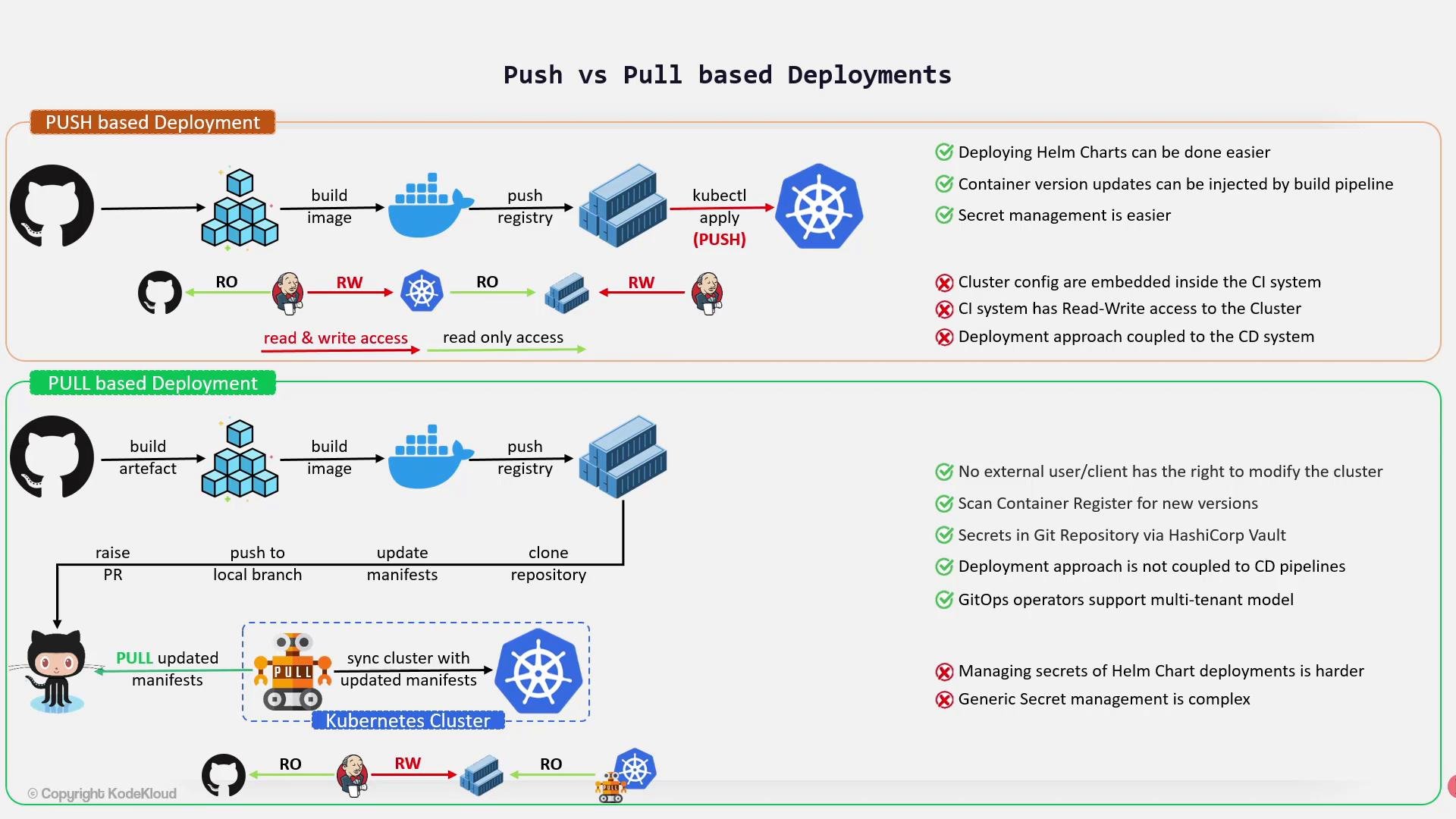
In a push-based model the CI/CD system builds the application, publishes container images to a registry, and then actively pushes the resulting manifests or executeskubectl/helm commands against the cluster to deploy changes.
Typical access patterns:
- CI/CD system:
- Read-only access to the Git repo (source code and manifests).
- Read-write access to the container registry (to push images).
- Read-write access to the Kubernetes API (to apply manifests or run
kubectl/helm).
- Kubernetes cluster:
- Pulls images from the container registry (read-only to registry).
- Flexible tooling and integrations (e.g., Jenkins, GitHub Actions) with direct
kubectl/Helm support. - Pipelines can inject secrets stored in the CI system to simplify deployments.
- Centralized control: build artifacts and deployment jobs live together in the CI environment.
- Deployment logic is coupled to the CI system; migrating CI platforms often requires reimplementing deployment steps.
- CI must hold cluster credentials (a
kubeconfigor token) with write privileges, increasing attack surface if the CI system is compromised. - Managing multi-tenant or team-scoped deployments from a single CI pipeline becomes complex.
Pull-based deployments (GitOps)
Pull-based deployments, often called GitOps, move the act of applying changes into the cluster. A GitOps operator (for example Argo CD or Flux) runs inside Kubernetes and reconciles the cluster state against a declared desired state stored in Git or a registry. The operator watches for manifest changes or new image tags and applies updates automatically. In a pull-based model:- CI/CD still builds images and pushes them to the container registry (read-write to registry).
- The in-cluster operator has read access to Git (or the registry) and the permissions necessary to apply changes to the cluster — external CI systems do not directly write to the Kubernetes API.
- No external system needs routine write access to the Kubernetes API.
- Decouples deployment from CI: any CI system can build and push artifacts; the cluster decides when to apply them.
- Reduces the need to store cluster write credentials outside the cluster.
- Easier multi-tenancy: operators can sync different repos to different namespaces or clusters.
- Declarative infrastructure: manifests and encrypted secrets live in Git and are reconciled by the operator. Operators can also detect new image tags and drive automated rollouts.
- Secrets must be encrypted before committing to Git (tools such as Mozilla SOPS, Bitnami Sealed Secrets, or integration with HashiCorp Vault are common solutions). An operator or sidecar controller needs the ability to decrypt or inject secrets at deploy time.
- Rendering templated artifacts (for example Helm charts) can require an extra rendering step or an operator extension to supply secret values securely prior to applying manifests.
Avoid placing long-lived cluster admin credentials in your CI system. If CI must access the cluster, prefer short-lived tokens, least-privilege RBAC, and strong auditing.
Choose push-based workflows when you need tight control from the CI runner and simple secret injection from the pipeline. Choose pull-based (GitOps) workflows when you want declarative, cluster-driven reconciliation, better separation of concerns, and fewer external systems holding cluster write access.
Quick comparison
References and further reading
- GitOps — The Vendor Neutral Guide
- Argo CD Documentation
- Flux CD
- Mozilla SOPS
- Bitnami Sealed Secrets
- HashiCorp Vault