

- Slack -> KAgent: a user invokes a Slack slash command; the Slack bot forwards the query to a KAgent via the A2A protocol; the agent runs tools and returns results to Slack.
- KAgent -> Slack: the agent proactively posts notifications to a Slack channel using a Slack MCP server.
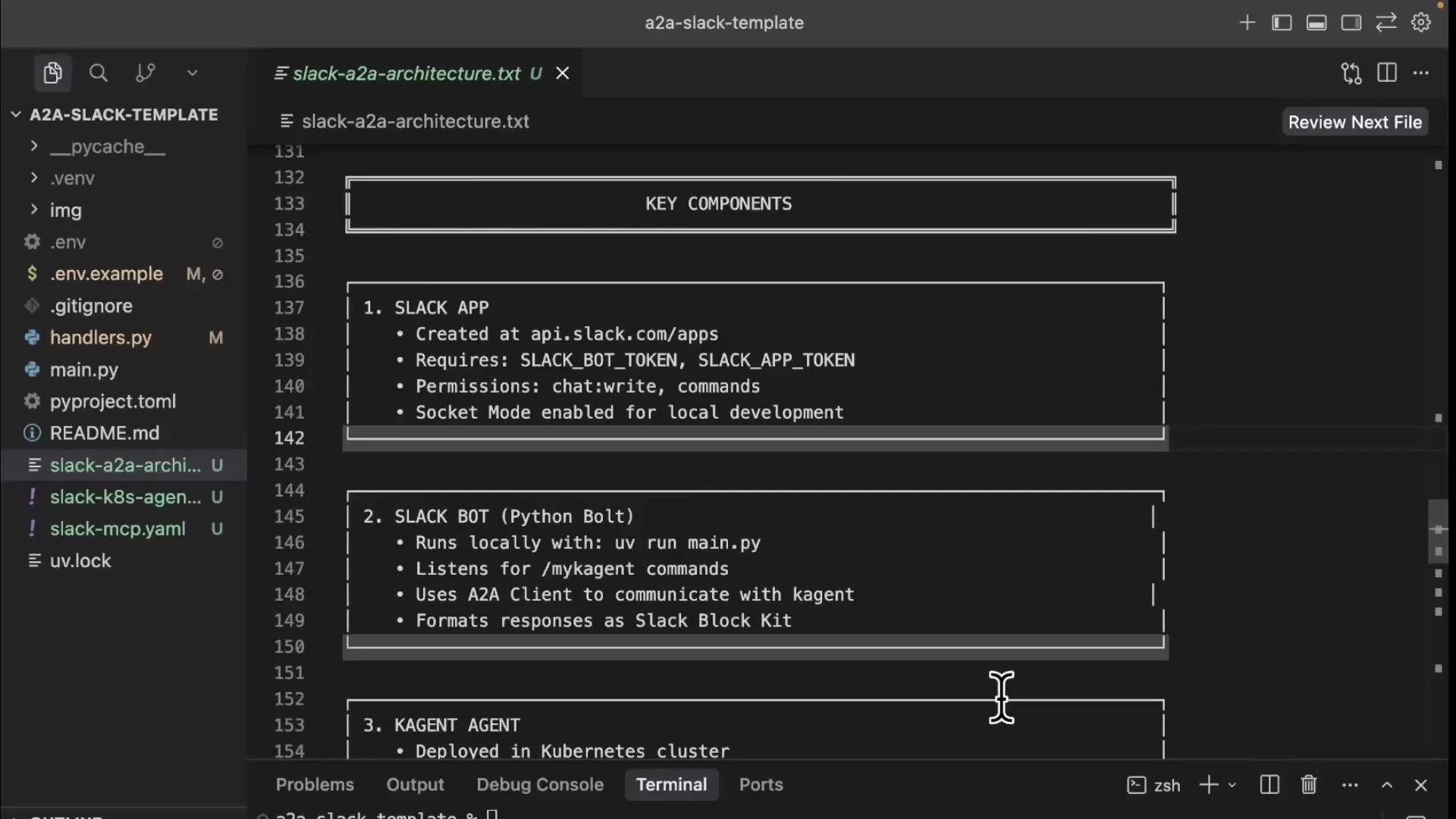
This article does not cover Slack app creation specifics because that depends on your organization’s Slack configuration. At a minimum you will need a bot token and an app token with appropriate scopes (
chat:write and commands) and Socket Mode enabled for local development.Key components (overview)
Notes:
- Use backticks for endpoints that contain braces (e.g.,
/api/a2a/{namespace}/{agent-name}/). - This example uses Socket Mode for the local Slack bot with Python Bolt.
Local connection and setup (development flow)
A typical local development flow:- Port-forward the KAgent controller so your local machine can reach the A2A endpoint:
- Set the A2A URL environment variable (pointing to the agent you will deploy). Use backticks when copying the path:
- Start the Slack bot locally (example for a uvicorn-based app):
- Test from Slack using the configured slash command, e.g.:
Environment variables (.env example)
Store Slack tokens and the A2A URL in a.env file or secret manager:
Do not commit tokens or secrets to source control. Use Kubernetes Secrets or a secret manager for production credentials. Rotate tokens if they are accidentally exposed.
Slack -> KAgent request flow (high-level)
- USER (Slack) types a slash command (e.g.,
/mykagent "show me pods"). - Slack delivers the command event (via Socket Mode) to the local Slack bot.
- SLACK BOT (Python Bolt) extracts the query and performs an HTTP POST to the A2A endpoint configured in
KAGENT_A2A_URL. - The A2A request hits the KAgent controller (port-forwarded to localhost).
- The controller routes the request to the appropriate agent pod.
- The agent processes the query using its LLM, chooses and executes tools (e.g., Kubernetes resource tools), and crafts a response.
- The agent returns the response via A2A; the Slack bot posts formatted output back to the Slack channel.
Running the bot and deploying the agent
Start the Slack bot locally:Example Slack query -> agent response
User input:KAgent -> Slack (Agent-initiated messages)
Agents can proactively post to Slack channels by calling Slack MCP tools. Typical flow:- Agent determines a message/alert should be posted to Slack.
- Agent calls a Slack MCP tool such as
send_message_to_slackorslack_post_message. - The Slack MCP server performs an HTTP POST to Slack API
chat.postMessage. - The message appears in the configured Slack channel.
Deploying and configuring the Slack MCP server
A Slack MCP server is anMCPServer custom resource. A minimal manifest looks like this:
slack_post_message, slack_get_channel_history, and slack_add_reaction are available to agents. Confirm visibility in the KAgent UI.
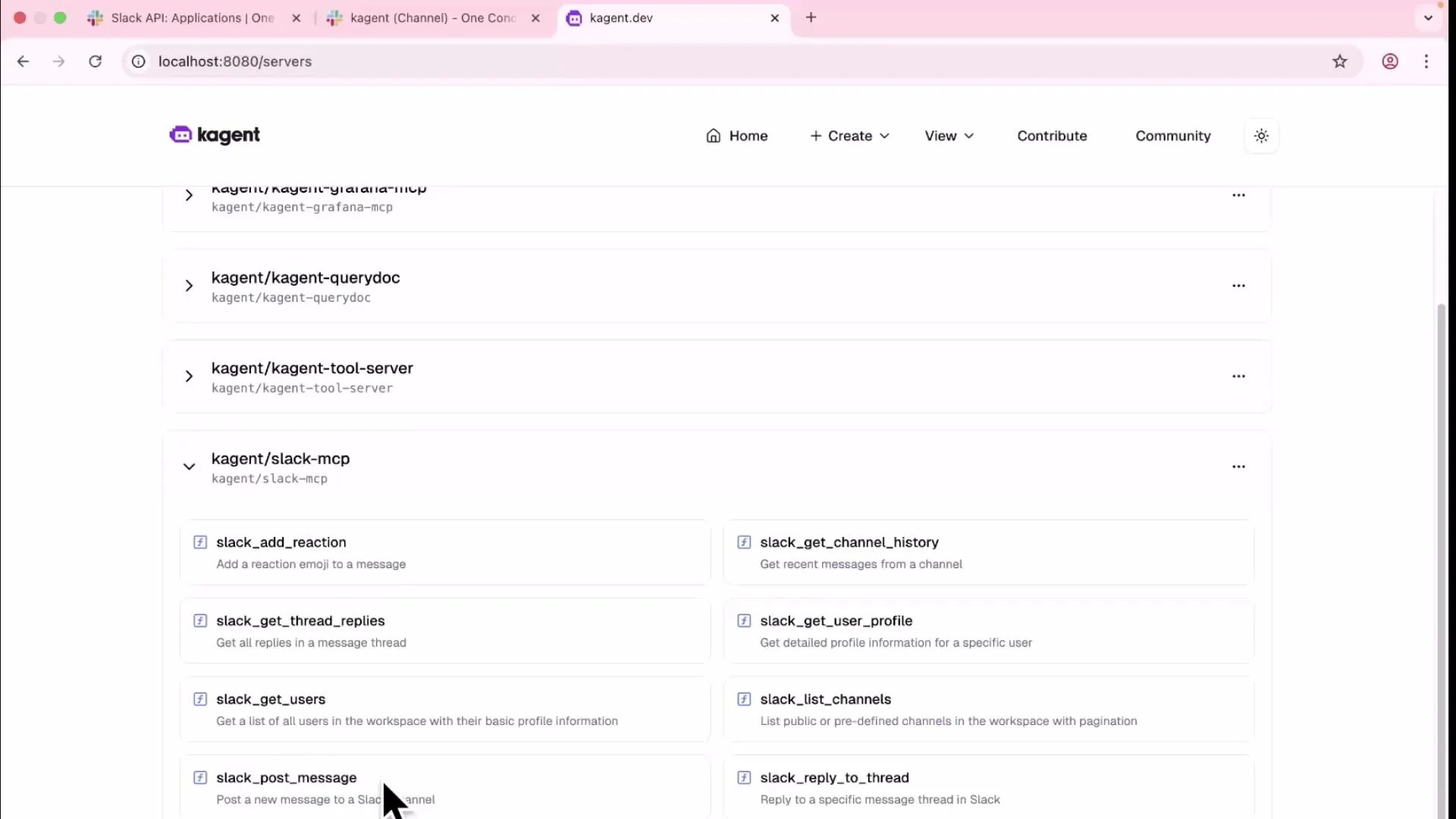
Granting the agent Slack posting permissions
Steps to allow agents to post into Slack:- Create a Kubernetes Secret with Slack credentials (bot token, team ID, channel IDs).
- Update your agent manifest to include Slack MCP tools (e.g.,
slack_post_message) in the agent’s tool list. - Apply the updated agent manifest and wait for KAgent to reconcile. It may take a minute for new tools to become available.
get_resource_information(fetch deployments)slack_post_message(post formatted message to Slack channel)
Quick reference commands
Closing
This lesson covered a two-way integration pattern between Slack and KAgent:- Slack -> KAgent: Slack commands are forwarded to agents via the A2A protocol; agents execute tools and return results back to Slack.
- KAgent -> Slack: Agents post messages or alerts to Slack by invoking MCP tools exposed by a Slack MCP server.
Links and references
- Slack API: chat.postMessage
- Socket Mode (Slack)
- Kubernetes Documentation
- KAgent (project docs) (check your cluster’s docs for KAgent-specific manifests)