Pod Definition Example
Below is an example of a Pod definition file. This Pod requires 10 CPU units and will only be scheduled on a node that meets or exceeds that capacity.High-priority settings ensure that Pods with this classification are placed at the front of the scheduling queue.
Scheduling Phases
The Pod scheduling process comprises three main phases:-
Filter Phase:
In this phase, the scheduler eliminates nodes that do not satisfy the Pod’s resource requirements. For instance, if the first two nodes do not have the needed 10 CPU units available, they are filtered out. -
Scoring Phase:
Nodes that pass the filter phase are then scored. The scheduler assigns each node a score based on factors such as the remaining CPU after allocating the Pod’s requirements. For example, if one node has 2 CPU units remaining while another has 6, the latter will receive a higher score. -
Binding Phase:
In the final phase, the Pod is assigned to the node with the best score during the binding process.
Key Plugins in the Scheduling Process
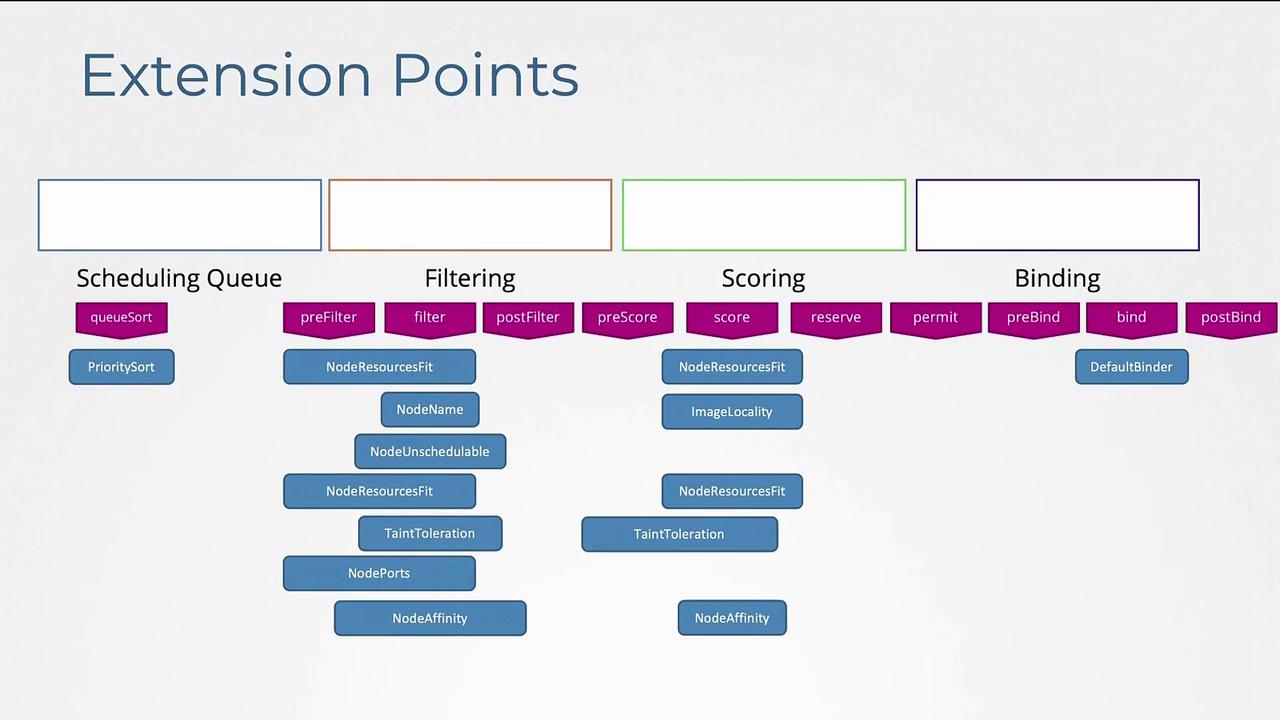
Plugins are integral to the Kubernetes scheduling process. Here are some examples:-
Priority Sort Plugin:
During the scheduling queue phase, this plugin orders Pods based on their assigned priority. -
Node Resources Fit Plugin:
This plugin is active during the filter phase to exclude nodes lacking sufficient resources. Additionally, during the scoring phase, this plugin re-evaluates nodes based on free resources. -
Node Unschedulable Plugin:
This plugin ensures that nodes marked as unschedulable do not have Pods assigned. For example, running the command:confirms that the node unschedulable plugin prevents Pod scheduling on such nodes. -
Image Locality Plugin:
This plugin is a soft preference during the scoring phase, favoring nodes that already contain the required container image. -
Default Binder Plugin:
In the binding phase, this plugin finalizes the Pod-to-node assignment.
Using Multiple Scheduling Profiles
Kubernetes’ extensibility is further demonstrated by its support for multiple scheduler profiles within a single scheduler binary. This feature, introduced in Kubernetes 1.18, simplifies process maintenance and reduces race conditions by eliminating the need for separate scheduler binaries (such as default scheduler, my-scheduler, and my-scheduler2). Consider the following configuration files that define separate scheduler configurations with unique scheduler names:For more information on multi-scheduling profiles, refer to the Kubernetes enhancement proposal CAP-1451 and other related scheduling framework articles.