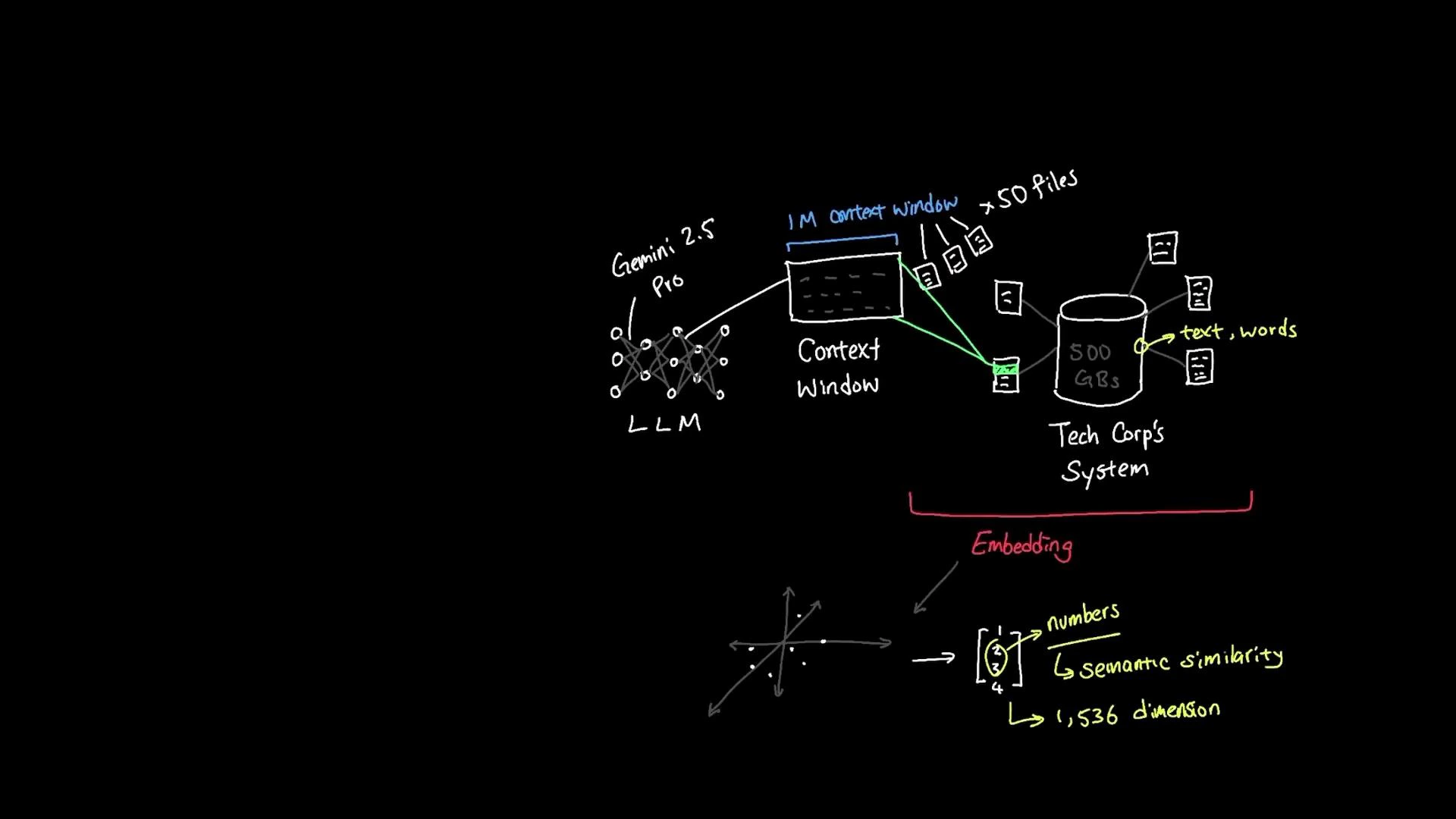
Embeddings convert text meaning into numeric vectors so machines can compare semantics rather than surface words. Instead of indexing raw keywords, embedding-based systems map words, phrases, and documents into a high-dimensional space where semantically similar items lie close together. This makes tasks like semantic search, clustering, and recommendation far more robust to paraphrase and synonyms. For example, the phrases “employee vacation policy” and “staff time-off guidelines” use different wording but convey the same concept. An embedding model encodes both into vectors that occupy nearby positions in the embedding space, reflecting their semantic similarity. An embedding model accepts text and returns a numeric vector (often with hundreds or thousands of dimensions — e.g., 1,536). Similar meaning produces similar numeric patterns; distance or similarity measures such as cosine similarity or dot product are used to identify related items. Words like “vacation” and “holiday” typically produce embeddings that are mathematically close. When an employee asks, “Can I wear jeans to work?”
A hand-drawn schematic showing an LLM (labeled "Gemini 2.5 Pro") using a large context window to retrieve relevant files from a tech company's 500 GB document store. Below that is a depiction of embeddings — text mapped to numerical vectors in a semantic similarity space (noted as 1,536 dimensions).
The typical retrieval pipeline works like this:
  1. User query -> embed: Convert the user’s question into an embedding vector.
  2. Vector search: Compare the query embedding against stored document embeddings in a vector database (vector store) to find nearest neighbors.
  3. Context assembly: Retrieve the top matching documents (e.g., HR policies, dress-code documents).
  4. LLM grounding: Provide those retrieved documents as context to a large language model so it can generate a grounded answer — returning responses based on meaning and relevant documents rather than only keyword matches.
Practical benefits for an organization (e.g., TechCorp):
  • Semantic search across a large document corpus (e.g., 500 GB) to find intent-matching documents.
  • Robustness to paraphrase and synonyms: employees get correct answers even if they ask questions differently.
  • Better relevance ranking by combining vector similarity with metadata and filters (date, author, department).
Similarity metrics and when to use them:
MetricUse CaseNotes
Cosine similarityGeneral semantic similarityRobust to vector magnitude; widely used for embeddings
Dot productWhen using models that use attention scoresScales with vector norms; useful when magnitude encodes relevance
Euclidean distanceClustering and nearest neighbor visualizationSensitive to scaling; less common for normalized embeddings
Normalize embeddings (L2 normalization) if you plan to use cosine similarity — this simplifies comparisons and often improves search quality. Combine vector similarity with metadata filters (time, department) to reduce false positives.
A concise example flow for the question “Can I wear jeans to work?”:
  • Convert the question to an embedding.
  • Query the vector store to retrieve top N documents about attire, dress code, and HR policies.
  • Provide those documents as context (prompting context window) to the LLM so it can answer with citations or specific policy language.
  • Optionally, re-rank or filter results by document freshness or source trustworthiness.
Links and references Further reading
  • Semantic search: architectures that combine embeddings + vector DB + LLMs.
  • Vector database options: Pinecone, Milvus, Weaviate, and Faiss.
  • Prompting strategies: how to assemble retrieved documents into LLM prompts for grounded answers.

Watch Video