This guide walks through building stateful AI workflows using LangGraph and related tools. You’ll set up a Python environment, create nodes that transform shared state, connect them into directed graphs, add routers for conditional routing, integrate tools (calculator and web search), and combine everything into a simple research agent. Table of contents
  • Environment setup
  • Task overview
  • Task 1 — Imports & minimal state
  • Task 2 — Simple nodes
  • Task 3 — Wiring nodes with edges
  • Task 4 — Multi-step flow (outline → draft → review)
  • Task 5 — Conditional routing (routers)
  • Task 6 — Tool integration (calculator)
  • Task 7 — Research agent: combining tools (DDGS + calculator + LLM)
  • Architecture diagrams
  • Integrating external systems with self-describing interfaces
  • Further exploration
  • Links & references
Environment setup Prepare a virtual environment and install the runtime dependencies used in these examples: LangGraph, LangChain, an OpenAI wrapper, and the DuckDuckGo search client (ddgs). After installation, optionally run a verification script if you have one.
cd /root
source /root/venv/bin/activate

pip install langgraph langchain langchain-openai ddgs
# Optionally run a verification script if provided:
# python3 /root/code/verify_setup.py
Activate the virtual environment in every new shell where you run these examples. Use a requirements file or pinned versions in production to ensure reproducible installs.
Task overview
TaskGoal
Task 1Verify imports and define a minimal State TypedDict
Task 2Implement simple node functions that return partial state updates
Task 3Connect nodes in a StateGraph and execute a linear workflow
Task 4Build a multi-step content pipeline (outline → draft → review)
Task 5Add routers for conditional branching
Task 6Integrate a tool (calculator) safely
Task 7Combine a calculator, web search (ddgs), and an LLM into a research agent
Task 1 — Understanding imports and basic state definition Start by importing the core classes from LangGraph and creating a minimal State type used by the graph runtime.
from langgraph.graph import StateGraph, END
from typing import TypedDict, List

print("🍕 Task 1: Understanding Imports\n")

class State(TypedDict):
    messages: List[str]

# Test that imports work by constructing a StateGraph
print("Testing imports...")
try:
    test_graph = StateGraph(State)
    print("✅ StateGraph imported and constructed successfully!")
except Exception as e:
    print("❌ Error constructing StateGraph:", e)
What to remember
  • StateGraph represents the workflow and enforces the shape of the shared state.
  • END is used to mark termination nodes in more advanced flows.
  • TypedDict helps document and type-check the keys passed across nodes.
Task 2 — Creating simple nodes Nodes are plain Python functions that accept the global state and return only the partial state updates they produce. Below are two example nodes: greet_node and enhance_node. We also show how to merge returned partial state with the running state (the graph runtime normally handles this merge).
import time
from typing import TypedDict

class State(TypedDict):
    name: str
    greeting: str

def greet_node(state: State):
    """Create a greeting from the name."""
    print("⏳ Processing in greet_node...")
    time.sleep(1)  # Simulate processing time
    greeting = f"Hello, {state['name']}!"
    print("Node returned:", {"greeting": greeting})
    return {"greeting": greeting}

def enhance_node(state: State):
    """Enhance the greeting with a follow-up question."""
    print("⏳ Processing in enhance_node...")
    time.sleep(1)
    enhanced = state["greeting"] + " How are you?"
    print("Node returned:", {"greeting": enhanced})
    return {"greeting": enhanced}

# Test nodes directly (no graph)
initial_state: State = {"name": "Alice", "greeting": ""}
g = greet_node(initial_state)
state_after_greet = {**initial_state, **g}
print("State after greet:", state_after_greet)

h = enhance_node(state_after_greet)
final_state = {**state_after_greet, **h}
print("Final state:", final_state)
Key points
  • Nodes return only the fields they update (partial state).
  • The graph runtime merges these partial updates into the running state.
Task 3 — Wiring nodes with edges Use StateGraph to compose nodes into directed workflows. The graph runtime invokes nodes following the topology you define via edges and entry points.
from langgraph.graph import StateGraph, END
from typing import TypedDict
import time

class State(TypedDict):
    name: str
    greeting: str

def greet_node(state: State):
    print("⏳ Processing in greet_node...")
    time.sleep(1)
    return {"greeting": f"Hello, {state['name']}!"}

def enhance_node(state: State):
    print("⏳ Processing in enhance_node...")
    time.sleep(1)
    return {"greeting": state["greeting"] + " How are you?"}

# Build a graph and add nodes/edges
graph = StateGraph(State)
graph.add_node("greet", greet_node)
graph.add_node("enhance", enhance_node)
graph.add_edge("greet", "enhance")
graph.set_entry_point("greet")

# Invoke the graph with an initial state
initial_state: State = {"name": "Alice", "greeting": ""}
result = graph.invoke(initial_state)
print("Graph result:", result)
This constructs a simple linear workflow: greetenhance. The graph runtime handles ordering and state merging. Task 4 — Multi-step flow (draft & review) Workflows often have several transformation steps. The following example shows an outlinedraftreview pipeline, where each node adds or refines pieces of the document.
from langgraph.graph import StateGraph
from typing import TypedDict
import time

class State(TypedDict):
    topic: str
    outline: str
    draft: str
    final: str

def outline_node(state: State):
    print("📝 Creating outline...")
    time.sleep(1)
    return {"outline": f"Outline for '{state['topic']}':\n1. Introduction\n2. Main points\n3. Conclusion"}

def draft_node(state: State):
    print("✍️ Writing draft from outline...")
    time.sleep(1)
    return {"draft": f"Draft: Expanding on the outline for '{state['topic']}' based on:\n{state['outline']}"}

def review_node(state: State):
    print("🔍 Reviewing draft...")
    time.sleep(1)
    return {"final": f"Final: Reviewed and polished content about '{state['topic']}'. Ready to publish!"}

graph = StateGraph(State)
graph.add_node("outline", outline_node)
graph.add_node("draft", draft_node)
graph.add_node("review", review_node)

graph.add_edge("outline", "draft")
graph.add_edge("draft", "review")
graph.set_entry_point("outline")

initial_state: State = {"topic": "LangGraph Basics", "outline": "", "draft": "", "final": ""}
result = graph.invoke(initial_state)

print("=" * 50)
print("WORKFLOW RESULTS:")
print("Topic:", result["topic"])
print("Outline:", result["outline"])
print("Draft:", result["draft"][:80] + "..." if len(result["draft"]) > 80 else result["draft"])
print("Final:", result["final"])
print("=" * 50)
Benefits of multi-step flows
  • Encourages single-responsibility nodes.
  • Easier debugging and targeted retries.
  • State captures intermediate artifacts useful for observability.
Task 5 — Conditional routing (routers) Routers enable state-driven branching: inspect the state and return the next node name. This pattern supports dynamic workflows such as choosing between a quick answer or a detailed response.
from langgraph.graph import StateGraph
from typing import TypedDict
import time

class State(TypedDict):
    query: str
    query_length: str  # "short" or "detailed"
    response: str

def classify_length(state: State):
    print("🔍 Classifying query length...")
    time.sleep(0.5)
    qlen = "short" if len(state["query"]) < 30 else "detailed"
    return {"query_length": qlen}

def quick_answer_node(state: State):
    print("⚡ Providing a quick answer...")
    return {"response": f"Quick answer to: {state['query']}"}

def detailed_answer_node(state: State):
    print("🧩 Providing a detailed answer...")
    return {"response": f"Detailed response to: {state['query']}"}

def router(state: State):
    if state["query_length"] == "short":
        return "quick_answer"
    return "detailed_answer"

graph = StateGraph(State)
graph.add_node("classify_length", classify_length)
graph.add_node("quick_answer", quick_answer_node)
graph.add_node("detailed_answer", detailed_answer_node)
graph.add_router("classify_length", router)  # router decides next node after classification

graph.set_entry_point("classify_length")

res = graph.invoke({"query": "What is Python?", "query_length": "", "response": ""})
print("Query:", res["query"])
print("Route taken:", res["query_length"])
print("Response:", res["response"])
Routers let you build flexible, branchable workflows driven by runtime state. Task 6 — Tool integration (calculator) Tools are nodes that encapsulate specialized capabilities. The example below demonstrates a simple calculator tool and a detector that decides whether to use it.
from langgraph.graph import StateGraph
from typing import TypedDict
import math

class State(TypedDict):
    query: str
    is_math: bool
    result: str

def math_detector(state: State):
    # Very simple heuristic; real systems would use an LLM classifier
    is_math = any(ch.isdigit() for ch in state["query"]) and any(op in state["query"] for op in ["+", "-", "*", "/"])
    return {"is_math": is_math}

def calculator_tool(state: State):
    print("🧮 Processing with calculator...")
    try:
        # WARNING: Using eval is dangerous; in production use a safe math parser
        answer = str(eval(state["query"], {"__builtins__": {}}, {}))
    except Exception as e:
        answer = f"Error calculating expression: {e}"
    return {"result": answer}

def default_answer(state: State):
    return {"result": "This is not a math question. Please ask a calculation!"}

def router(state: State):
    return "calculator" if state["is_math"] else "default"

graph = StateGraph(State)
graph.add_node("math_detector", math_detector)
graph.add_node("calculator", calculator_tool)
graph.add_node("default", default_answer)
graph.add_router("math_detector", router)
graph.set_entry_point("math_detector")

# Example: non-math
res = graph.invoke({"query": "What is the weather today?", "is_math": False, "result": ""})
print("Query:", res["query"])
print("Result:", res["result"])

# Example: math
res2 = graph.invoke({"query": "2 + 2 * 3", "is_math": False, "result": ""})
print("Query:", res2["query"])
print("Result:", res2["result"])
Never use eval on untrusted input in production. Replace it with a safe mathematical expression evaluator or sandboxed execution environment.
Task 7 — Research Agent: combining tools (DDGS + calculator + LLM) Combine classification, routing, a calculator tool, and a DuckDuckGo search client to build a small research agent. This example shows how to integrate external tools and orchestrate them with LangGraph.
import os
import time
from typing import TypedDict
from ddgs import DDGS
from langchain.chat_models import ChatOpenAI  # or other LLM wrapper
from langgraph.graph import StateGraph

class State(TypedDict):
    query: str
    query_type: str  # "math" or "search"
    result: str

# Initialize LLM (example)
llm = ChatOpenAI(
    model_name=os.getenv("OPENAI_MODEL", "gpt-4o-mini"),
    temperature=0.7,
    openai_api_key=os.getenv("OPENAI_API_KEY"),
    openai_api_base=os.getenv("OPENAI_API_BASE")
)

# Initialize DuckDuckGo search client
ddgs = DDGS()

def classify_query(state: State):
    """Classify query as math or search using simple heuristics or LLM."""
    print("🔍 Analyzing query type...")
    time.sleep(0.5)
    # Simple heuristic for demo; replace with LLM classification as needed
    q = state["query"].lower()
    is_math = any(ch.isdigit() for ch in q) and any(op in q for op in ["+", "-", "*", "/"])
    return {"query_type": "math" if is_math else "search"}

def router(state: State):
    if state["query_type"] == "math":
        return "calculator_tool"
    return "search_tool"

def calculator_tool(state: State):
    print("🧮 Calculator tool invoked for:", state["query"])
    try:
        answer = str(eval(state["query"], {"__builtins__": {}}, {}))
    except Exception as e:
        answer = f"Error calculating expression: {e}"
    return {"result": f"Answer: {answer}"}

def search_tool(state: State):
    print("🔎 Searching the web for:", state["query"])
    # Perform a simple search and collect top results
    results = []
    try:
        with ddgs as client:
            for r in client.search(state["query"], max_results=3):
                results.append(f"- {r.get('title', '<no title>')}: {r.get('body', '')}")
    except Exception as e:
        results = [f"Search error: {e}"]
    content = "Search results:\n" + "\n".join(results)
    return {"result": content}

# Build graph
graph = StateGraph(State)
graph.add_node("classify", classify_query)
graph.add_node("calculator_tool", calculator_tool)
graph.add_node("search_tool", search_tool)
graph.add_router("classify", router)
graph.set_entry_point("classify")

# Test: math query
math_test = {"query": "12 / (2 + 4)", "query_type": "", "result": ""}
print("\nTEST 1: Math query")
res_math = graph.invoke(math_test)
print("Result:", res_math["result"])

# Test: search query
search_test = {"query": "What is LangGraph used for?", "query_type": "", "result": ""}
print("\nTEST 2: Search query")
res_search = graph.invoke(search_test)
print("Result:", res_search["result"][:300], "...")
This research agent demonstrates:
  • Classification of queries (heuristic or LLM-based)
  • Conditional routing to specialized tools
  • Integration with external search (DuckDuckGo via ddgs)
  • Orchestration of tools and LLMs in a single StateGraph
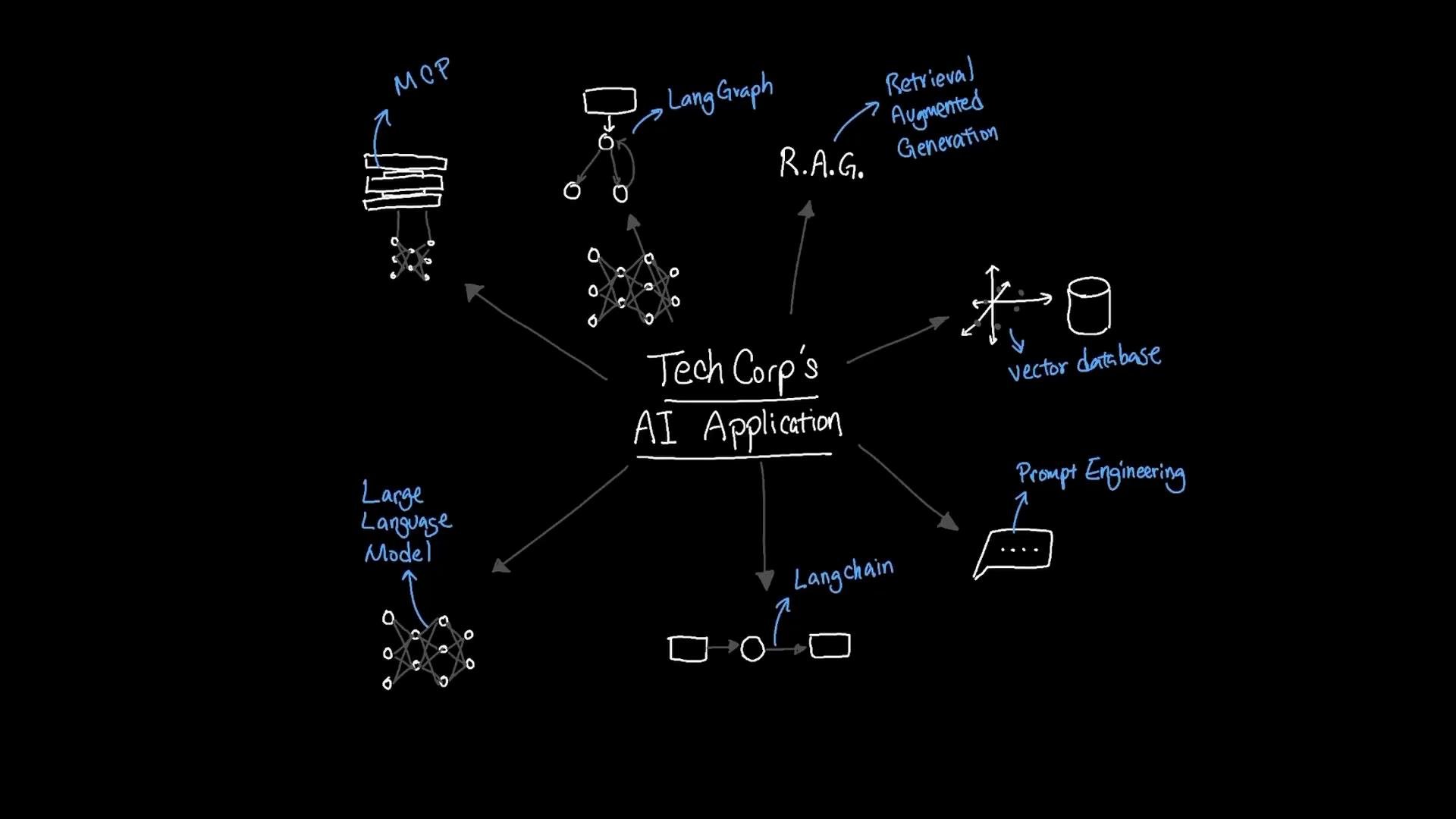
A hand-drawn blackboard-style diagram titled "Tech Corp's AI Application" with a central node and arrows pointing to components like Large Language Model, R.A.G. (Retrieval Augmented Generation), vector database, LangChain, LangGraph, prompt engineering, and related modules. The sketch uses white and blue handwriting and simple icons to represent each component.
Integrating external systems with self-describing interfaces TechCorp’s internal AI document assistant works well for internal content, but real-world deployments need access to external systems such as customer databases, ticketing systems, inventory, and third-party APIs. Building a custom adapter for each system quickly becomes costly and brittle. A model-facing, self-describing interface reduces this friction. Instead of exposing raw endpoints tied to low-level implementation details, these interfaces expose machine-readable capability descriptions that agents can query and invoke. Advantages include:
  • Easier discovery of available actions and required inputs
  • Reduced brittle, hand-coded adapter logic
  • Safer orchestration across heterogeneous systems
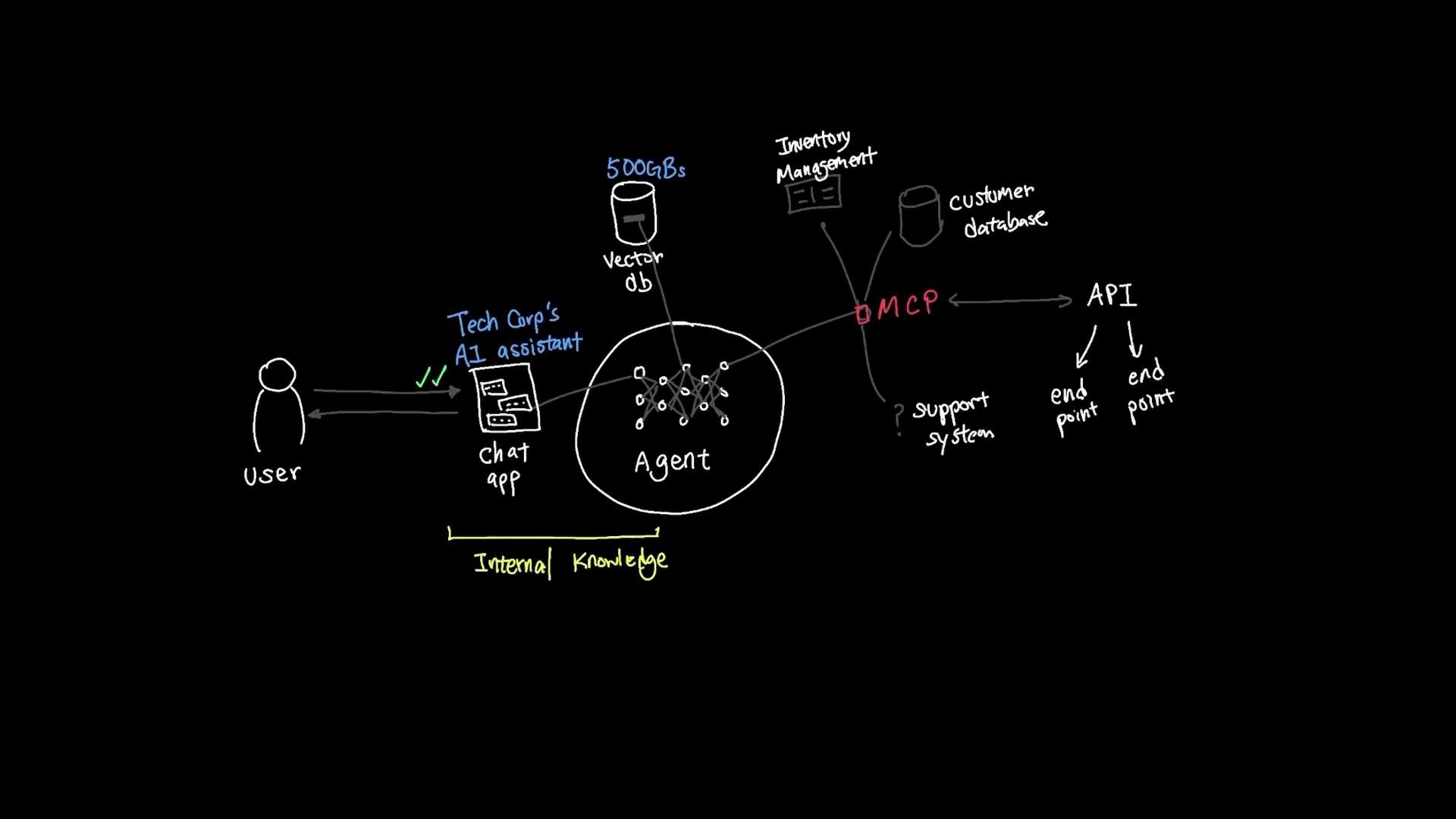
In practice, a self-describing interface might provide an OpenAPI-like schema, examples of usage, and type-safe I/O contracts the agent can read at runtime to plan its interactions.
A hand-drawn architecture diagram showing a user chatting with "Tech Corp's AI assistant" through a chat app. The assistant's agent links to a vector database and external systems (customer DB, inventory management, APIs) via an intermediary labeled "MCP."
Best practices when integrating external tools
  • Use machine-readable schemas (OpenAPI, JSON Schema) to let agents discover capabilities.
  • Implement authentication, role-based access control, and audit logging.
  • Provide clear error semantics so agents can retry or escalate correctly.
  • Validate and sanitize inputs; never run untrusted code directly.
Further exploration
  • Replace simple heuristics with LLM-based classifiers to improve routing decisions.
  • Use safe math parsers (e.g., asteval, numexpr, or a dedicated math library) rather than eval.
  • Add caching or vector search (RAG) to improve performance and relevance for search-oriented tools.
  • Implement observability (tracing, logs, per-node metrics) for reliability and debugging.
  • Experiment with multi-agent orchestration and cross-graph communication patterns.
Links and references Happy building!

Watch Video

Practice Lab