

How the model processes requests (brief recap)
- The model you interact with is a frozen artifact created at training time: its parameters (the billions of learned weights) are fixed after training. What you type doesn’t change those weights.
- Models have no built-in, persistent memory across requests. Each request is handled independently: the model starts from a blank slate unless the application supplies prior context.
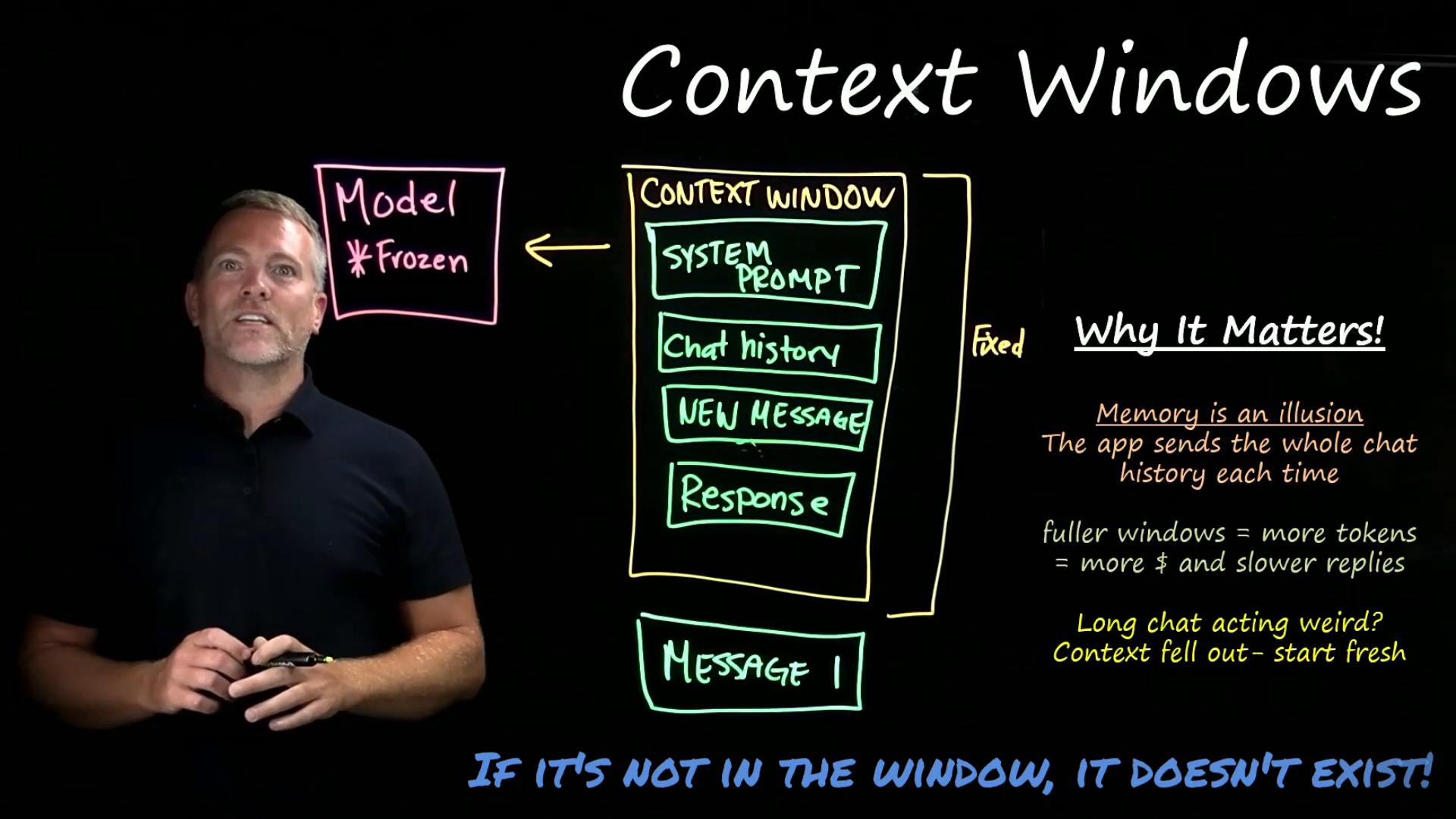
- The appearance of “memory” in chat interfaces comes from the application assembling prior messages and other materials into a single request for the model. That assembled content is called the context window.
What the context window is
- The context window is the model’s working memory for one request. Everything the model can “read” must be inside this window.
- Capacity is measured in tokens (the same token units used during training).
- Typical sizes vary by model: common windows are tens to hundreds of thousands of tokens (for example,
128000or200000tokens), and some experimental models extend toward a million tokens. Those numbers sound large, but token usage accumulates quickly when you include long histories, system prompts, and long inputs.
What goes inside the context window
How overflow is handled
- The model only reads what’s inside the context window—nothing outside of it. It can’t access files, past chats, or external systems unless those tokens are provided in the same request.
- If the total tokens (system prompt + history + new message + generated response) exceed the window capacity, typical strategies drop the oldest content first: the earliest messages or documents fall out of the window.
- The model has no awareness that content was evicted; it simply no longer has access to those tokens. This is why an early instruction can suddenly be ignored or a pasted file can stop being referenced later in a long conversation.
Practical consequences and quick tips
- If information isn’t included in the context window at request time, it effectively doesn’t exist for the LLM. Plan to include any required facts or instructions each time you need the model to act on them.
- Longer conversations increase token usage, which affects cost and latency because chat apps that resend the entire conversation each turn are sending more tokens to the model.
- When a chat starts contradicting itself or “forgets” prior instructions, the most likely cause is eviction from the context window.
- Restart the conversation and re-supply essential instructions if the model is drifting.
- Shorten the system prompt or trim irrelevant chat history to save tokens.
- Use concise summaries of prior conversation instead of full verbatim history.
- Use retrieval-augmented approaches (RAG) or external tooling to inject only the relevant documents at the right time.
When to use RAG and other architectures
Retrieval-Augmented Generation (RAG) systems are built to ensure the right information is placed into the context window when needed. Instead of resending your entire history or every file, RAG pulls the most relevant documents (or memory snippets) into the request so the model can act on them without overflowing the window. Useful links and references:- Retrieval-Augmented Generation (RAG) overview
- Kubernetes Basics — example of technical docs and context management
Key takeaway: The model only operates on the tokens in its context window. Ensure the information you need is included there, or the model won’t be able to use it.