

- Historically, help‑desk AI required a human to paste logs into a chat. The agent could read them and reply, but output stayed in a terminal or operator app.
- With MCP, you replace individual integrations with a single standard: a host (your script) runs a client that connects to an MCP server which exposes tools (issue_read, get_file_contents, add_issue_comment, issue_write, …). The model discovers the server’s tools and uses them directly — no bespoke API client needed.
- Same assistant behavior as before: triage a ticket and follow the runbook.
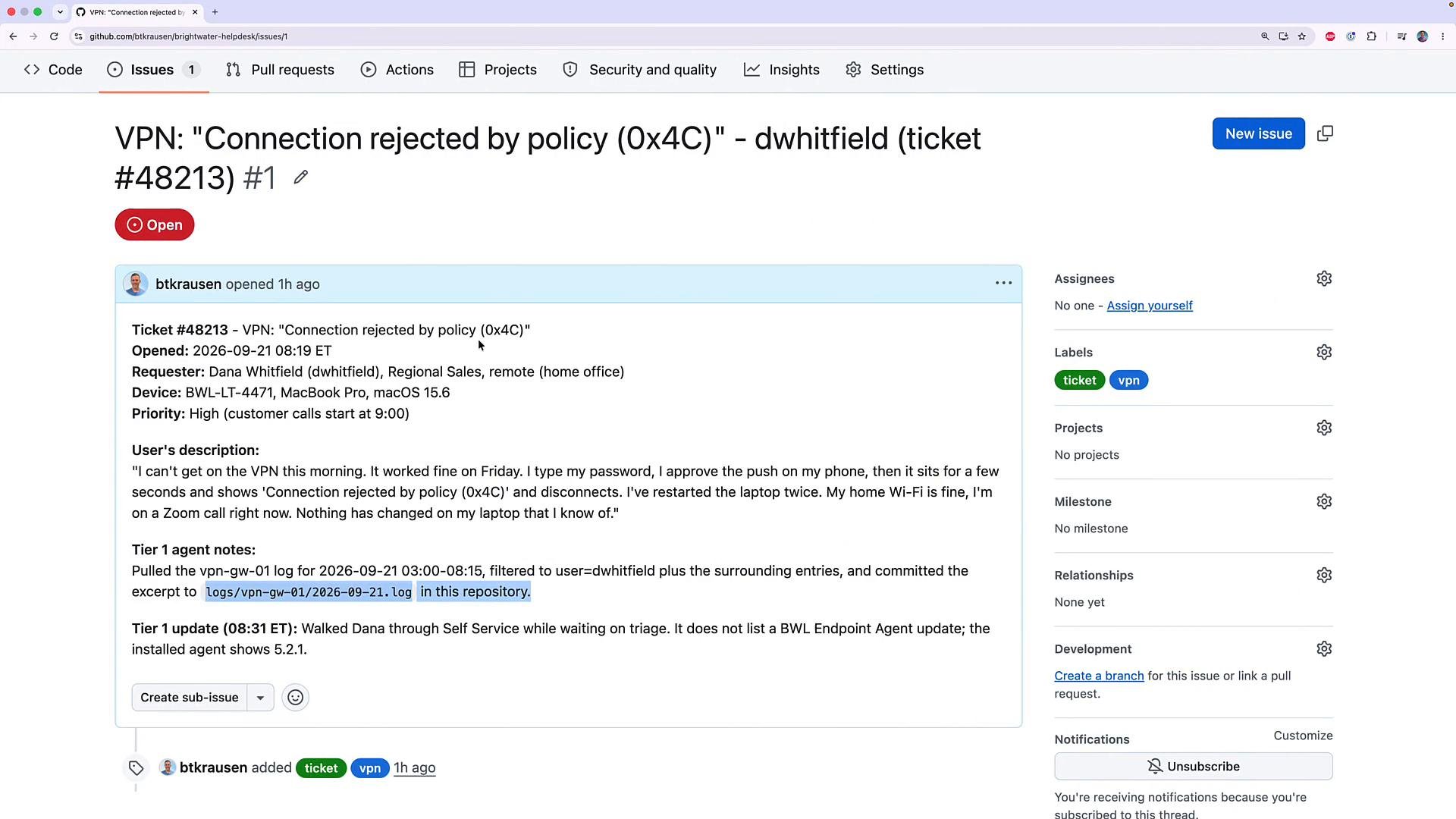
- Change: tickets are GitHub issues. Logs live in files in the same repository. The model:
- fetches the issue,
- reads the log file referenced in the Tier 1 notes (use the exact path),
- analyzes the logs,
- posts a triage comment,
- creates an escalation issue only when the runbook requires it.
- The assistant receives a one‑line request naming the repo and issue ID. Example:
- The model must:
- fetch the issue,
- fetch the exact file path mentioned in the Tier 1 notes,
- analyze the log excerpt,
- post the triage comment,
- create an escalation issue only when the runbook requires it.
- The MCP server exposes a set of tools (for example:
issue_read,get_file_contents,add_issue_comment,issue_write). The model sees these tool definitions as part of its context and can call them directly. - The host (your script) launches the MCP server locally (binary or Docker) and connects over stdio using JSON‑RPC.
- The MCP server authenticates to GitHub using a personal access token provided via environment variable (
GITHUB_PERSONAL_ACCESS_TOKEN).
Store
GITHUB_PERSONAL_ACCESS_TOKEN in your environment as a fine‑grained token scoped only to the demo repo. Never hardcode tokens in scripts.Use a fine‑grained GitHub token scoped only to the repository and the exact tool permissions you need. Do not grant broad organization rights or hardcode tokens in source control.
- On macOS you can install the official binary (Homebrew) and run:
- The host decides whether to run the binary directly or via Docker, then launches the MCP server with the requested
--toolsets. The host passes theGITHUB_PERSONAL_ACCESS_TOKENvia the environment.
Note: Limit the toolsets to only what you need (
context,repos,issues) to reduce the model’s action surface.
Listing tools (host runs agent with --list-tools)
- Running the local agent with
--list-toolslaunches the MCP server, discovers the tools, and prints them. Example:
- The host passes the target repository and issue number to the agent. The agent loop shows each tool call and its arguments; the MCP server responds with the requested content, and then the agent acts (comment, create issue, etc.).
- The agent posted a triage comment and opened an escalation issue. The comment followed the required output structure and included quoted log evidence.
logs/vpn-gw-01/2026-09-21.log (example lines found and quoted by the agent):
- After the run, refresh the Issues page: the original ticket has a triage comment, and a new escalation issue was created with the required labels and the quoted log evidence.
- Reuse the same assistant code and runbook across any MCP server implementing the required toolsets. The host only needs to start and authorize the server and present the model with the tool definitions.
- The model no longer relies on human copy/paste of logs; its output is written directly to the team’s workflow (GitHub issues), so other members see triage instantly.
- Reduces custom integration work: instead of building bespoke clients for each system, the MCP server provides a standard toolset the model can call.
- Host: your script — runs the agent loop and launches the MCP server.
- Client: the small client code inside your host that starts/communicates with the server (stdio or Docker).
- Server: the GitHub MCP server binary (official) that authenticates to GitHub and exposes tools the model can call.
- Limit the toolsets you expose to only what’s necessary (
context,repos,issues). - Use fine‑grained tokens and store them in environment variables.
- Keep the runbook prescriptive so the agent can act without human intervention.