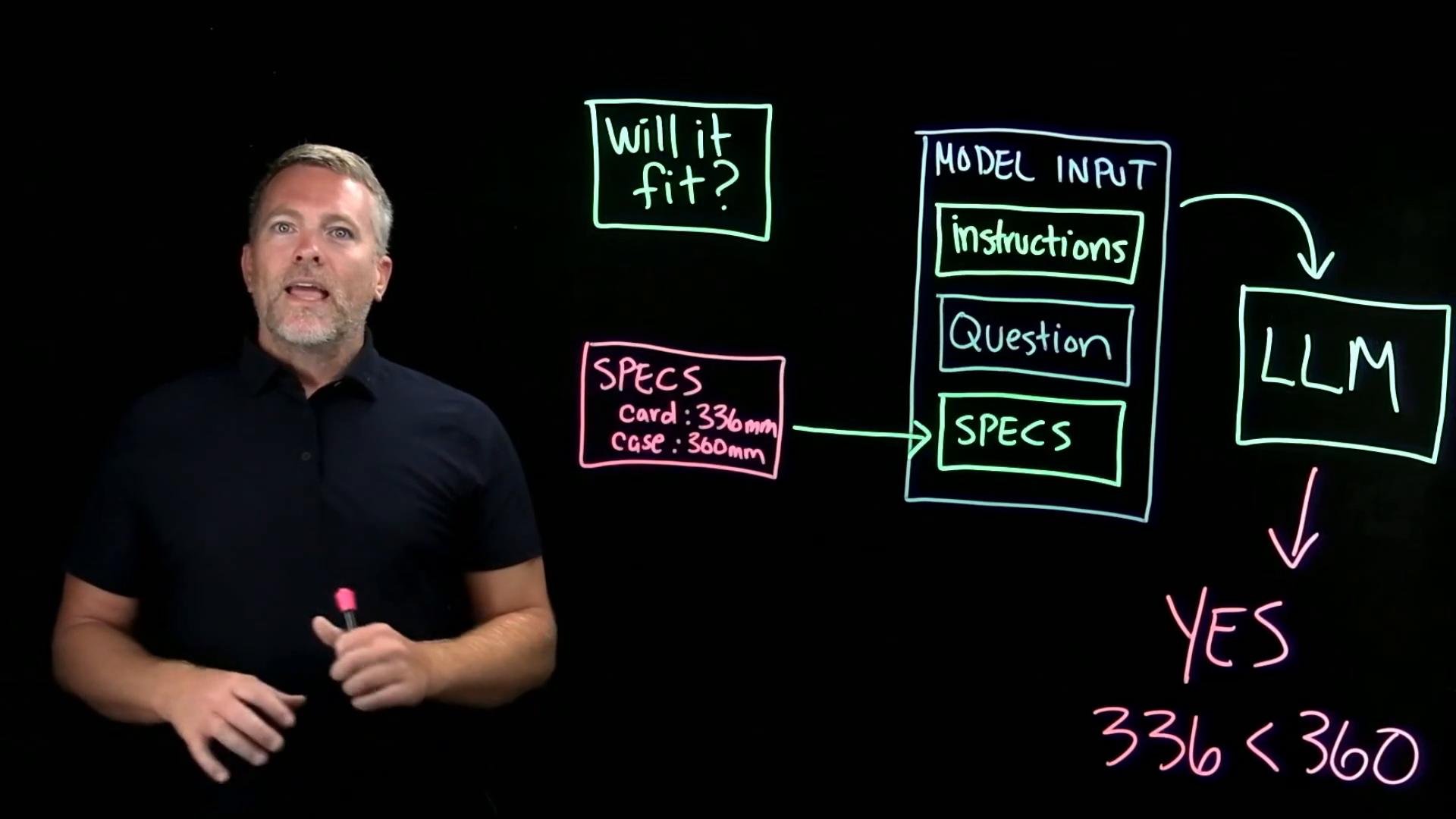
- Retrieval locates passages likely to answer the question.
- The application augments the model’s input with those retrieved passages.
- The model generates the final answer based on that augmented context.
- The model’s trained weights remain unchanged — we’re only giving it relevant context for this request.
- The original user question (shortened): “Will it fit?” — referencing the graphics card and case.
- Retrieved passages from product documentation, e.g.:
- Graphics card length: 336 mm
- Case maximum GPU length: 360 mm
Use retrieval to include only concise, relevant passages in the model context. This reduces token usage, avoids distracting information, and helps the LLM focus on the facts that matter.
These roles can be represented as separate messages (system/user/tool) or assembled into a single combined prompt depending on the API. The LLM ultimately receives them as one temporary context.
Why retrieval matters here
- Instead of attaching an entire manual, retrieval selects only the passages likely to answer the question.
- This conserves tokens, reduces noise, and focuses the model’s reasoning on the relevant facts.
- Different retrieval results on subsequent requests enable the same model to answer questions about content it did not contain during training.
- the instructions (what to do),
- the user’s question (why we’re doing it), and
- the retrieved passages (what facts to use).
The model then generates a response based solely on that temporary context.
- The model itself is unchanged; retrieved specifications are transient context for a single request.
- Each request can retrieve different documents and build a new input for the same model.
- The accuracy of the answer depends on what was retrieved and how clearly the application assembled the input. Missing, incorrect, or ambiguous specs can lead to incorrect answers.
Always validate retrieved source passages for accuracy and recency. The LLM will confidently use whatever text you provide, even if the passage is incomplete or outdated.
- Graphics card length: 336 mm
- Case maximum GPU length: 360 mm
This completes the end-to-end RAG workflow:
- Retrieval finds useful specs.
- The application assembles instructions, the user’s question, and the retrieved passages.
- The LLM receives that combined context and generates the answer.