

A concrete request that drives the stack
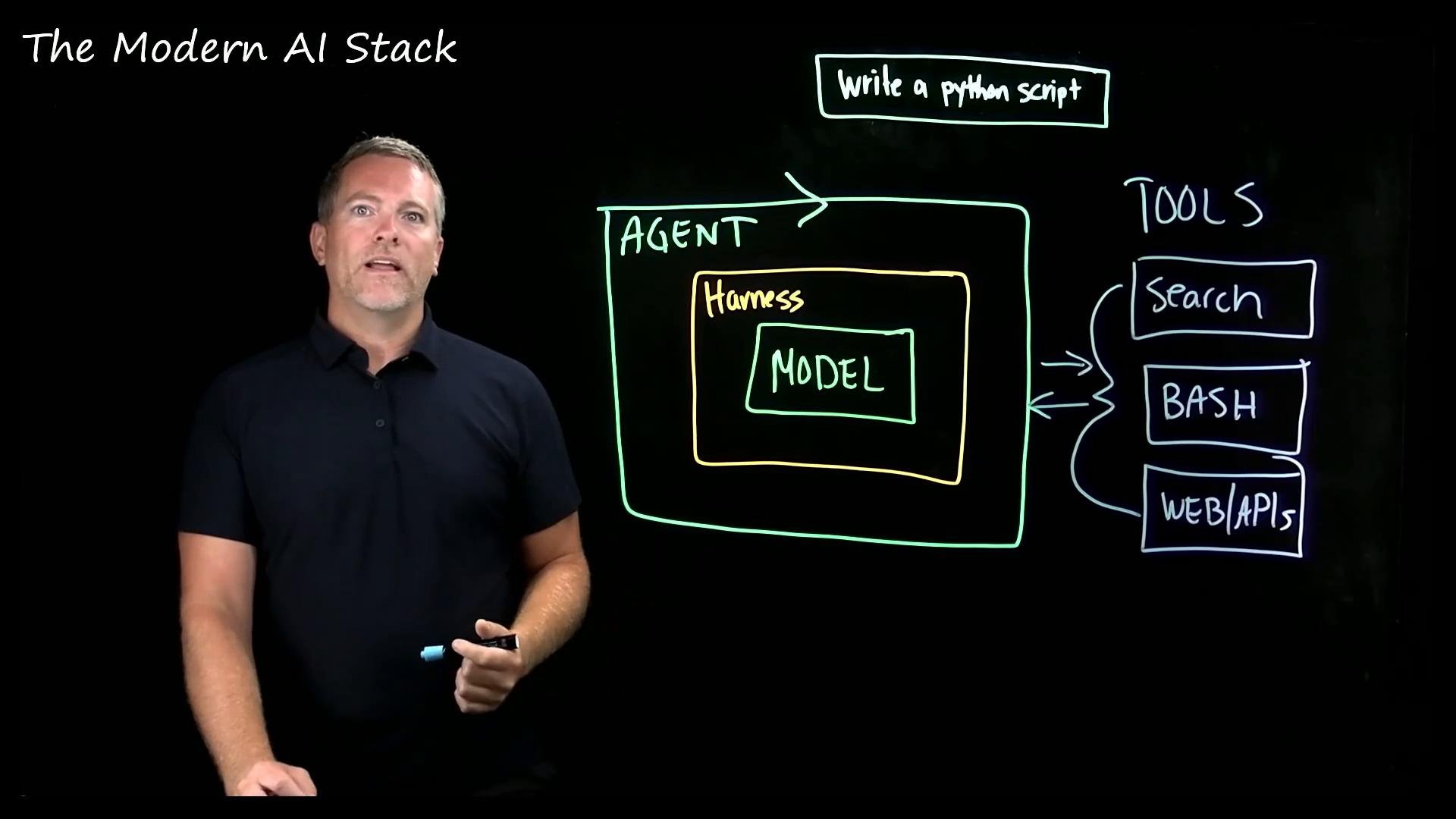
“Write me a Python script that summarizes the errors in this log file.” This simple request exposes the key responsibilities each layer must handle: generate code, run it, observe outputs and errors, iterate on fixes, and finally produce a reliable summary of the log errors.What the model (LLM) can and cannot do
At the center of the stack is the model — the component people usually mean when they say “AI.” The model is a probabilistic text generator (tokens → tokens), so it can produce code, comments, and natural language. But by itself it has important limitations:- It predicts text; it does not keep long-lived goals or external state beyond the prompt and context window.
- It cannot read local files or otherwise access your environment.
- It cannot execute code or observe runtime errors.
- It cannot decide to run external processes without being wrapped by software that provides that capability.
The harness: state, rules, and tool interfaces
The harness is the surrounding code that turns a raw model into a practical system. It provides:- Memory or a persistent goal store to track progress across steps.
- Safety and behavior rules (e.g., restrict shell commands or network access).
- A standardized interface that exposes tools (filesystem, shell, APIs) the model may call.
Because harnesses may grant models access to sensitive resources (files, networks, shell), you should design and audit tool permissions carefully. Limit scopes, log tool calls, and require human review for risky actions.
The loop: how agents convert generation into action
The harness typically runs the model in a loop: generate → act → observe → update. That loop is what we call an agent. Example loop for the log-summarizing request:- Model generates an initial
summarize.py. - Harness runs
python summarize.pyin a sandboxed environment. - If the script errors, the harness collects stderr and feeds it back to the model.
- The model edits the script and returns a patched version.
- Repeat until the script runs successfully and produces a summary.
Tools: the agent’s capabilities
An agent is only as capable as the tools the harness exposes. For the log-summary task, useful tools include:- Filesystem access (read the log file).
- Shell or terminal to run scripts and commands.
- Search or documentation lookup to find API usage or error explanations.
- Web/API access to fetch external resources or metadata.
- Specialized debuggers, linters, or IDE integrations.
python summarize.py”). The tool returns output the model uses to plan the next step.
How the pieces fit together
One user request enters the system. Behind that single interaction, four layers collaborate to produce a working result:
If you take away one idea: the model is the engine; the harness, loop, and tools are the car that let the engine do useful work in the real world.
Key takeaway: Models predict text. Harnesses provide memory, policies, and tool interfaces. Agents implement an execution loop that iterates on actions, and tools let agents interact with external systems to complete tasks end-to-end.
Practical notes and next steps
- Design harnesses with least privilege: only expose the tools the model needs.
- Log and monitor tool usage to allow auditing and rollback.
- Use sandboxed environments for running generated code.
- Consider human-in-the-loop checkpoints for high-risk operations.
Links and references
- OpenAI Documentation
- LangChain — Tools & Agents
- Best practices for safe model deployment (blog/tutorials)