

Installing an NGINX Gateway implementation
To adopt the Gateway API you first install a Gateway implementation (controller). In these examples we use the NGINX Gateway Fabric Helm chart, which installs the control plane and the CRDs required to create Gateway API objects (GatewayClass, Gateway, HTTPRoute, GRPCRoute, ReferenceGrant, etc.).Install the CRDs before creating Gateway API objects. Many Helm charts include a CRD installation step; confirm whether your chart installs CRDs or requires a separate apply. Creating Gateways or Routes without CRDs will fail.
helm install for the NGINX Gateway Fabric chart, the chart typically creates these resources by default:
These resources form the control plane. As you create Gateways and Routes the controller will begin provisioning data-plane components automatically.
Data plane provisioning and path of traffic
After the controller is installed and a Gateway is created, the controller provisions data-plane pods to implement the actual traffic handling. Typical behavior:- Creating a Gateway triggers the controller to create a data-plane Deployment in the same namespace.
- The Deployment name often encodes the Gateway name, the word
nginx, and a unique suffix, for example:
- When Routes are attached to the Gateway, the controller translates route rules into NGINX configuration files and writes them to the data-plane pods (for example,
/etc/nginx/conf.d).
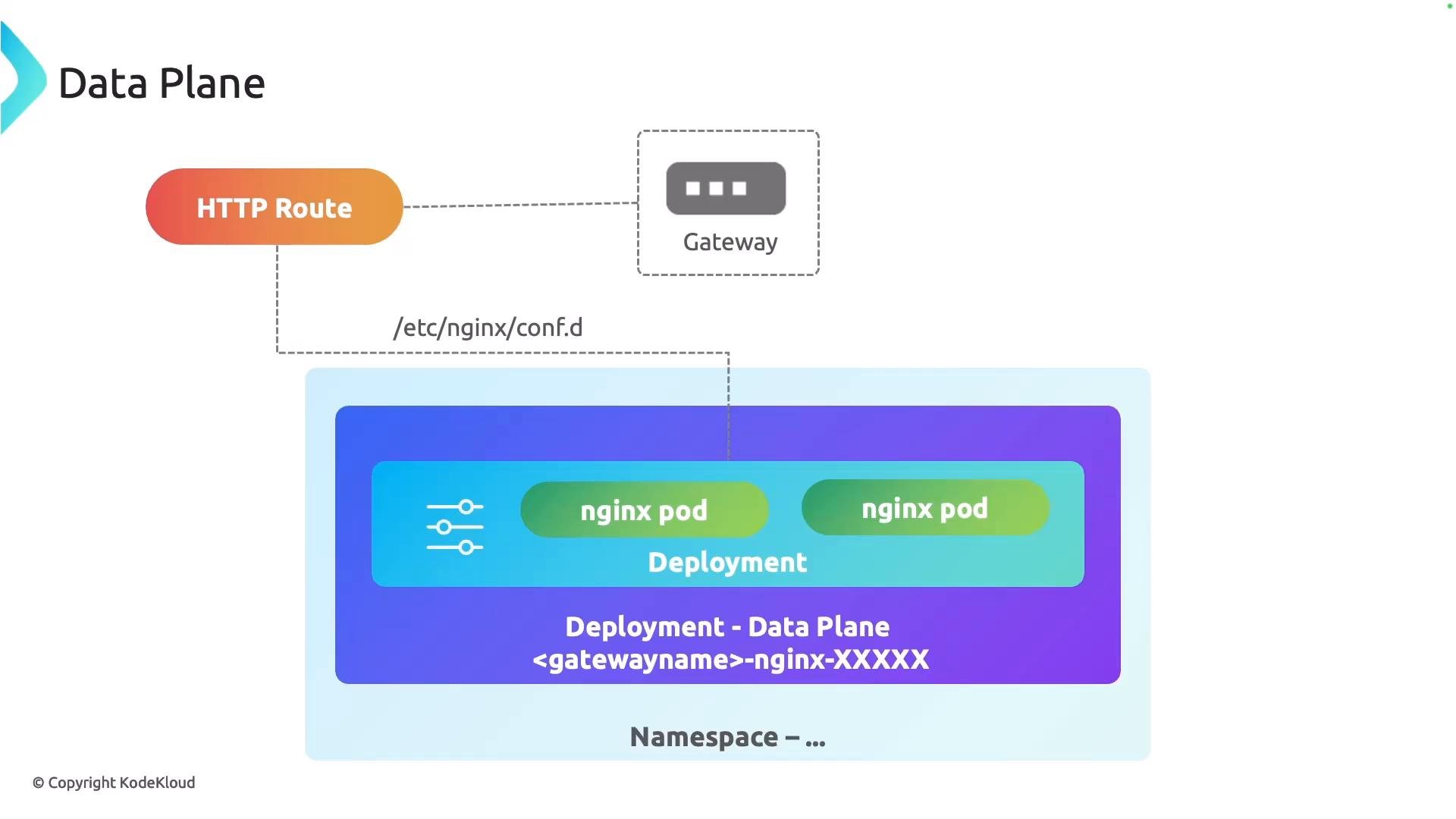
- The control plane translates Gateway and Route resources into the concrete configuration for the data plane.
- Data-plane pods serve traffic and mount the generated configuration at the expected path (e.g.,
/etc/nginx/conf.d). - Multiple Gateways can be reconciled by the same controller and may result in separate data-plane deployments per Gateway, depending on the controller’s design and the Gateway configuration.
Gateway API: logical components
Conceptually the Gateway API introduces a small set of logical components that map to responsibilities and allow better role separation.- GatewayClass — Declares which controller implementation will reconcile Gateways that reference it (examples: NGINX, Istio, HAProxy, Envoy).
- Gateway — Represents the network boundary that exposes your application traffic. Configure listeners, TLS, allowed routes, and the set of namespaces or origins that can attach Routes.
- Routes (HTTPRoute, GRPCRoute, etc.) — Define how requests are matched and forwarded to backend
Serviceobjects. Routes express routing rules, header manipulation, retries, timeouts, and other request-level behavior.
- GatewayClass is typically provisioned and maintained by infrastructure providers or platform maintainers.
- Gateways (and the controller lifecycle) are typically managed by SREs or platform engineers.
- Routes are authored by application developers to express application-specific routing and policies.
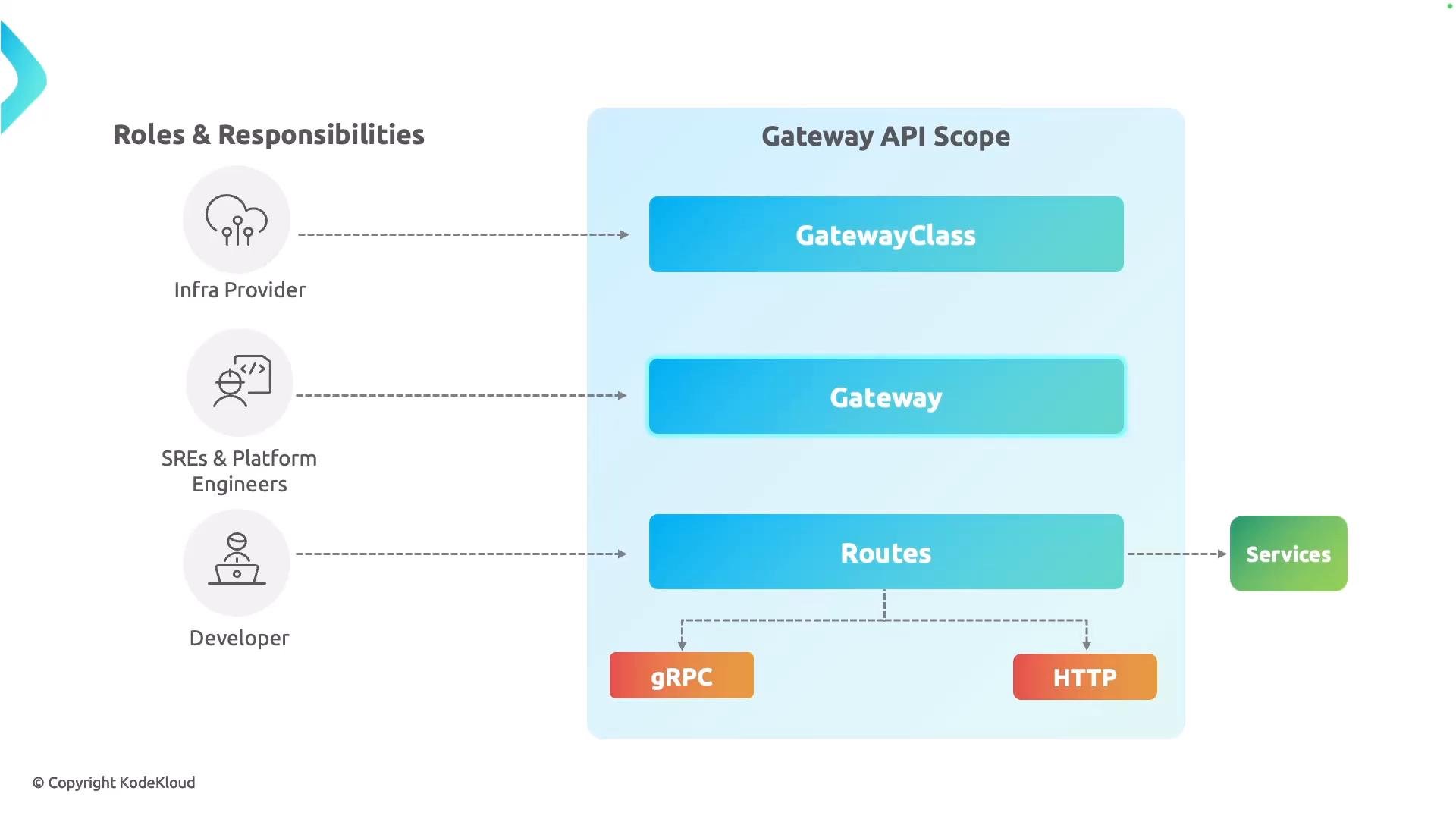
Recommended responsibilities:
- Infrastructure Provider: publish and maintain a
GatewayClassand the controller distribution. - SRE / Platform Engineers: operate the control plane, manage namespaces, RBAC, and the lifecycle of Gateways.
- Developers: create
HTTPRoute/GRPCRoutemanifests to expose application services safely and with application-level policies.
Next steps
In subsequent lessons you’ll create and delete Gateway API objects, customize listener and route behavior, and test traffic flows through the NGINX data plane. Practice creating aGatewayClass, provisioning a Gateway, and attaching an HTTPRoute to see the controller generate data-plane configuration.
Links and references
- Gateway API: https://gateway-api.sigs.k8s.io/
- Kubernetes Concepts: https://kubernetes.io/docs/concepts/overview/what-is-kubernetes/
- NGINX Gateway Fabric (product docs): https://www.nginx.com/products/nginx-gateway-fabric/