

- How to define clear requirements and deliverables for iterative development.
- How to build a Flask app with upload, validation, optimization, and cleanup.
- How to run, debug, and extend the app during long interactive sessions.
- How to capture session notes so future work can rehydrate context quickly.
Requirements (summary)
Project scaffold & high-level notes
Deliverables included:app.py— Flask server coretemplates/index.html— UI with drag-and-dropstatic/js/main.js— upload + optimize client logicstatic/css/style.css— responsive UIrequirements.txtSESSION_NOTES.md— session documentation
- Use Flask-Limiter for IP-based rate limiting. For development the in-memory store is sufficient; switch to Redis for production to preserve rate-limit state across processes.
- Use Pillow for primary image I/O and operations for broad cross-platform compatibility; keep OpenCV (cv2) installed for future advanced processing.
- Save uploads with secure, UUID-based filenames into a temporary directory and track them in a thread-safe set. Clean up on response, periodically, and at process exit.
For development, an in-memory Flask-Limiter store is acceptable. In production, configure a persistent backend (for example, Redis) to avoid lost rate-limit state and to scale across worker processes.
Example app.py (core pieces)
Below is a consolidated, corrected example that captures the main functionality described in the lesson: upload validation, rate limiting, MAX_CONTENT_LENGTH, temp file handling, error handlers, and the optimize endpoint skeleton. This is not the full file, but the important, runnable parts:- Keep the
cv2import available but prefer Pillow operations for cross-platform portability and smaller runtime surface. - The code prints tracebacks on exceptions to help during interactive debugging—a useful habit for long sessions.
requirements.txt (example)
Run locally: virtual environment, install, run
Quick local setup:- zsh: command not found: python
- Use
python3instead ofpythonon systems wherepythonis not aliased.
- Use
- Flask-Limiter warning about in-memory storage:
- Development-only; configure Redis for production.
- Address already in use (port 5000):
- Use
lsofto find the process and stop it, or run the app on another port.
- Use
UI and example workflow
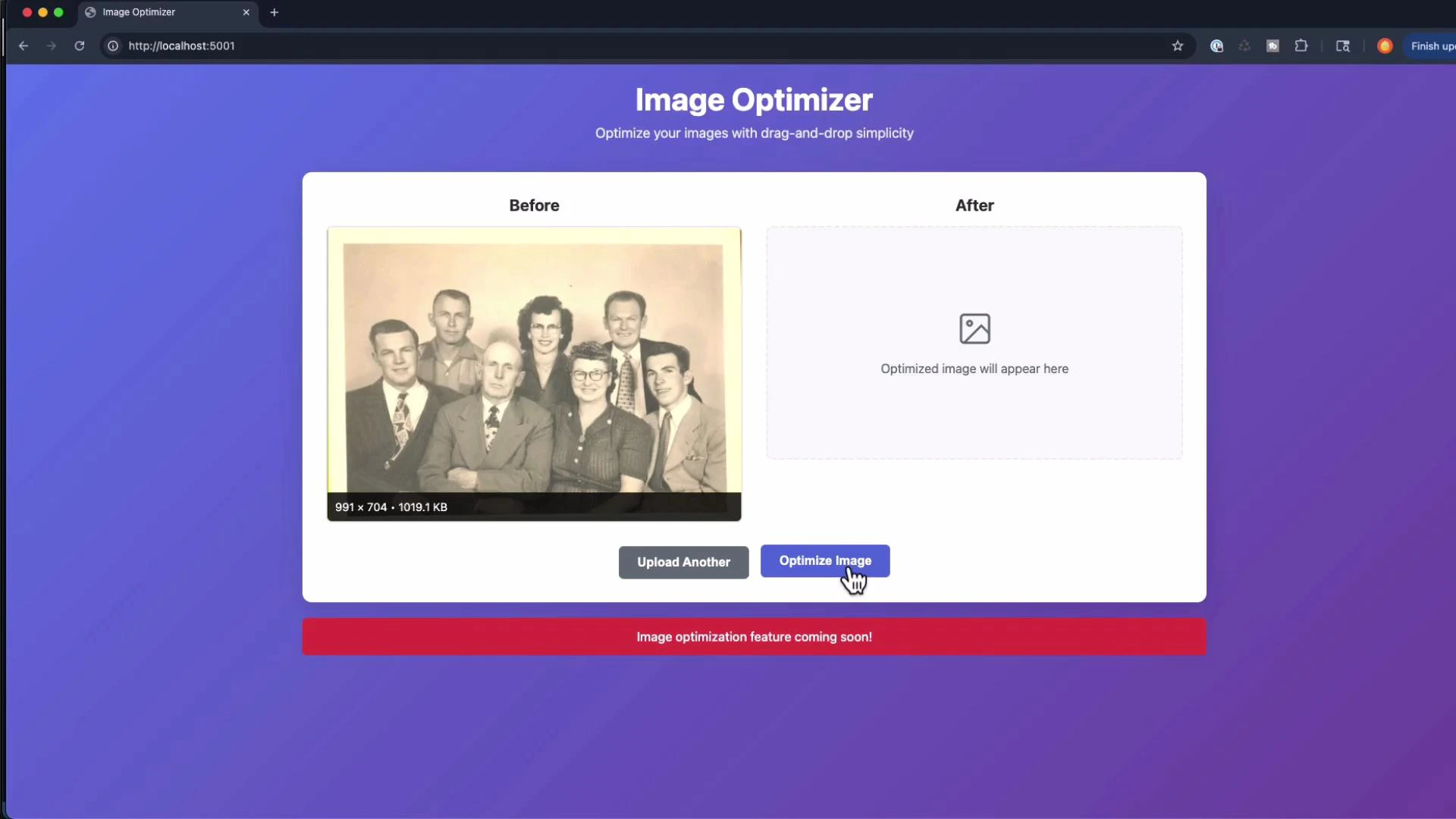
The app provides:- Drag-and-drop upload (client-side JS)
- “Before” pane that displays the uploaded image
- “After” pane with placeholder until the image is optimized
- Controls: quality slider, resize percent, sharpen/blur slider, strip metadata toggle, format dropdown, presets
Debugging: common runtime errors & fixes
-
500 Internal Server Error on /optimize:
- Inspect server logs and printed tracebacks.
- Common causes:
- Passing float where an integer is required (e.g., UnsharpMask percent).
- Trying to save a JPEG from an image with an alpha channel.
- Attempting to re-optimize a non-existent or already-deleted source file.
- Fixes:
- Cast or round floats to integers where Pillow expects ints.
- Convert image mode to RGB before saving as JPEG.
- Ensure the original upload is preserved as the canonical source; write optimized images to new temp files.
-
Port conflicts:
- On macOS, system services (like AirPlay Receiver) may claim port 5000. Use
lsofto identify or change the app port.
- On macOS, system services (like AirPlay Receiver) may claim port 5000. Use
Adding new features iteratively
During the lesson we iteratively added:- Quality slider for JPEG/WebP (1–95 for JPEG)
- Resize by percentage (10–200%) while preserving aspect ratio
- Strip metadata toggle (EXIF removal)
- Sharpen and blur sliders (convert floats safely for Pillow filters)
- Contrast/brightness controls (planned/added later)
- Format conversion (JPEG, PNG, WebP)
- Live preview workflow (optimize multiple times without re-uploading)
- Auto-cleanup for temp files and thread-safe tracking of temp file paths
- Validate all incoming parameters (type and bounds).
- Cast floats to ints where required by Pillow filtering APIs (or compute safe integer equivalents).
- Preserve the original upload as the source for all reprocessing so iterative tuning produces reproducible results.
Session documentation (SESSION_NOTES.md)
Capture progress and decisions in a session notes file so future sessions or collaborators can rehydrate context quickly. Example (excerpt):SESSION_NOTES.md concise and up to date helps you break long sessions into logical steps and prevents context loss.
Best practices for long interactive sessions
Avoid attempting an entire project or a major refactor in a single continuous interactive session. Long contexts can cause confusion and increase the risk of mistakes. Instead:
- Break work into logical steps and commit frequently.
- Maintain a session notes file and update it after each major change.
- When context becomes noisy, compact or restart your session and rehydrate from SESSION_NOTES.md.
- Summarize progress before adding large new features.
- Use session notes to provide a concise context snapshot for a fresh session.
- Start a fresh session for major refactors or when debugging unexpected behavior.
- Print tracebacks and return structured JSON error payloads to speed up iterative debugging.
- For production, replace in-memory rate-limiter storage with Redis and run the app under Gunicorn inside Docker.
Quick links and references
- Flask documentation: https://flask.palletsprojects.com/
- Pillow (PIL) docs: https://pillow.readthedocs.io/
- Flask-Limiter: https://flask-limiter.readthedocs.io/
- Gunicorn: https://gunicorn.org/
- Docker: https://www.docker.com/
Summary
This lesson walked through building an image-optimization Flask app with practical choices for safe iteration:- Core features: MAX_CONTENT_LENGTH, allowed types, UUID filenames, temp file cleanup.
- Rate limiting with Flask-Limiter (dev vs. production).
- Image processing with Pillow (and keeping OpenCV available).
- Debugging tips for 500 errors and port conflicts.
- Session hygiene:
SESSION_NOTES.md, breaking work into chunks, and restarting sessions when necessary.